







Transport Layer Security (TLS) provides confidentiality and data integrity between two communicating applications. OceanBase Database extends the original TCP communication to support SSL/TLS protocols, addressing communication encryption.
OceanBase Database can be divided into the following three basic parts from the product architecture perspective.
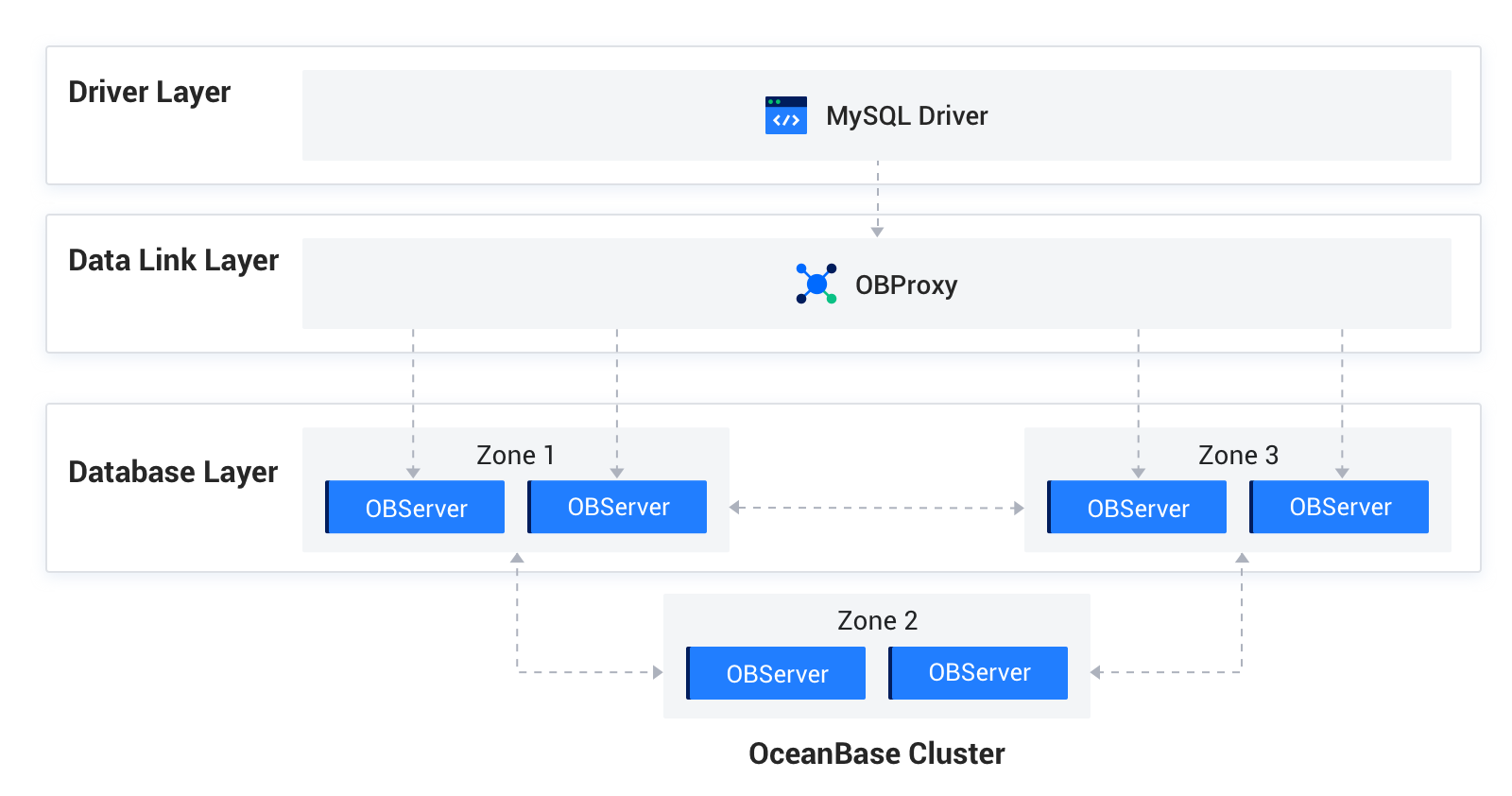
Communication uses the following two protocols:
MySQL protocol: Communication between the driver layer and the data link layer, and between the data link layer and the DB layer, uses the extended MySQL protocol.
OB-RPC protocol: Communication between nodes, or between nodes and components such as liboblog and ob_admin, uses the node's own RPC protocol.
The data link layer and DB layer components, including OBServer nodes, liboblog, and ob_admin, all support SSL/TLS encrypted communication. They rely on OpenSSL or third-party SSL libraries at the bottom to provide secure encrypted transmission for the business.
Supported methods for loading private keys or certificates
The underlying communication of OBServer nodes, liboblog, ob_admin, and other components all depends on the Libeasy library. Therefore, they support the same private key and certificate loading method (local file mode): place the CA certificate, user certificate, and private key in the wallet folder, and they are read and loaded from that directory when enabled by the configuration.
Enable transmission encryption
Transmission encryption for nodes is enabled by using multiple parameters together.
Specify the method for obtaining the private key, certificate, or CA certificate.
Local file mode
alter system set ssl_external_kms_info = ' { "ssl_mode":"file" }';Enable SSL for the corresponding protocol.
alter system set ssl_client_authentication = 'TRUE'; When set to TRUE, MySQL communication SSL is enabled immediately.Configure the SSL allowlist for RPC communication. Because TCP connections between nodes are long-lived, RPC SSL must be enabled by restarting the nodes.
RPC SSL requires an allowlist configuration. alter system set _ob_ssl_invited_nodes='ALL'; Enable SSL for the entire cluster. alter system set _ob_ssl_invited_nodes='xx.xx.xx.xx, xx.xx.xx.xx'; Enable SSL for OBServer nodes with the specified IP addresses. ssl
How to verify that transmission encryption is enabled
The simplest method is to capture packets on the MySQL and RPC ports to check whether encryption is enabled. You can also use the following method:
Log in to the node with OBClient or MySQL, query the
ssl_key_expired_timefield of theoceanbase.GV$OB_SERVERStable in the sys tenant to verify whether encryption is enabled.This field records the expiration time of the SSL certificate used by the current node when SSL is enabled, in UTC and in microseconds.
obclient> select svr_ip, svr_port,zone, ssl_key_expired_time, from_unixtime(ssl_key_expired_time/1000000) from oceanbase.GV$OB_SERVERS; +-----------------+----------+-------+----------------------+---------------------------------------------+ | svr_ip | svr_port | zone | ssl_key_expired_time | from_unixtime(ssl_key_expired_time/1000000) | +-----------------+----------+-------+----------------------+---------------------------------------------+ | xxx.xxx.xxx.xxx | 13212 | zone1 | 1871860075 | 2029-04-26 09:07:55 | +-----------------+----------+-------+----------------------+---------------------------------------------+ 1 row in set (0.00 sec)
Check whether SSL is enabled on the MySQL port
Log in to an OBServer node from OBClient or a MySQL client and run the \s command to view the information about SSL, as shown in the following example:
obclient> \s
--------------
obclient Ver 1.1.8 Distrib 5.7.24, for Linux (x86_64) using EditLine wrapper
Connection id: 3221506046
Current database: test
Current user: root@xx.xx.xx.xx
SSL: Cipher in use is DHE-RSA-AES128-GCM-SHA256
Current pager: less
Using outfile: ''
Using delimiter: ;
Server version: 5.7.25 OceanBase 2.2.60 (r1-63cbd3084a3283523f09d6ba20795f77b95e046b) (Built Jun 30 2020 10:10:29)
Protocol version: 10
Connection: xx.xx.xx.189 via TCP/IP
Server characterset: utf8mb4
Db characterset: utf8mb4
Client characterset: utf8mb4
Conn. characterset: utf8mb4
TCP port: 13213
Active --------------
Check whether SSL is enabled on the RPC port
In OBServer.log, search for "rpc connection accept" and check whether use_ssl is True or False to determine whether RPC SSL is enabled.