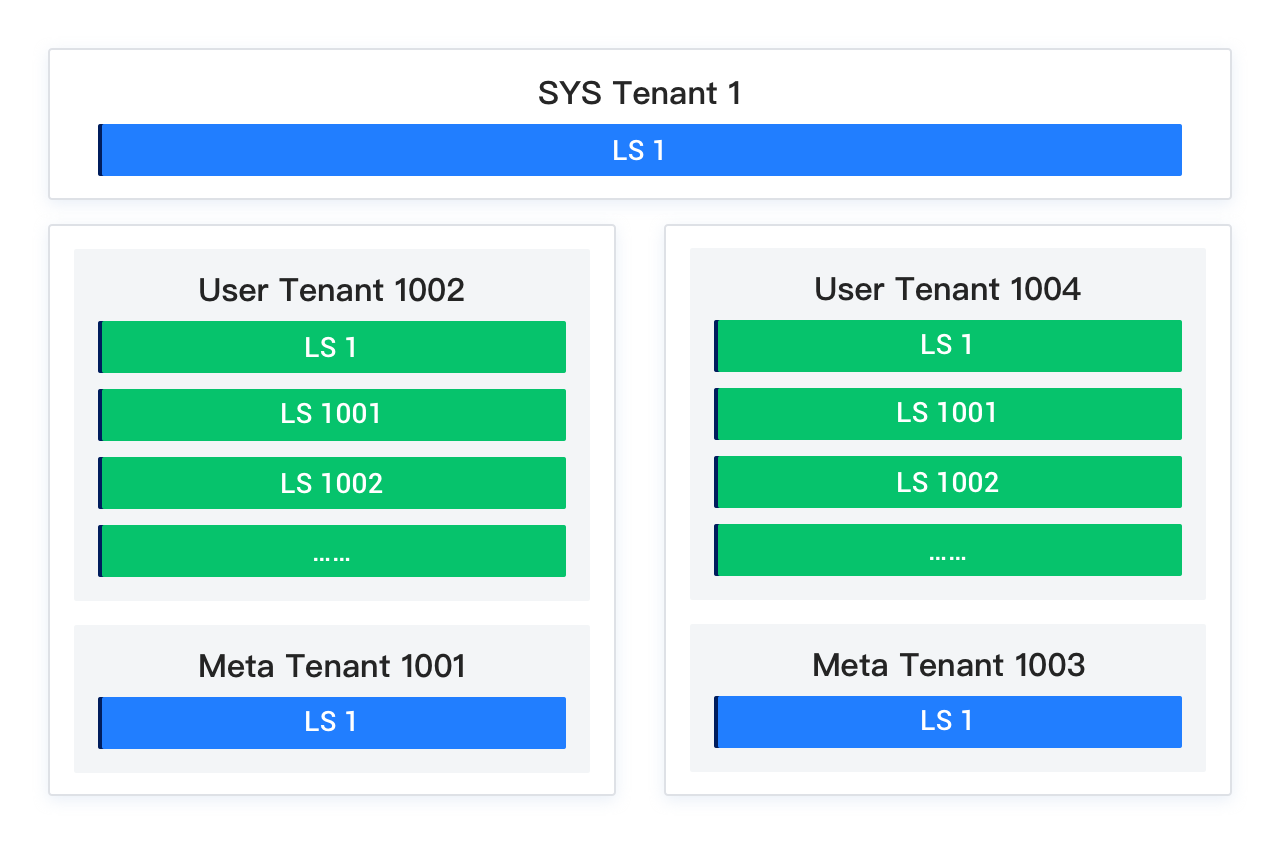
OceanBase Database uses a multi-tenant architecture. Before V4.0.0, it supported only two types of tenants: the system tenant and user tenants. Since V4.0.0, the concept of the Meta tenant has been introduced. Therefore, the current version has three types of tenants visible to users: the system tenant, user tenants, and Meta tenants.
System tenant (sys tenant)
The system tenant is the default tenant created for a cluster. Its lifecycle is consistent with that of the cluster. It manages the lifecycle of the cluster and all tenants. The system tenant has only one No. 1 log stream, which supports only single-point write and cannot be scaled.
You can create user tables in the system tenant. All user tables and system tables are served by the No. 1 log stream. The data of the system tenant is cluster-specific and does not support physical synchronization or physical backup and restore across clusters.
Notice
The system tenant is intended for cluster and tenant management and does not provide full database functionality. It is not recommended for use in production or business testing environments.
User tenant
A user tenant is a tenant created by a user. It provides complete database functionality and supports two compatibility modes: MySQL and Oracle. A user tenant supports horizontal scaling across multiple machines, dynamic scale-in and scale-out, and automatic creation and deletion of log streams based on user configuration.
A user tenant has stronger data protection and availability requirements and supports physical synchronization and physical backup and restore across clusters. Typical data includes schema data, user table data, and transaction data.
Applicability
OceanBase Database Community Edition provides only the MySQL-compatible mode.
Meta tenant
The Meta tenant is an internally self-managed tenant in OceanBase Database. When a user tenant is created, the system automatically creates a corresponding Meta tenant. The lifecycle of the Meta tenant is consistent with that of the user tenant.
The Meta tenant stores and manages cluster-private data of the user tenant. This data does not require physical synchronization or physical backup and restore across clusters. It includes parameters, location information, replica information, log stream status, backup and restore related information, and merge information.
Tenant comparison
The following table shows the differences among the system tenant, user tenants, and Meta tenants from the user perspective.
Attribute |
System tenant |
User tenant |
Meta tenant |
|---|---|---|---|
| Tenant ID | 1 |
|
|
| Tenant naming conventions | SYS | User-defined, consisting of upper- and lower-case letters, digits, and underscores | META${user_tenant_id}For example, if the user tenant ID is 1002, the corresponding Meta tenant name is META$1002. |
| Tenant type | SYS | USER | META |
| Data property | Cluster-private data. Physical synchronization and physical backup and restore across clusters are not supported. | Non-cluster-private data. Physical synchronization and physical backup and restore across clusters are supported. | Cluster-private data. Physical synchronization and physical backup and restore across clusters are not supported. |
| Scalability | Data cannot be scaled horizontally. Only one log stream is available. | Supports horizontal scaling, dynamic scaling in and scaling out. | Data cannot be scaled horizontally. Only one log stream is available. |
| Tenant O&M |
|
|
|
| External data access interface | Views in the system tenant |
|
You cannot log in to a Meta tenant. Its information can be accessed through user tenants and the system tenant.
|
Tenant architecture
The following figure shows the tenant architecture. Each user tenant corresponds to one Meta tenant. Both the system tenant and the Meta tenant have only one No. 1 log stream (Log Stream, LS). User tenants support dynamic creation and deletion of log streams.