







In OceanBase Database, tables are the fundamental data storage units. Tables contain all the data accessible to users, with each table consisting of multiple rows and each row containing several columns. The design and usage of each table must be reasonably planned based on business requirements to ensure the efficiency and scalability of the system. This section covers various aspects of tables, including table types, update modes, data distribution, indexes, data types, and views. It also provides scenario recommendations and combinations around the AP table design principles.
Overview of table design principles in AP scenarios
In AP scenarios, table design can be based on the following three principles, which can be combined with other capabilities such as table types, data distribution, indexes, and views described later:
- Wide tables: In analysis scenarios, wide tables with a large number of columns are often used. A single query usually accesses only a subset of the columns. Using columnar storage tables or columnar indexes allows for columnar storage and scanning, reducing I/O and facilitating vectorization and skip indexes. Combined with partitioning and table groups, wide tables can be horizontally distributed and aligned with other tables, facilitating joins and parallel scans. For more information, see the sections on "Table types" and "Data distribution" in this topic, as well as Best practices for designing and optimizing data tables in AP scenarios.
- Pre-aggregation: For fixed-dimensional aggregations and reports, you can precompute and persist the results using materialized views. This way, queries can directly read the materialized views, reducing the overhead of real-time aggregation. This approach is suitable for reports, dashboards, and fixed analysis scenarios. For more information, see the section on "Views" in this topic, as well as Materialized views (MySQL mode) and Materialized views (Oracle mode).
- Partitioning strategy: Using partitioned tables, you can horizontally split data based on partitioning keys (such as time, region, or ID). This allows for partition pruning to reduce the amount of data scanned, parallel computation by partition, and lifecycle management (archiving and cleanup) by partition. In AP scenarios, it is recommended to use partitioning keys that align with commonly used filtering and aggregation dimensions and to use table groups to align partitions across multiple tables for optimized joins. For more information, see the section on "Data distribution" in this topic, as well as Best practices for table partitioning in OLAP scenarios.
Table types
OceanBase Database supports various table types, including partitioned tables, replicated tables, primary key tables, non-primary key tables, and external tables.
- Partitioned tables: OceanBase Database allows you to divide the data of a regular table into different partitions based on specific rules. Data within the same partition is stored together physically. This type of table is called a partitioned table. OceanBase Database supports basic partitioning strategies such as range, list, and hash partitioning.
- Replicated tables: Replicated tables are a special type of table in OceanBase Database. Data in these tables can be read from any healthy replica.
- Primary key tables and non-primary key tables: A primary key table is a table that contains a primary key. A non-primary key table is a table without a specified primary key.
- External tables: In a database, table data is stored in the database's storage space. In contrast, external table data is stored in an external storage service.
- Heap tables (heap-organized tables): In heap tables, data is not sorted by the primary key. The primary key serves as a secondary unique index, and data and indexes are decoupled. The primary key enforces uniqueness constraints, while queries rely on the main table. When user data is written in chronological order, heap tables can more effectively utilize skip indexes to improve the performance of analytical queries. In AP scenarios, new tables are defaultly created as heap tables. If the tenant-level configuration item default_table_organization is set to
HEAPin the OLAP parameter template, new tables are heap tables unless explicitly specified otherwise. This facilitates bulk imports and skip index utilization. - Temporary tables: In AP scenarios, temporary tables are commonly used to store intermediate results of ETL processes, temporary data during direct load operations, and intermediate results of complex queries. Data is isolated by session or transaction, and it is automatically cleared when the session ends or after a transaction is committed or rolled back. Temporary tables are distinct from persistent tables. In MySQL mode, temporary tables are session-level. In Oracle mode, global temporary tables are supported.
In AP scenarios, OceanBase Database supports various table types beyond those commonly used in TP scenarios, such as replicated tables, partitioned tables, primary key tables, and non-primary key tables. Based on the data storage method, whether data is stored row-wise or column-wise, new table types are introduced: columnar tables and hybrid row-column tables.
Columnar tables: Columnar tables store data by column rather than by row. This significantly improves the performance of analytical queries, especially in scenarios involving large datasets and frequent aggregation analysis. For more information, see Columnar table architecture.
Hybrid row-column tables: Hybrid row-column tables store data both row-wise and column-wise. The system automatically determines whether to use row-wise or column-wise queries based on the query statement, making them suitable for scenarios that require both transactional and analytical capabilities.
Table update modes
OceanBase Database allows you to specify the write and query modes for data when creating a table. When creating a table, you can use the merge_engine parameter in the CREATE TABLE statement to choose between the delete_insert update mode and the partial_update update mode. These two modes are data update strategies designed for different business scenarios.
delete_insert (full-column update mode)
This mode prioritizes query performance. It uses the "Merge-On-Write" mechanism to convert
UPDATEoperations into full-columnDELETEandINSERTrecords, ensuring that each row contains complete column values. This mode significantly improves the efficiency of complex queries and batch processing (such as analytical tasks), but it requires additional storage space for incremental data. It is suitable for scenarios with frequent incremental data and the need for rapid analysis.partial_update (partial update mode)
This mode only records the values of modified columns, avoiding redundant storage. During queries, multiple data sets need to be merged to obtain the latest values, resulting in relatively lower performance. However, it is more suitable for scenarios with high-frequency updates but low query demands (such as OLTP applications) or environments sensitive to storage costs.
Feature Category |
delete_insert Update Mode |
partial_update Update Mode |
|---|---|---|
| Storage Method | Each update writes two rows (DELETE and INSERT) to the SSTable, containing all column data. |
Each update only records the values of modified columns, saving storage space. |
| Query Efficiency |
|
Multiple Memtable/SSTable records need to be merged to obtain the latest primary key values during queries, which may impact performance. Suitable for scenarios with frequent updates and storage cost sensitivity. |
| Applicable Scenarios | Scenarios with a high proportion of incremental data that require frequent execution of complex queries or batch processing. | Scenarios with high-frequency updates but low query demands. |
For more information, see Create a table in MySQL mode and Create a table in Oracle mode.
Data distribution
Partitioning strategy is a crucial aspect of AP table design. OceanBase Database allows you to create partitioned tables to distribute data across different partitions. Data from different partitions can be distributed across different machines. During queries, partition pruning reduces the amount of data scanned and leverages multi-machine resources to enhance query performance. By default, data across different tables is randomly distributed without direct relationships. Load balancing ensures that data from a table is evenly distributed across the entire cluster.
In distributed AP systems, tables often contain a large amount of data. When data from different tables is randomly distributed, the overhead of data transfer during table joins can be significant. Using table groups (Table Group) aligns data from partitioned tables with the same partitioning strategy according to specific rules. This allows related data to be concentrated on the same machine, enabling the use of Partition Wise Join during table joins. This effectively reduces data transfer overhead and improves performance.
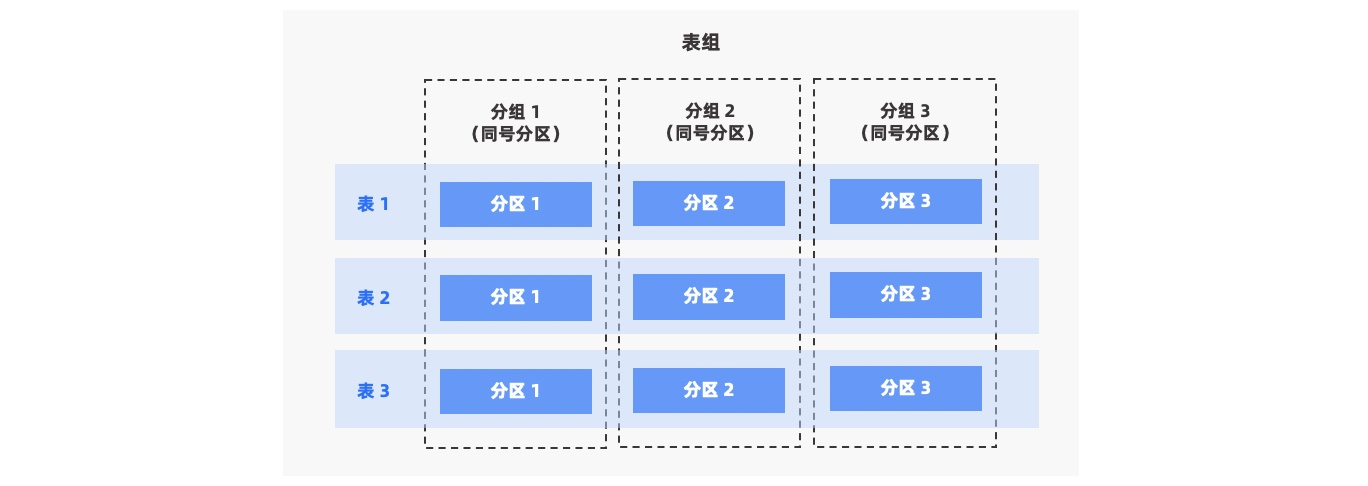
OceanBase Database supports both primary and secondary partitioned tables and provides three partitioning types: RANGE, LIST, and HASH.
OceanBase Database provides three types of table groups:
NONE: All tables and all partitions within the table group are concentrated on the same machine.
PARTITION: Data from each table in the table group is distributed across different partitions. For secondary partitioned tables, all secondary partitions under each primary partition are concentrated.
ADAPTIVE: Data from each table in the table group is distributed adaptively. For primary partitioned tables, data is distributed across primary partitions; for secondary partitioned tables, data is distributed across secondary partitions under each primary partition.
For more information, see Data distribution, Table groups in MySQL mode, and Table groups in Oracle mode.
Index types
Indexes are key components for improving query performance. OceanBase Database supports various index types in the AP scenario.
- Index distribution: A local index is a partitioned index that is bound to the partitions of the base table. A global index is an index that is independent of the partitions of the base table and can be organized across partitions. The distribution of indexes depends on the partitioning of the base table.
- Index storage format: A rowstore index and a columnstore index refer to indexes that are organized by rows or columns, respectively. Columnstore indexes (such as
WITH COLUMN GROUP (each column)) are suitable for analytical scans and aggregations. Rowstore indexes are suitable for point queries and random access. A columnstore index is an index that is stored in columnar format (such as a B-tree index specified as columnstore). The index table is organized by columns (WITH COLUMN GROUP (each column), for example) and stored by columns rather than rows. This format is suitable for aggregations, wide table scans, and analytical queries in HTAP scenarios, significantly improving analytical query performance, especially when handling large-scale data. For more information, see Columnstore and Create an index (MySQL mode)—Columnstore index.
Based on the index structure, indexes can be classified into the following types:
- B-tree index (normal index): The default index structure, including unique index, non-unique index, and function index. It is suitable for equality queries, range queries, sorting, and point queries. A B-tree index can be a local index or a global index, and it can be stored in rowstore or columnstore format. A B-tree index stored in columnstore format is commonly referred to as a columnstore index. It is suitable for analytical scans in HTAP scenarios. For more information, see Index overview, Create an index (MySQL mode), and Columnstore.
- Full-text index: A full-text index is built on
CHAR,VARCHAR, andTEXTcolumns based on inverted indexes and tokenization. It is suitable for log analysis, document/knowledge base retrieval, and relevance ranking. It supports only local indexes. For more information, see Full-text indexes. - JSON multi-value index: OceanBase Database in MySQL mode supports multi-value indexes. You can create indexes on arrays or sets to improve the query efficiency of searches based on JSON array elements. It is suitable for tags, classifications, many-to-many associations, and predicates such as
MEMBER OF(),JSON_CONTAINS(), andJSON_OVERLAPS(). It supports only local indexes. For more information, see Multi-value indexes and Create an index (MySQL mode). - Spatial index: A spatial index is an independent index structure for geographic space data and GIS scenarios. It allows you to quickly retrieve data within a specified coordinate range. It supports only local indexes.
- Vector index: A vector index is an index built on a Vector column. It includes dense vector indexes and sparse vector indexes. Examples of dense vector indexes include HNSW and IVF. For more information about sparse vector indexes, see Vector indexes. It supports L2, inner product, and cosine distance/similarity calculations. It is suitable for vector similarity retrieval queries. It has an independent index structure and supports only local indexes.
For more information about columnstore indexes, rowstore base tables + columnstore indexes, and other combinations in AP scenarios, see Optimize queries in HTAP scenarios. For more information about special indexes such as full-text indexes, JSON multi-value indexes, spatial indexes, and vector indexes, see Best practices for choosing special indexes. For more information about syntax and implementation details, see Index overview (MySQL mode) and Index overview (Oracle mode).
Data types
Before creating and using tables, database administrators need to plan the table structure and data types based on business requirements. To ensure efficient data storage and query optimization, administrators should follow these principles:
- Normalize the table structure: Design the table structure reasonably to minimize data redundancy and improve query efficiency.
- Select appropriate SQL data types: Choose the most suitable SQL data type for each column to reduce storage space and improve query speed.
Common SQL data types include:
- Basic data types: such as
INT,VARCHAR, andDATE. - Complex data types: such as
JSON,ARRAY, andBITMAP, which are suitable for storing more complex data structures.
For more information about SQL data types, see:
Views
OceanBase Database supports standard views and materialized views.
- Standard views: Standard views are also known as non-materialized views. They are the most common type of view. They store only the SQL query that defines the view, not the query results.
- Materialized views: Unlike standard views, materialized views store the results of the query in physical storage. OceanBase Database supports asynchronous materialized views, which means that the materialized view is not immediately updated when the data in the base table changes. This ensures the performance of DML operations on the base table. Materialized views are a common implementation of pre-aggregation, which is suitable for scenarios with fixed analysis requirements, reports, and dashboards. For more information, see Materialized views in MySQL mode and Materialized views in Oracle mode.
Scenario recommendations and combinations
Combining wide tables, pre-aggregation, and partitioning strategies, the following table provides table design recommendations for typical scenarios, making it easier to choose based on business requirements. Specific partition keys, number of partitions, storage formats, and indexes need to be further refined based on data volume and query patterns. For more information, see Data table design and query optimization practices in AP scenarios, Table partitioning practices in OLAP scenarios, and JSON multi-value indexes and full-text indexes practices.
Typical scenario |
Recommended table design combination |
Description |
|---|---|---|
| Pure analysis, large wide tables, and multi-column scans | Columnstore table + Partitioned table (by time/dimension) + Table group (for multi-table joins) | Wide tables use columnar storage to reduce I/O; partitioning strategies enable pruning and parallel processing; table groups ensure partition alignment for associated tables, facilitating Partition Wise Join. |
| Fixed reports/dashboards and repeated aggregation queries | Detail table (partitioned and columnar or hybrid) + Materialized view (pre-aggregated results) | Pre-aggregation: Materialized views store aggregated results for direct query; detail tables can still support ad-hoc analysis. |
| HTAP with TP as the primary and some analysis | Rowstore base table + Columnstore index + Partitioned table | Writes and point queries use rowstore; analysis uses columnstore indexes, with storage controlled. For more information, see Rowstore base table + Columnstore index in Data table design and query optimization practices in AP scenarios. |
| Need for TP/AP physical isolation | Rowstore (F/R) or hybrid + Columnstore replica (C replica) | AP traffic uses C replicas for weak reads; TP uses F/R; no need to create columnstore indexes on F/R for analysis to achieve columnar scanning. |
| Ad-hoc analysis with query columns that vary | Hybrid rowstore/columnstore table + Partitioned table | Optimizer automatically selects rowstore or columnstore paths; partitions enable pruning and lifecycle management. |
| Logs/tracking and queries/cleansing by time range | Columnstore table or hybrid + RANGE partitioning (by day/hour) | Partitioning strategy: Time-based partitioning enables pruning and partition-level archiving/deletion; columnar storage facilitates columnar scanning and compression. |
These combinations can be used together (e.g., partitioned table + columnar storage + materialized view). The specific choice depends on business write volume, query patterns, and storage costs.
Sample for creating a table
This example shows how to create a table that contains partitions, columnstore, and rowstore indexes.
CREATE TABLE salesdata (
sale_id INT,
product_id INT NOT NULL,
saledate DATE NOT NULL,
saledate_int INT, -- a normal column
quantity INT,
price DECIMAL(10, 2),
customer_id INT,
PRIMARY KEY (sale_id, saledate_int) -- a normal column can be part of a PRIMARY KEY
)
PARTITION BY RANGE COLUMNS (saledate_int) (
PARTITION p2023_q1 VALUES LESS THAN (202304),
PARTITION p2023_q2 VALUES LESS THAN (202307),
PARTITION p2023_q3 VALUES LESS THAN (202310),
PARTITION p2023_q4 VALUES LESS THAN (202401)
)
WITH COLUMN GROUP(each column);
CREATE INDEX idx_product_id ON salesdata(product_id);
CREATE INDEX idx_customer_id ON salesdata(customer_id);
Partitions:
PARTITION BY RANGE COLUMNS (saledate_int)specifies a range partitioning strategy based on thesaledate_intcolumn.The table is partitioned into four partitions:
p2023_q1includes data before the start of the first quarter of 2023.p2023_q2,p2023_q3, andp2023_q4include data from the second, third, and fourth quarters of 2023 respectively.
Columnstore: The
WITH COLUMN GROUP(each column);clause specifies a columnstore storage strategy.Rowstore Indexes: Rowstore indexes are created for the
product_idandcustomer_idcolumns, namedidx_product_idandidx_customer_id. These indexes are suitable for high-frequency small queries based on specific columns.
When you create and use columnstore tables, especially when you import large amounts of data, you must execute a major compaction to improve read performance. You must also execute schema statistics collection and adjust the execution strategy based on the collected statistics.
Major compaction: A major compaction is recommended to be executed after you batch import data. A major compaction improves read performance by reorganizing fragmented data to make it physically continuous, which reduces disk I/O during reads. After the data is imported, execute a major compaction in the tenant to ensure that all data is compacted to the base layer. For more information, see MAJOR and MINOR (MySQL mode) and MAJOR and MINOR (Oracle mode).
Schema statistics collection: You are recommended to execute schema statistics collection after you execute the major compaction. This step is vital for the optimizer to generate effective query plans and execution strategies. For more information, see GATHER_SCHEMA_STATS (MySQL mode) and GATHER_SCHEMA_STATS (Oracle mode). You can also monitor the collection progress in the GV$OB_OPT_STAT_GATHER_MONITOR (MySQL mode) and GV$OB_OPT_STAT_GATHER_MONITOR (Oracle mode) views.
When the amount of data in a columnstore table increases, the major compaction takes more time.