







Background
The full-text indexing feature of OceanBase Database effectively addresses various challenges in real-world applications, especially in scenarios such as system log analysis and user behavior and profile analysis. This feature enables efficient data filtering and screening, as well as high-quality relevance assessment. Additionally, by combining sparse and dense vectors in a multi-stage retrieval architecture, OceanBase Database achieves more efficient retrieval performance in RAG systems within specific knowledge domains.
This tutorial uses a news and information business scenario as an example. In this scenario, the retrieval system faces three core challenges:
- Real-time requirements: Quickly locate target information from TB-level data.
- Semantic complexity: Address challenges in synonym handling and phrase recognition in natural language processing.
- Hybrid query demands: Enhance the joint optimization of text retrieval and structured queries.
This tutorial demonstrates how to use the full-text indexing feature to quickly find target news in a large amount of information. We will showcase the improvements in OceanBase Database's full-text indexing feature in terms of functionality, performance, and ease of use through keyword queries.
Overview
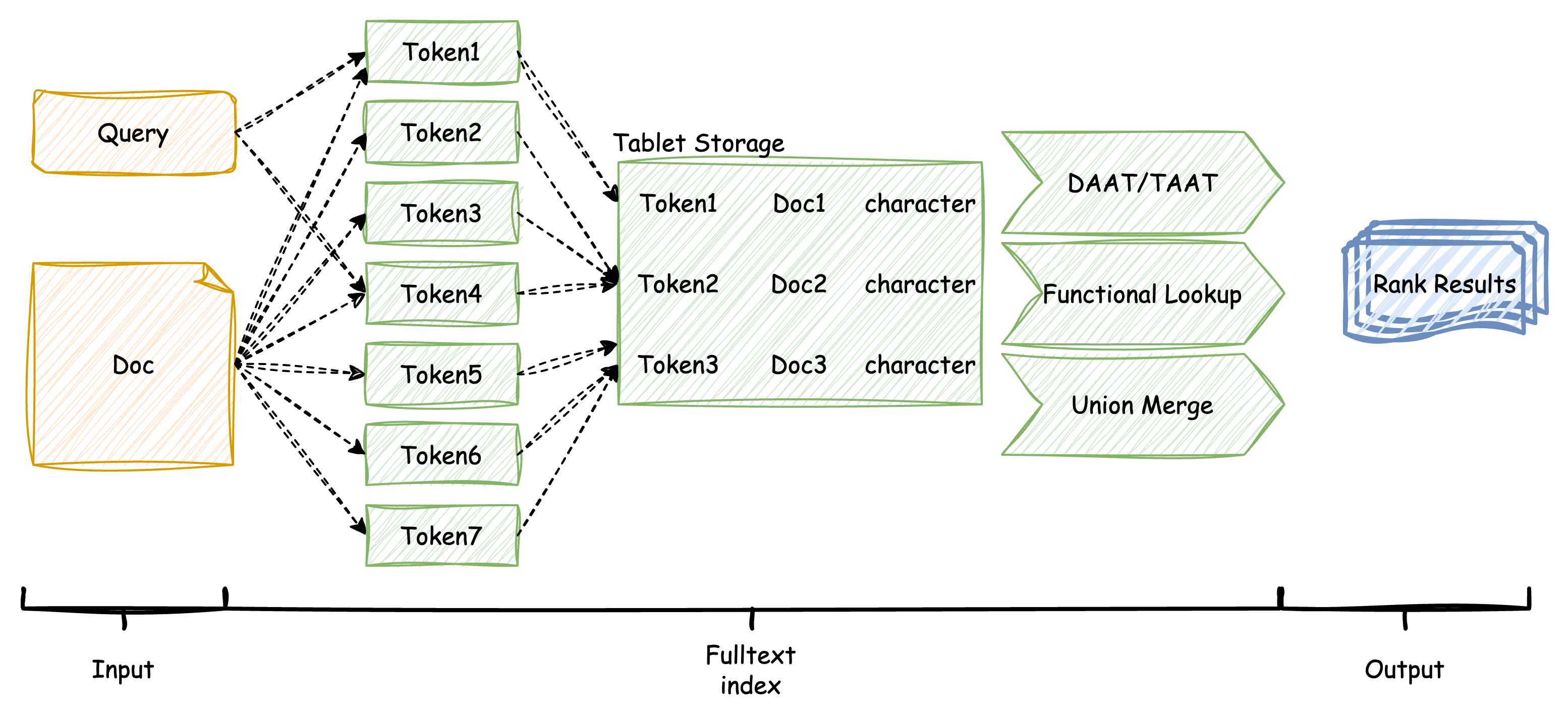
In the OceanBase storage engine, user documents (doc) and queries (query) are split into multiple keywords (word/token) using a tokenizer. These keywords, along with the statistical features of the documents, are stored in internal auxiliary tables (tablet) to facilitate relevance assessment (ranking) during the information retrieval phase. OceanBase employs the advanced BM25 algorithm, which more effectively calculates the relevance scores between keywords in user queries and stored documents, ultimately outputting the documents that meet the criteria along with their scores.
Prerequisites
To operate and experience the full-text indexing feature of OceanBase Database, make sure that the following conditions are met:
Environment requirements: You have deployed an OceanBase cluster of V4.3.5 BP1 or later and created a MySQL-compatible tenant. For more information about how to deploy an OceanBase cluster, see Overview. After the deployment is complete, run the following SQL statements to verify the cluster and tenant information:
-- Verify the cluster information. SELECT * FROM GV$OB_SERVERS; -- Verify the tenant information. SELECT * FROM oceanbase.DBA_OB_TENANTS;Privilege settings: The MySQL-compatible tenant that you created must have the privileges to insert and query data. For more information about how to set privileges, see Directly grant privileges.
Database creation: Make sure that you have created a database. For more information about how to create a database, see Create a database.
Procedure
This topic describes how to use full-text indexes and views in OceanBase Database and how to query data.
Step 1: Import the dataset
OceanBase Database is pre-installed with built-in tokenizers and the boolean mode, which is more efficient than traditional natural language processing. We will use the Sports news dataset to import data into OceanBase Database. This dataset contains sports news articles from sources such as BBC Sport, covering football, cricket, rugby, tennis, and athletics. The CSV file should have three columns: event (sport category), date (publication date), and news (article content). You can prepare your own CSV from the BBC Sport dataset (737 articles in five categories). We will create a table named sport_data_whole with three columns of variable-length characters (event, date, and news). We will also create a full-text index on the news column using the space tokenizer, which is well-suited for English text.
Note
The space tokenizer splits text by whitespace, which works effectively for English.
OceanBase Database also includes other built-in tokenizers, such as the IK tokenizer for Chinese (with smart and max_word modes), beng for basic English, and ngram for splitting by character length.
-- Create a table and create a full-text index using the space tokenizer for English
CREATE TABLE sport_data_whole (
event VARCHAR(64),
date VARCHAR(16),
news VARCHAR(65535),
FULLTEXT INDEX ft_idx_news (news) WITH PARSER space
);
Import the news dataset into the table using the local file method. This process is expected to take about 30 seconds.
-- Import data
LOAD DATA /*+ PARALLEL(8) */ LOCAL INFILE '/home/sports_news_en.csv' INTO TABLE sport_data_whole
FIELDS TERMINATED BY ',' ENCLOSED BY '"' LINES TERMINATED BY '\n';
After importing the data, the table contains approximately 700 news articles, with an average length of about 350 words per article. The original data size is about 2 MB. After efficient compression, the total storage space required is less than 5 MB. This is mainly due to the large amount of data stored in the inverted and forward auxiliary tables of the full-text index, which contain a significant number of tokenization records.
-- Verify the number of imported records
SELECT AVG(LENGTH(news)), COUNT(*) FROM sport_data_whole;
The result is as follows:
+-------------------+----------+
| avg(length(news)) | count(*) |
+-------------------+----------+
| 1850.2400 | 737 |
+-------------------+----------+
1 row in set
-- Query the view to verify the result
SELECT * FROM oceanbase.DBA_OB_TABLE_SPACE_USAGE;
The result is as follows:
+----------+---------------+--------------------------------+-------------+---------------+
| TABLE_ID | DATABASE_NAME | TABLE_NAME | OCCUPY_SIZE | REQUIRED_SIZE |
+----------+---------------+--------------------------------+-------------+---------------+
| 500035 | test | sport_data_whole | 920000 | 1048576 |
| 500036 | test | __idx_500035_news | 1500000 | 2097152 |
| 500037 | test | __idx_500035_fts_rowkey_doc | 21058 | 28672 |
| 500038 | test | __idx_500035_fts_doc_rowkey | 23236 | 28672 |
| 500039 | test | __idx_500035_news_fts_doc_word | 1600000 | 2097152 |
+----------+---------------+--------------------------------+-------------+---------------+
Step 2: Query using full-text index
With the stored news dataset and index, we can perform multi-condition combination or highly filtered searches. For example, as a fan, if you want to search for news containing both "Manchester" and "goal," you can use the Boolean mode.
Compared to string LIKE matching without an index, the Boolean mode syntax is more concise and queries faster.
-- Query using Boolean mode to find news containing both "Manchester" and "goal"
SELECT COUNT(*) FROM sport_data_whole
WHERE MATCH (news) AGAINST ('+Manchester +goal' IN BOOLEAN MODE);
The result is:
+----------+
| count(*) |
+----------+
| 12 |
+----------+
1 row in set (0.03 sec)
In contrast, using the LIKE syntax:
-- Query using LIKE syntax
SELECT COUNT(*) FROM sport_data_whole
WHERE news LIKE '%Manchester%' AND news LIKE '%goal%';
The result is also:
+----------+
| count(*) |
+----------+
| 12 |
+----------+
1 row in set (0.08 sec)
We can further rank the returned news articles based on the scores in the output to determine which one is more relevant to the query.
-- Return the event, date, and score of the news to help determine relevance
SELECT event, date, MATCH (news) AGAINST ('Manchester goal') AS score
FROM sport_data_whole
WHERE MATCH (news) AGAINST ('+Manchester +goal' IN BOOLEAN MODE);
The result is:
+---------+------------+---------------------+
| event | date | score |
+---------+------------+---------------------+
| football| 2004-10-15 | 0.4657063867776557 |
| football| 2005-03-22 | 0.41760566608994765 |
| ... | ... | ... |
+---------+------------+---------------------+
12 rows in set
Additionally, Boolean mode allows us to exclude certain keywords. For example, fouls and cards are often mentioned in football match reports. If you want to find intense matches without mentions of yellow cards, red cards, or fouls, you can use the - operator in Boolean mode.
-- Query for intense matches without yellow cards, red cards, or fouls
SELECT COUNT(*) FROM sport_data_whole
WHERE MATCH (news) AGAINST ('+intense -yellow -red -foul' IN BOOLEAN MODE);
The result is:
+----------+
| count(*) |
+----------+
| 18 |
+----------+
1 row in set
Step 3: Tune
Tune the TOKENIZE function
When the query results of a full-text index are not as expected, it is usually because the tokenization results are not ideal. OceanBase Database provides a quick TOKENIZE function to help you test the tokenization effects. This function supports all tokenizers and their corresponding attributes. You can use the TOKENIZE function to verify the tokenization effects of tokenizers.
For example, when searching for compound or hyphenated terms such as "hat-trick" or "clean sheet," the tokenization result affects whether your query will match the intended documents. The space tokenizer splits text by whitespace; hyphenated terms may be split into separate tokens.
Use the
TOKENIZEfunction to verify the tokenization effects of tokenizers:-- Verify the tokenization effects of English sports news using the space tokenizer SELECT TOKENIZE('Wayne Rooney scored a brilliant hat-trick in the Premier League match', 'space', '[{"output": "default"}]');The returned result is as follows:
+------------------------------------------------------------------------------------------------------------------------------------------------------+ | TOKENIZE('Wayne Rooney scored a brilliant hat-trick in the Premier League match', 'space', '[{"output": "default"}]') | +------------------------------------------------------------------------------------------------------------------------------------------------------+ | ["Wayne", "Rooney", "scored", "a", "brilliant", "hat-trick", "in", "the", "Premier", "League", "match"] | +------------------------------------------------------------------------------------------------------------------------------------------------------+ 1 row in setThe above result shows that "hat-trick" is kept as a single token. If your tokenizer splits it into "hat" and "trick," you would need to search using
+hat +trickin Boolean mode to find relevant documents.Execute the following statement to query whether the target documents are hit:
-- Boolean mode search for news about specific players and achievements SELECT COUNT(*) FROM sport_data_whole WHERE MATCH (news) AGAINST ('+Rooney +hat-trick' IN BOOLEAN MODE);If the tokenizer treats "hat-trick" as one token and your dataset contains such articles, the query returns matching records. If "hat-trick" is split into two tokens, use
+Rooney +hat +trickinstead.When tokenization does not meet your needs (for example, for custom vocabularies or language-specific rules), you can update the system dictionary. After updating the system dictionary, you need to refresh the cache.
Note
To update the system dictionary, we recommend that you contact OceanBase Technical Support.
Rebuild the full-text index after dictionary changes:
-- Rebuild the full-text index to apply the new dictionary ALTER TABLE sport_data_whole DROP INDEX ft_idx_news, ADD FULLTEXT INDEX ft_idx_news (news) WITH PARSER space;Verify the optimization effect by running your search again. Using
TOKENIZEto inspect tokenization helps you choose the correct Boolean mode query syntax (for example,+hat +trickversus+hat-trick) and improves retrieval accuracy.
Performance comparison between OceanBase Database and MySQL
To compare the full-text search performance of OceanBase Database with that of MySQL, we use the full-text search feature of MySQL as a reference. For a fair comparison, we selected the wikir1k dataset, which contains 369,721 rows with an average of 100 words per row, for the performance comparison.
The following table shows the comparison results under different scenarios in the natural language mode and the boolean mode. As shown in the table, OceanBase Database outperforms MySQL significantly in scenarios that require extensive text segmentation or return a large number of results. For small result sets, since the computational load is relatively small, the advantages of the query engine are not significant, and the performance of both engines is close.
Test environment: OceanBase Database tenant specifications are 8 cores and 16 GB of memory. MySQL version is 8.0.36 for Linux on x86_64 (MySQL Community Server - GPL).
Natural language queries
-- q1: Find documents containing "and"
SELECT * FROM wikir1k WHERE MATCH (document) AGAINST ('and');
-- q2: Find documents containing "and", limit to 10 results
SELECT * FROM wikir1k WHERE MATCH (document) AGAINST ('and') LIMIT 10;
-- q3: Find documents containing "librettists"
SELECT * FROM wikir1k WHERE MATCH (document) AGAINST ('librettists');
-- q4: Find documents containing "librettists", limit to 10 results
SELECT * FROM wikir1k WHERE MATCH (document) AGAINST ('librettists') LIMIT 10;
-- q5: Find documents containing "alleviating librettists"
SELECT * FROM wikir1k WHERE MATCH (document) AGAINST ('alleviating librettists');
-- q6: Find documents containing "black spotted white yellow"
SELECT * FROM wikir1k WHERE MATCH (document) AGAINST ('black spotted white yellow');
-- q7: Find documents containing "black spotted white yellow", limit to 10 results
SELECT * FROM wikir1k WHERE MATCH (document) AGAINST ('black spotted white yellow') LIMIT 10;
-- q8: Find documents containing "between up and down"
SELECT * FROM wikir1k WHERE MATCH (document) AGAINST ('between up and down');
-- q9: Find documents containing "between up and down", limit to 10 results
SELECT * FROM wikir1k WHERE MATCH (document) AGAINST ('between up and down') LIMIT 10;
-- q10: Find long documents
SELECT * FROM wikir1k WHERE MATCH (document) AGAINST ('alleviating librettists modifications retelling intangible hydrographic administratively berwickshire strathaven dumfriesshire lesmahagow transhumanist musselburgh prestwick cardiganshire montgomeryshire');
-- q11: Find long documents, with "and" added
SELECT * FROM wikir1k WHERE MATCH (document) AGAINST ('alleviating librettists modifications retelling intangible hydrographic administratively berwickshire strathaven dumfriesshire lesmahagow transhumanist musselburgh prestwick cardiganshire montgomeryshire and');
-- q12: Find long documents, limit to 10 results
SELECT * FROM wikir1k WHERE MATCH (document) AGAINST ('alleviating librettists modifications retelling intangible hydrographic administratively berwickshire strathaven dumfriesshire lesmahagow transhumanist musselburgh prestwick cardiganshire montgomeryshire and') LIMIT 10;
Scenario |
OceanBase |
MySQL |
|---|---|---|
| q1 single token, high frequency words | 3820458us | 5718430us |
| q2 single token, high frequency words with limit | 231861us | 503772us |
| q3 single token, low frequency words | 879us | 672us |
| q4 single token, low frequency words with limit | 720us | 700us |
| q5 multiple tokens, small result set | 1591us | 1100us |
| q6 multiple tokens, medium result set | 259700us | 602221us |
| q7 multiple tokens, medium result set with limit | 25502us | 42620us |
| q8 multiple tokens, large result set | 3842391us | 6846847us |
| q9 multiple tokens, large result set with limit | 301362us | 784024us |
| q10 many tokens, small result set | 22143us | 10161us |
| q11 many tokens, large result set | 3905829us | 5929343us |
| q12 many tokens, large result set with limit | 345968us | 769970us |
Boolean mode
-- q1: +high-frequency words -medium-frequency words
SELECT * FROM wikir1k WHERE MATCH (document) AGAINST ('+and -which -his' IN BOOLEAN MODE);
-- q2: +high-frequency words -low-frequency words
SELECT * FROM wikir1k WHERE MATCH (document) AGAINST ('+which (+and -his)' IN BOOLEAN MODE);
-- q3: +medium-frequency words (+high-frequency words -medium-frequency words)
SELECT * FROM wikir1k WHERE MATCH (document) AGAINST ('+and -carabantes -bufera' IN BOOLEAN MODE);
-- q4: +high-frequency words +low-frequency words
SELECT * FROM wikir1k WHERE MATCH (document) AGAINST ('+and +librettists' IN BOOLEAN MODE);
Scenario |
OceanBase |
MySQL |
|---|---|---|
| q1: +high-frequency words -medium-frequency words | 1586657us | 2440798us |
| q2: +high-frequency words -low-frequency words | 3726508us | 7974832us |
| q3: +medium-frequency words (+high-frequency words -medium-frequency words) | 3080644us | 5612041us |
| q4: +high-frequency words +low-frequency words | 230284us | 357580us |
Performance comparison summary
From the above data comparison, it can be seen that OceanBase outperforms MySQL in complex full-text search scenarios, whether in natural language mode or boolean mode. Especially in queries that require extensive tokenization or return a large number of results, OceanBase's advantages are even more evident. This provides developers and data analysts with a strong reference for choosing a database, particularly in applications that require efficient retrieval of massive data. OceanBase clearly demonstrates its powerful performance and flexible query capabilities in such scenarios.
OceanBase's full-text index can provide fast response times in complex queries, making it more suitable for real-world applications that require high concurrency and high-performance retrieval.