







Column Store FAQ
What is columnar storage?
OceanBase columnar storage is a data storage format that saves static disk data as columnar storage and in-memory modified data as row-based storage. It balances scan performance and transaction processing capabilities.
For analytical queries, columnar storage can significantly improve query performance and is an essential feature for OceanBase to excel in HTAP. In classic AP databases, columnar data is usually static and difficult to update in-place. In OceanBase's LSM Tree architecture, the SSTable is static and naturally suitable for implementing columnar storage; the MemTable is dynamic and remains row-based storage, which does not impose additional impact on transaction processing. This allows us to balance TP and AP query performance to some extent.
What is a "columnar index"?
OceanBase Database also supports the concept of a columnar index, which is different from "creating an index on columnar storage." A columnar index refers to an index table with a columnar storage format.
For example, if you already have a row-based table t6 and want to sum c3 with optimal performance, you can create a columnar index on c3:
create table t6(
c1 TINYINT,
c2 SMALLINT,
c3 MEDIUMINT
);
create /*+ parallel(2) */ index idx1 on t6(c3) with column group (each column);
In addition, we support more ways to create indexes:
Supports redundant row-based storage in indexes.
create index idx1 on t1(c2) storing(c1) with column group(all columns, each column); alter table t1 add index idx1 (c2) storing(c1) with column group(all columns, each column);Supports pure columnar storage in indexes.
create index idx1 on t1(c2) storing(c1) with column group(each column); alter table t1 add index idx1 (c2) storing(c1) with column group(each column);
Using the STORING clause in database indexes is to store additional non-index column data into the index. This can provide performance optimization for specific queries, avoiding table access and reducing the cost of index sorting. When a query only needs to access columns stored in the index without needing to retrieve original rows from the table, it can greatly improve query efficiency.
Common questions about columnar tables and columnar replicas
The following content collectively refers to "columnar replicas" as C replicas.
What is the difference between a columnar table and a columnar replica? What is their relationship?
They describe different dimensions:
Columnar table: Refers to the table-level storage format (such as row-based, pure columnar, or hybrid row-column storage), determined by
WITH COLUMN GROUPor the tenant-level parameterdefault_table_store_format. Data is physically stored on the tenant's F (Full) / R (Read-Only) replicas. On these replicas, MemTables/dumps are still organized in rows, while the baseline can be organized in columnar or hybrid row-column redundancy. The read path integrates incremental and baseline data. When executing a semantic path on F/R, strong-consistency reads consistent with the replica role are provided by default (related to transactions, isolation levels, etc.).Columnar replica (C replica): Refers to an independent replica type, typically placed in a separate zone. It does not participate in Paxos elections or voting and asynchronously catches up with F/R via logs. The local major layer primarily uses columnar storage to carry user table data. The same logical table can have one storage format on F/R (e.g., row-based or hybrid row-column) and columnar storage on the C replica, used for resource isolation between AP and TP.
Relationship: They are independent. You can create a columnar table on a tenant without C replicas (data exists only in the columnar or hybrid form on F/R); or in a tenant with C replicas, you can have a row-based table on F/R and the same table in columnar form on the C replica for read-only analytics. Columnar tables and C replicas can also coexist, combined according to architectural requirements.
- Read consistency: There is a lag in catching up with the log source for C replicas. Analytical queries accessing C replicas via independent ODPs are typically planned as weak-consistency reads. If you require exactly the same log as TP, without C replica lag, analytics should preferably be completed on a columnar table or hybrid row-column table on F/R.
Is a columnar table required to have columnar replicas? Can a columnar table be created on Full replicas?
A columnar table does not require columnar replicas and can be created on Full (F) replicas.
A columnar table is a table-level storage format configuration, specified during table creation with WITH COLUMN GROUP or through the tenant-level parameter default_table_store_format. As long as the tenant has F/R replicas, it is sufficient: a columnar table or hybrid row-column table can be created under any locality (for example, only F@zone1, F@zone2), and data will be stored in columnar (or hybrid row-column redundancy) form on F/R replicas. Columnar replicas (C replicas) are an optional independent deployment form, used for physical or logical isolation between TP/AP and for read-only analytical traffic, and are not dependent on "whether a columnar table can be created."
Does OceanBase support creating a pure columnar table directly? Or must it be based on a row-based table?
You can directly create a pure columnar storage table without first creating a hybrid row-column storage table.
Specify WITH COLUMN GROUP (each column) when creating the table to obtain a pure columnar storage table (with only the columnar storage baseline, no row storage baseline). For example:
CREATE TABLE t (pk INT PRIMARY KEY, c1 INT, c2 INT) WITH COLUMN GROUP (each column);
In a partitioned table, the primary key columns retain an additional row-based storage for point queries, but the table is still considered a pure columnar storage table overall. You can also create a hybrid row-column storage table first and then convert it into a columnar storage table using DDL statements such as ALTER TABLE ... ADD COLUMN GROUP (each column);. For details, see "How do I create a columnar storage table?" in this topic.
How is data consistency maintained between columnar storage and row-based storage? If it's asynchronous, what is the latency?
There are two scenarios:
- Columnar storage table (on F/R replicas): The baseline is a columnar or hybrid row-column layout, and incremental data is organized in rows (in MemTables or during minor compactions). During reads, incremental data is fused with the baseline. Under the default semantics of F/R, this provides strong consistency without any additional cross-replica lag.
- Columnar storage replica (C replica): C replicas do not participate in Paxos. They catch up with F/R and replay logs through asynchronous logs, resulting in a latency relative to the log source. Analysis reads from C replicas accessed via an independent ODP are planned for weak consistency. If you require exactly the same logs as TP and no C replica latency, analysis should still preferably be completed on a columnar storage table or hybrid row-column storage table on F/R.
How do I separate TP and AP traffic? If an AP fails, are there disaster recovery measures?
Traffic separation:
- No C replicas: TP and AP share the same set of F/R replicas and access entry points. The optimizer automatically selects row-based/storage paths. No physical isolation at the cabinet or link level is required between TP and AP.
- With C replicas: The typical approach is for TP to use the entry point for accessing F/R (for strong reads/writes), while AP uses an independent ODP. Weak read is configured on the ODP side, and requests are routed to C replicas (e.g., using
proxy_primary_zone_name,route_target_replica_type = 'ColumnStore',init_sql='set @@ob_route_policy = COLUMN_STORE_ONLY', etc.) to achieve link isolation between TP/AP and C replicas. For operations and replica management, see Deploy and use columnar storage replicas.
Disaster recovery and limitations for AP (C replica) side:
- C replicas cannot be restored to Leaders. Physical restore does not support restoring C replicas (if C replicas are included in the tenant's locality, the restore will fail). When no C replicas are deployed in the primary database, deploying C replicas in the standby database is also not recommended.
- If the zone where C replicas are located or the ODP fails, AP queries can roll back to F/R replicas: Change the AP client to connect to the primary ODP or adjust routing so that analysis requests are executed as strong reads on F/R (sharing resources with TP).
- Starting from V4.3.5 BP1, deploying multiple C replicas is supported (up to 3 are recommended). C replicas can be deployed across multiple zones. By using multiple independent ODPs and routing configurations, AP read load can be distributed, achieving redundancy and high availability.
FAQ on Accessing and Routing Columnar Storage Replicas
Why is an independent ODP usually required when accessing C replicas?
On OceanBase V4.3.5, a common practice to isolate AP traffic from TP links and stably route to C replicas is to deploy a separate set of ODP for C replicas, and configure weak read and columnar storage routing strategies on that ODP. For detailed steps, see Deploy and use columnar storage replicas.
Where should an independent ODP be deployed? Is an exclusive server required?
It is not mandatory. An independent ODP can be deployed on any host that is network-accessible to the cluster. The documentation recommends standalone deployment mainly to reduce the risk of resource contention with OBServer, rather than being a protocol or product limitation.
What is the relationship between proxy_idc_name and columnar storage replica routing?
proxy_idc_name is primarily used for data center affinity (LDC) routing. Whether to route to C replicas is a replica selection dimension. Both can be used simultaneously, but should be configured and verified separately.
For more information, see ODP read/write splitting and routing strategies and LDC routing.
How do I create a columnar storage table?
First, create a hybrid row-column storage table.
- Non-partitioned table:
create table t1(
c1 TINYINT,
c2 SMALLINT,
c3 MEDIUMINT
) with column group (all columns, each column);
- Partitioned tables:
create table t2(
pk int,
c1 int,
c2 int,
primary key (pk)
)
partition by hash(pk) partitions 4
with column group (all columns, each column);
When creating a hybrid row-column columnar storage table, you always use the with column group (all columns, each column) syntax, which means the following:
all columns: Aggregates all columns into groups, treating them as one wide column and storing them row by row. This is essentially the same as the original row-based storage.each column: Stores each column in the table separately in column format.
The appearance of both all columns and each column together indicates that by default, after creating a columnar storage table, it also redundantly stores data in row-based format, with each replica storing two copies of the baseline data. However, it's worth noting that regardless of the number of baseline data copies for each table, the incremental data in the memtable and during minor compactions is still shared among them.
Next, create a pure columnar storage table.
- Non-partitioned tables:
create table t3(
c1 TINYINT,
c2 SMALLINT,
c3 MEDIUMINT
) with column group (each column);
- Partitioned tables:
create table t4(
pk1 int,
pk2 int,
c1 int,
c2 int,
primary key (pk1, pk2)
)
partition by hash(pk1) partitions 4
with column group (each column);
For table t4, a columnar storage will be created for each combination of pk1, pk2, c1, and c2, and a row-based storage will also be created for the (pk1, pk2) combination.
How to make tables created by tenants default to columnar storage?
You can set a tenant-level parameter:
alter system set default_table_store_format = "column";
Correspondingly, you can also set the default table creation format to row-based storage, or to dual row-column storage:
alter system set default_table_store_format = "row"; // Row-based storage
alter system set default_table_store_format = "compound"; // Dual row-column storage
What is the recommended configuration for the columnar storage edition?
# Set collation to utf8mb4_bin for an instant 15% performance improvement.
set global collation_connection = utf8mb4_bin;
set global collation_server = utf8mb4_bin;
set global ob_query_timeout= 10000000000;
set global ob_trx_timeout= 100000000000;
set global ob_sql_work_area_percentage=30;
set global max_allowed_packet=67108864;
# It is recommended to set this to 10 times the number of CPU cores.
set global parallel_servers_target=1000;
set global parallel_degree_policy = auto;
set global parallel_min_scan_time_threshold = 10;
# Limits the maximum DOP when parallel_degree_policy = auto.
# A large DOP may cause performance issues. The following value is recommended to be set to cpu_count * 2.
set global parallel_degree_limit = 0;
alter system set compaction_low_thread_score = cpu_count;
alter system set compaction_mid_thread_score = cpu_count;
alter system set default_table_store_format = "column";
Note
In the code above, cpu_count represents the min_cpu specified when creating the tenant.
How do I determine if a query uses columnar storage?
When scanning data in row format, the EXPLAIN statement shows TABLE FULL SCAN. When scanning data in columnar format, it shows COLUMN TABLE FULL SCAN. Consider accessing the following T5 table as an example:
create table t5(
c1 TINYINT,
c2 SMALLINT,
c3 MEDIUMINT,
c4 INT,
c5 INT,
PRIMARY KEY(c1, c2)
) with column group(all columns, each column);
OceanBase(admin@test)>explain select c1,c2 from t5;
+------------------------------------------------------------------------+
| Query Plan |
+------------------------------------------------------------------------+
| =============================================== |
| |ID|OPERATOR |NAME|EST.ROWS|EST.TIME(us)| |
| ----------------------------------------------- |
| |0 |TABLE FULL SCAN|t5 |1 |3 | |
| =============================================== |
| Outputs & filters: |
| ------------------------------------- |
| 0 - output([t5.c1], [t5.c2]), filter(nil), rowset=16 |
| access([t5.c1], [t5.c2]), partitions(p0) |
| is_index_back=false, is_global_index=false, |
| range_key([t5.c1], [t5.c2]), range(MIN,MIN ; MAX,MAX)always true |
+------------------------------------------------------------------------+
11 rows in set (0.011 sec)
OceanBase(admin@test)>explain select c1 from t5;
+------------------------------------------------------------------------+
| Query Plan |
+------------------------------------------------------------------------+
| ====================================================== |
| |ID|OPERATOR |NAME|EST.ROWS|EST.TIME(us)| |
| ------------------------------------------------------ |
| |0 |COLUMN TABLE FULL SCAN|t5 |1 |3 | |
| ====================================================== |
| Outputs & filters: |
| ------------------------------------- |
| 0 - output([t5.c1]), filter(nil), rowset=16 |
| access([t5.c1]), partitions(p0) |
| is_index_back=false, is_global_index=false, |
| range_key([t5.c1], [t5.c2]), range(MIN,MIN ; MAX,MAX)always true |
+------------------------------------------------------------------------+
11 rows in set (0.003 sec)
Can columns be added or deleted in a columnar storage table?
Adding and dropping columns is allowed.
The maximum and minimum lengths of VARCHAR columns can be changed.
Columnar storage supports various offline DDL operations, just like row-based tables.
For more information about modifications on columnar storage, see Convert between row-based and columnar storage for tables (MySQL-compatible mode) and Convert between row-based and columnar storage for tables (Oracle-compatible mode).
What are the characteristics of queries on columnar storage tables?
In a hybrid row-columnar storage table, the query logic for a columnar storage table query uses the range scan mode by default, while a point get query will fall back to the row store mode.
In a pure columnar storage table, all queries use the columnar storage mode.
Does columnar storage support transactions? What are the limitations on transaction size?
Like row-based tables, it supports transactions with no size limit, ensuring high consistency.
Are there any special considerations for log synchronization, backup, and recovery in a columnar table?
There are no special considerations; they are consistent with row-based tables. The synchronized logs are all in row-based format.
Can a row-based table be converted to a columnar table using DDL?
Yes. This can be achieved by adding or dropping columns. A sample syntax is as follows:
create table t1( pk1 int, c2 int, primary key (pk1));
alter table t1 add column group(all columns, each column);
alter table t1 drop column group(all columns, each column);
alter table t1 add column group(each column);
alter table t1 drop column group(each column);
Note
After executing alter table t1 drop column group(all columns, each column);, you don't need to worry about data being carried by an absent Group, as all columns will be placed into a default Group called DEFAULTL COLUMN GROUP.
Can multiple columns be stored together in columnar storage?
In OceanBase Database V4.3.0, either each column is stored independently, or all columns are stored together as rows. Storing a selected subset of columns together is not currently supported.
Does columnar storage support updates? What is the structure in the MemTable?
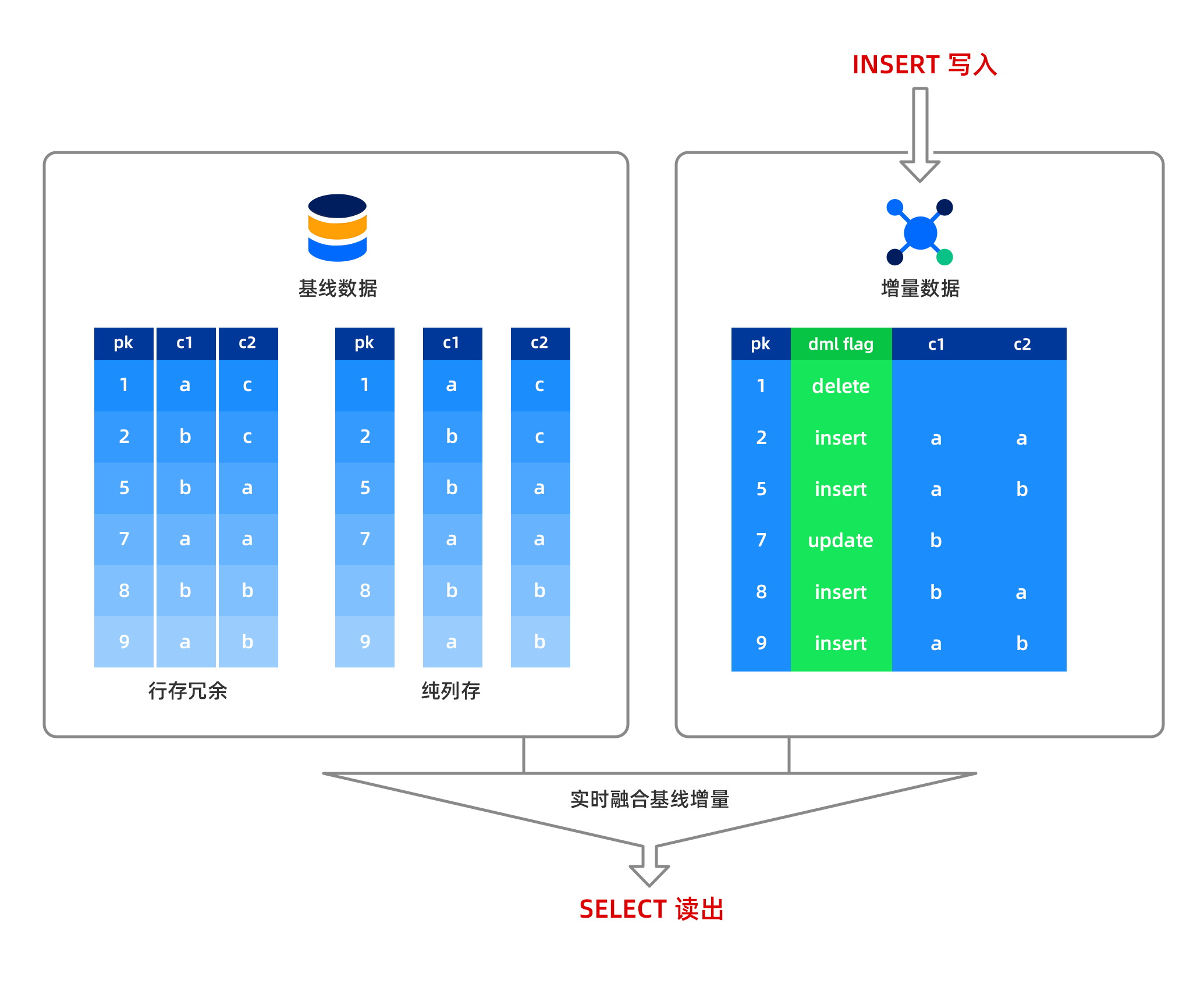
In OceanBase Database, insert, delete, and update operations are all performed in memory, with data stored in row-based format in the MemTable. Baseline data, which is read-only, is stored in columnar format on disk. When reading a column of data, the row-based data from the MemTable and the columnar data from disk are fused in real-time before being output to the user. This means OceanBase Database supports strongly consistent reads from columnar storage without any data latency. Data written to the MemTable can be minor compacted, and the compacted data is still stored in row-based format. After a major compaction, the row-based data and baseline columnar data are fused to form new baseline columnar data.
Notice
For a columnar table, if there are a large number of update operations and they are not compacted promptly, query performance will be affected. Therefore, it is recommended to initiate a major compaction after bulk data import to achieve optimal query performance. A small number of update operations have little impact on performance.
What are the characteristics of queries on a columnar table?
In a hybrid row-columnar table, the query logic for a columnar table defaults to a range scan in columnar mode, while a point get still falls back to row-based mode.
In a pure columnar table, all queries use columnar mode.
Can an index be created on a specific column in columnar storage?
Yes. OceanBase Database does not distinguish whether an index is created on columnar or row-based data; the index structure created is the same.
Creating an index on one or several columns in columnar storage allows you to construct a covering index to improve point query performance, or sort on specific columns to enhance sorting performance.
What is the maximum number of columns supported?
Currently, a columnar table supports up to 4,096 columns.
What are the considerations for using columnar storage?
First: After bulk data import, it is recommended to perform a major compaction for better read performance. After data import, trigger a major compaction within the tenant to ensure all data is compacted into the baseline. Execute alter system major freeze; in the tenant, then execute select STATUS from CDB_OB_MAJOR_COMPACTION where TENANT_ID = tenant ID; in the sys tenant to check if the major compaction is complete. When STATUS changes to IDLE, the major compaction is complete.
Second: After the major compaction, it is recommended to collect statistics. The method for collecting statistics is as follows:
Collect statistics for all tables in the business tenant with one click, starting 16 threads to collect concurrently:
CALL DBMS_STATS.GATHER_SCHEMA_STATS ('db', granularity=>'auto', degree=>16);Monitor the progress of statistics collection through the view
GV$OB_OPT_STAT_GATHER_MONITOR.
Third: You can use full direct load logic to import data in batches. Tables imported this way do not require a major compaction to achieve optimal columnar storage scan performance. Tools that support full direct load include obloader and the native load data command.
Fourth: For scenarios other than wide tables, not using columnar storage may still achieve performance comparable to columnar storage. This is due to OceanBase's hybrid row-column storage architecture at the microblock level in its row-store version (don't be surprised if this happens).
Fifth: For large data tables, there is a performance difference between cold runs and hot runs.
Sixth: The optimizer automatically chooses whether to access column data via row or columnar storage based on cost estimation.
Seventh: Major compaction speeds for columnar storage tables slow down.
Are there any special considerations for log synchronization, backup, and recovery of columnar storage tables?
There are no special considerations; they are consistent with row-store tables. All synchronized logs are in row-store format.
Data Import/Migration FAQ
What is direct load? How do I perform direct load?
Direct load is a method for accelerating data import and data queries. It is recommended to use direct load for importing data from large tables. Currently, the load data command and insert into select statement support direct load. For detailed usage instructions, see Overview of direct load.
Is it supported to synchronize data from other databases to OceanBase using FlinkCDC?
Yes. For more information, see the official documentation Synchronize data from MySQL to OceanBase using FlinkCDC.
Is access to OceanBase supported using the Flink Connector?
Yes. For details, see https://github.com/oceanbase/flink-connector-oceanbase.
Performance Tuning FAQ
What other methods can be used to further improve AP Query performance?
Based on practical experience, first, unless there are specific sorting requirements, do not use the utf8mb4 character set when creating tables; instead, use binary to improve performance. For example:
create table t5(c1 TINYINT, c2 VARVHAR(50)) CHARSET=binary with column group (each column);
Secondly, if users or the business can accept it, specify the utf8mb4_bin character set when creating a MySQL-compatible tenant table, with the following parameter: CHARSET = utf8mb4 collate=utf8mb4_bin.
Additionally, increasing the IOPS of UNIT can accelerate direct load.
What are the characteristics of the column-oriented storage optimizer?
Compared to the row-oriented storage optimizer, the column-oriented storage optimizer includes the following enhancements:
- The ability for the optimizer to autonomously choose between row and column storage.
- The ability to control row or column storage selection via hints (at the table level).
- Adaptation to plan cost calculation for column storage.
- Added late materialization optimization for column storage.