







This topic describes the concepts and internal logic of log archiving.
Log archiving architecture
Log archiving is a process of storing the redo logs generated in the database to other media such as Network File System (NFS) and Alibaba Cloud Object Storage Service (OSS) so that the redo operation history of the database can be stored for a longer period. OceanBase Database uses a multi-tenant architecture. You can separately enable log archiving for each tenant. Log archiving operations in different tenants are independent of each other.
In addition, OceanBase Database is a native distributed database. Therefore, archiving operations for different log streams within a tenant are also independent of each other. The leader of a log stream is responsible for log archiving. Each log stream is archived only once. During archiving, the leader of RootService calculates the archiving progress of the current tenant based on the archiving progress of each log stream.
The following figure shows the log archiving architecture.
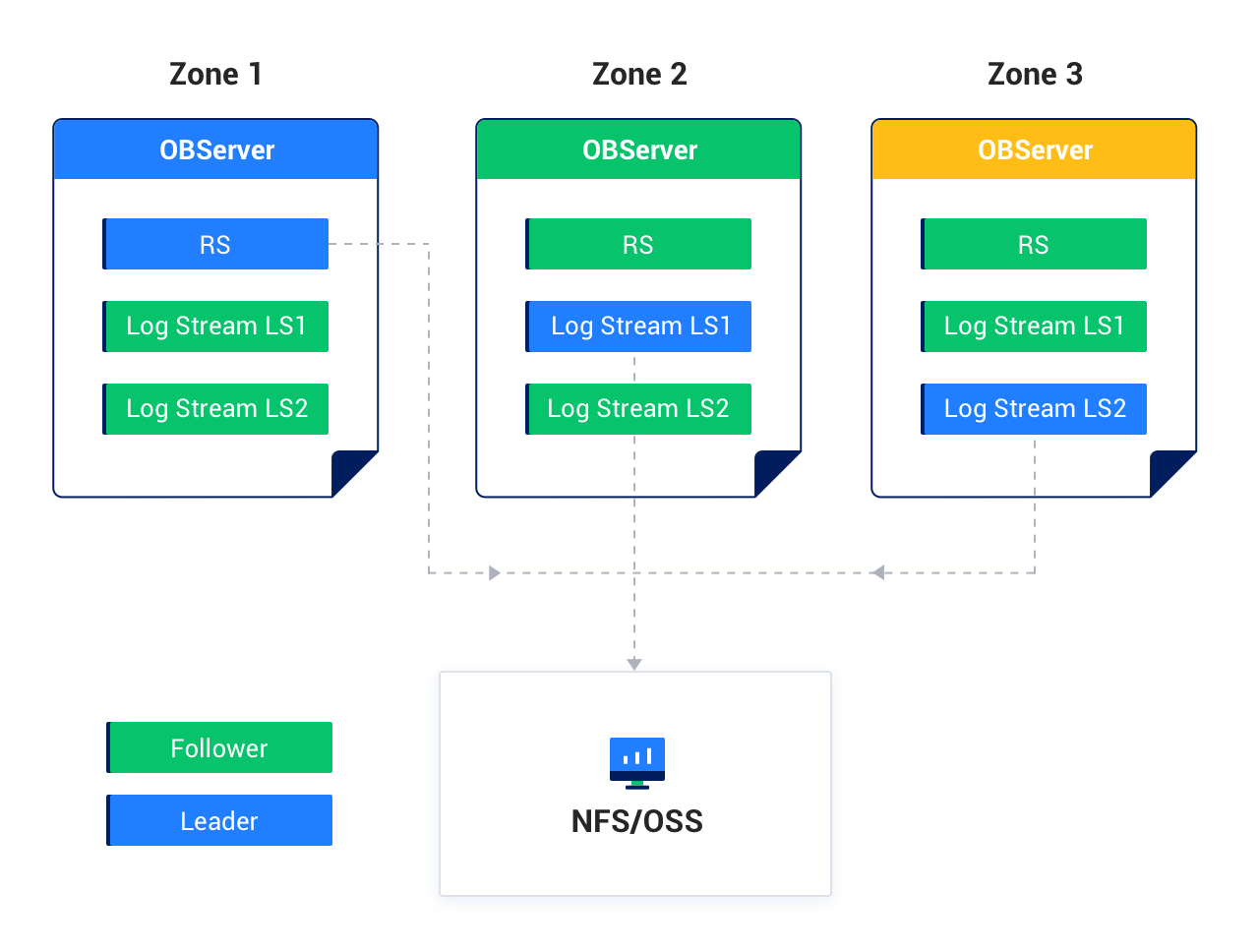
Log archiving modes
Two log archiving modes are supported: ARCHIVELOG and NOARCHIVELOG. You can initiate a log archiving job for a tenant only when the tenant is in ARCHIVELOG mode.
Archiving status
In log archiving, a collection of finite-state machines is used to describe the log archiving status of each tenant. You can view the archiving status of the sys tenant from the STATUS column in the oceanbase.CDB_OB_ARCHIVELOG view. You can view the archiving status of a user tenant from the STATUS column in the oceanbase.DBA_OB_ARCHIVELOG view in MySQL mode or from the STATUS column in the sys.DBA_OB_ARCHIVELOG view in Oracle mode.
The following table describes the archiving status.
State |
Description |
|---|---|
| PREPARE | The initial state for enabling log archiving. |
| BEGINNING | Log archiving is being started. In this state, each log stream is instructed to start archiving. |
| DOING | Log archiving is in progress. In this state, the log checkpoint constantly advances consecutively. In other words, the value of checkpoint_scn increments consecutively. |
| INTERRUPTED | Log archiving is interrupted. The log archiving state machine enters this state when log archiving is interrupted for at least one log stream. |
| SUSPENDING | Log archiving is being suspended. |
| SUSPEND | Log archiving is suspended. |
| STOPPING | Log archiving is being stopped. |
| STOP | Log archiving is stopped. |
Structure of archive logs
Log group
In OceanBase Database, each archive log record is a collection of logs, including several log entries. The archive log record is called a log group. Each log entry has a system change number (SCN). The log group also has an SCN, which is the largest one of the SCNs of all log entries. In log archiving, log groups are organized and managed in the archiving media.
Piece
OceanBase Database organizes and manages archived logs by piece. A piece is a complete collection of logs of a tenant within a consecutive period. The range of SCNs of logs in a piece is a left-closed and right-open interval. This implies the following points:
One piece contains the logs of a consecutive period, such as
1dor2d. This period is specified by thePIECE_SWITCH_INTERVALattribute in theLOG_ARCHIVE_DESTparameter.The logs in a piece are complete. The logs generated by all log streams of this tenant within the specified period are organized in this piece.
Assume that the PIECE_SWITCH_INTERVAL attribute in the LOG_ARCHIVE_DEST parameter is set to 1d. OceanBase Database will generate a piece every other day. Except for the last piece in each round of archiving, each piece contains the complete logs of one day. All logs are archived to this piece based on the specified rules. For example, after log archiving is enabled at '2022-06-01 06:00:00.000000', the range of SCNs of logs in the first complete piece generated for the current tenant is ['2022-06-01 06:00:00.000000', '2022-06-02 06:00:00.000000').
Attributes of pieces
A piece has the following attributes: START_SCN, END_SCN, CHECKPOINT_SCN, STATUS and FILE_STATUS.
START_SCN
START_SCN specifies the start SCN of consecutive logs in the piece.
END_SCN
END_SCN specifies the end SCN of the piece. The value of END_SCN minus the value of START_SCN is equal to the value of the PIECE_SWITCH_INTERVAL attribute.
For example, the PIECE_SWITCH_INTERVAL attribute in the LOG_ARCHIVE_DEST parameter is set to 1d, and log archiving is enabled at 2022-06-01 06:00:00. For the first piece generated during this round of archiving, START_SCN is '2022-06-01 06:00:00', and END_SCN is '2022-06-02 06:00:00'. All log groups generated at '2022-06-01 06:00:00' or later but earlier than '2022-06-02 06:00:00' are archived to this piece. For the second piece, START_SCN is '2022-06-02 06:00:00', and END_SCN is '2022-06-03 06:00:00'.
In the same round of archiving, log groups whose SCNs fall within the range of [START_SCN, END_SCN) belong to the same piece, but log entries whose SCNs fall within the range of [START_SCN, END_SCN) do not necessarily belong to the same piece.
For example, [START_SCN, END_SCN) of piece 1 is ['2022-06-01 06:00:00', '2022-06-02 06:00:00'), and a log group contains two log entries that correspond to SCNs '2022-06-02 05:59:59' and '2022-06-02 06:00:01' respectively. The SCN of the log group is the larger one of the SCNs of the two log entries and therefore is '2022-06-02 06:00:01', but the log entry with this SCN belongs to the next piece.
CHECKPOINT_SCN
CHECKPOINT_SCN specifies the largest SCN of consecutive logs in the piece, namely, the largest SCN of all log groups in the piece. All log groups whose SCNs fall within the range of [START_SCN, CHECKPOINT_SCN] are archived to this piece.
STATUS
STATUS specifies the status of the piece. The following table describes the possible states.
State |
Description |
|---|---|
| ACTIVE | An active piece, to which the system is archiving logs. |
| FROZEN | A frozen piece. The logs in the piece are complete and no more logs will be archived to it. |
FILE_STATUS
FILE_STATUS describes the status of piece files. The following table describes the possible states.
State |
Description |
|---|---|
| AVAILABLE | The data in the piece is intact and complete, not deleted or damaged. |
| INCOMPLETE | The data in the piece is incomplete. The data of some log streams is missing. |
| DELETING | The piece has expired and is being deleted. |
| DELETED | The piece is deleted. |
| BROKEN | The data in the piece is damaged. |