

OceanBase logo

OceanBase

A unified distributed database ready for your transactional, analytical, and AI workloads.

Product Overview
DEPLOY YOUR WAY

OceanBase Cloud

The best way to deploy and scale OceanBase

OceanBase Enterprise

Run and manage OceanBase on your infra

TRY OPEN SOURCE

OceanBase Community Edition

The free, open-source distributed database

OceanBase seekdb

Open source AI native search database

Customer Stories

Real-world success stories from enterprises across diverse industries.

View All
BY USE CASES

Mission-Critical Transactions

Global & Multicloud Application

Elastic Scaling for Peak Traffic

Real-time Analytics

Active Geo-redundancy

Database Consolidation

Resources

Comprehensive knowledge hub for OceanBase.

Blog

Live Demos

Training & Certification

Documentation

Official technical guides, tutorials, API references, and manuals for all OceanBase products.

View All
PRODUCTS

OceanBase Cloud

OceanBase Database

Tools

Connectors and Middleware

QUICK START

OceanBase Cloud

OceanBase Database

BEST PRACTICES

Practical guides for utilizing OceanBase more effectively and conveniently

Company

Learn more about OceanBase – our company, partnerships, and trust and security initiatives.

About OceanBase

Partner

Trust Center

Contact Us

International - English
中国站 - 简体中文
日本 - 日本語
Sign In
Start on Cloud

OceanBase

A unified distributed database ready for your transactional, analytical, and AI workloads.

Product Overview
DEPLOY YOUR WAY

OceanBase Cloud

The best way to deploy and scale OceanBase

OceanBase Enterprise

Run and manage OceanBase on your infra

TRY OPEN SOURCE

OceanBase Community Edition

The free, open-source distributed database

OceanBase seekdb

Open source AI native search database

Customer Stories

Real-world success stories from enterprises across diverse industries.

View All
BY USE CASES

Mission-Critical Transactions

Global & Multicloud Application

Elastic Scaling for Peak Traffic

Real-time Analytics

Active Geo-redundancy

Database Consolidation

Comprehensive knowledge hub for OceanBase.

Blog

Live Demos

Training & Certification

Documentation

Official technical guides, tutorials, API references, and manuals for all OceanBase products.

View All
PRODUCTS
OceanBase CloudOceanBase Database
ToolsConnectors and Middleware
QUICK START
OceanBase CloudOceanBase Database
BEST PRACTICES

Practical guides for utilizing OceanBase more effectively and conveniently

Learn more about OceanBase – our company, partnerships, and trust and security initiatives.

About OceanBase

Partner

Trust Center

Contact Us

Start on Cloud
编组
All Products
    • Databases
    • iconOceanBase Database
    • iconOceanBase Cloud
    • iconOceanBase Tugraph
    • iconInteractive Tutorials
    • iconOceanBase Best Practices
    • Tools
    • iconOceanBase Cloud Platform
    • iconOceanBase Migration Service
    • iconOceanBase Developer Center
    • iconOceanBase Migration Assessment
    • iconOceanBase Admin Tool
    • iconOceanBase Loader and Dumper
    • iconOceanBase Deployer
    • iconKubernetes operator for OceanBase
    • iconOceanBase Diagnostic Tool
    • iconOceanBase Binlog Service
    • Connectors and Middleware
    • iconOceanBase Database Proxy
    • iconEmbedded SQL in C for OceanBase
    • iconOceanBase Call Interface
    • iconOceanBase Connector/C
    • iconOceanBase Connector/J
    • iconOceanBase Connector/ODBC
    • iconOceanBase Connector/NET
icon

OceanBase Database

SQL - V4.2.2

    Download PDF

    OceanBase logo

    The Unified Distributed Database for the AI Era.

    Follow Us
    Products
    OceanBase CloudOceanBase EnterpriseOceanBase Community EditionOceanBase seekdb
    Resources
    DocsBlogLive DemosTraining & CertificationTicket
    Company
    About OceanBaseTrust CenterLegalPartnerContact Us
    Follow Us

    © OceanBase 2026. All rights reserved

    Cloud Service AgreementPrivacy PolicySecurity
    Contact Us
    Document Feedback
    1. Documentation Center
    2. OceanBase Database
    3. SQL
    4. V4.2.2
    iconOceanBase Database
    SQL - V 4.2.2
    SQL
    KV
    • V 4.6.0
    • V 4.4.2
    • V 4.3.5
    • V 4.3.3
    • V 4.3.1
    • V 4.3.0
    • V 4.2.5
    • V 4.2.2
    • V 4.2.1
    • V 4.2.0
    • V 4.1.0
    • V 4.0.0
    • V 3.1.4 and earlier

    Data transmission encryption

    Last Updated:2026-04-15 08:27:14  Updated
    share
    What is on this page
    Supported methods for loading private keys or certificates
    Enable transmission encryption
    Check whether transmission encryption is enabled for an OBServer node
    Check whether SSL is enabled on the MySQL port
    Check whether SSL is enabled on the RPC port

    folded

    share

    Transport Layer Security (TLS) is a cryptographic protocol that provides end-to-end communications security over networks. In addition to TCP, OceanBase Database also supports the Secure Sockets Layer (SSL) and TLS protocols to implement communication encryption.

    The following figure shows the architecture of OceanBase Database, which consists of three parts.
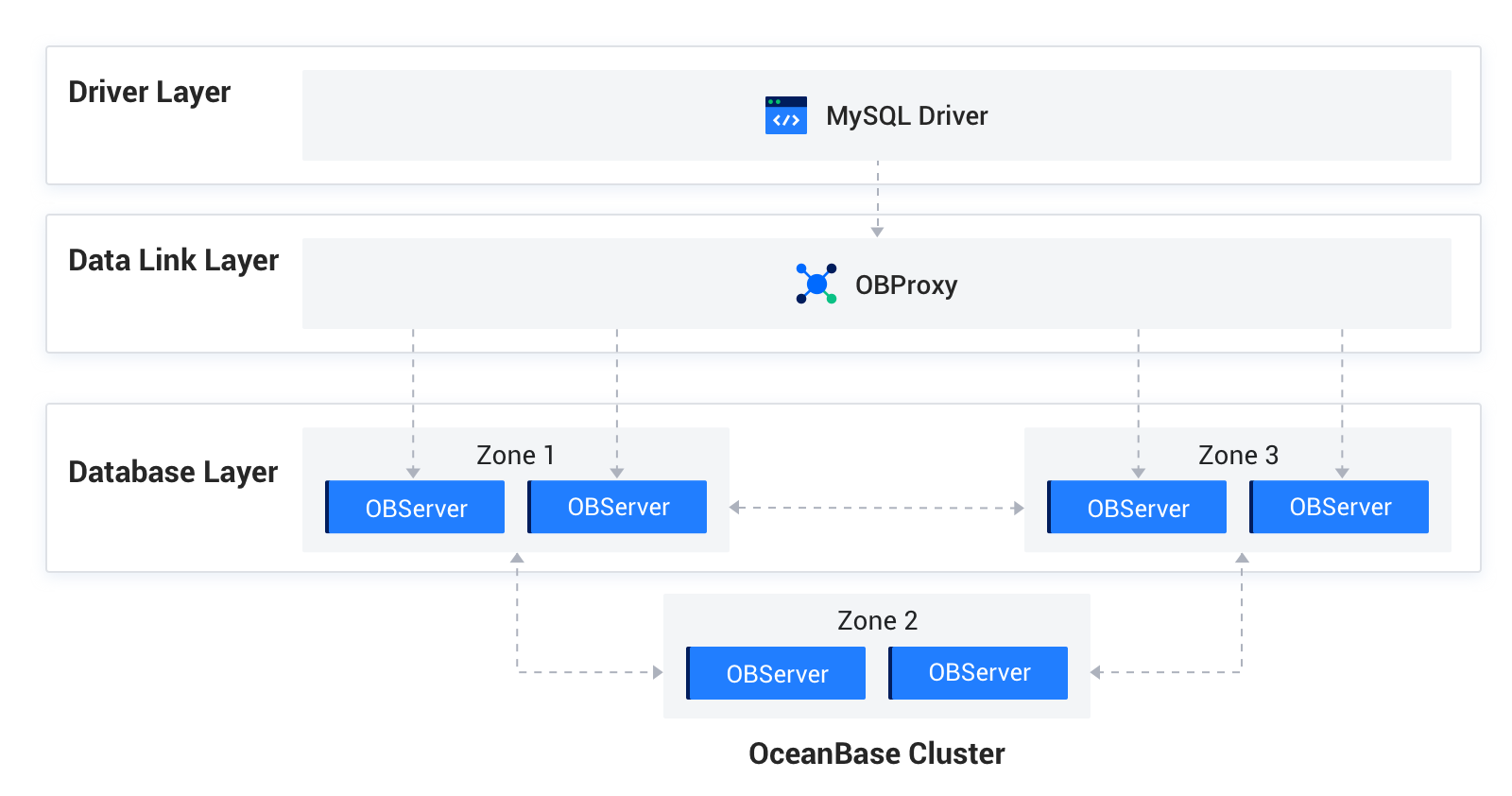
    Transmission encryption

    The three parts communicate over the following two protocols:

    • MySQL protocol: The data link layer communicates with the driver layer and the database layer over the extended MySQL protocol.

    • OB-RPC protocol: The inherent RPC protocol of OBServer nodes is used for communication between OBServer nodes and between OBServer nodes and components such as liboblog or ob_admin.

    The data link layer and the database components, such as OBServer nodes, liboblog, and ob_admin, all support SSL/TLS encrypted communication. The communication depends on OpenSSL or a third-party SSL library to enable secure and encrypted data transmission.

    Supported methods for loading private keys or certificates

    The communication between OBServer nodes, liboblog, and ob_admin depends on the libeasy library. Therefore, they all support loading private keys and certificates from local files. CA certificates, user certificates, and private keys are stored in the wallet/ directory and are loaded based on the configuration. This mode is not secure.

    Enable transmission encryption

    You can perform the following steps to enable transmission encryption for an OBServer node:

    1. Specify the method for loading the private key, user certificate, or CA certificate.

      Load private keys and certificates from local files.

      alter system set ssl_external_kms_info = '
      {
      "ssl_mode":"file"
      }';
      
    2. Configure the corresponding SSL-enabled protocol.

      alter system set ssl_client_authentication = 'TRUE';
      SSL is enabled for MySQL communication when the parameter is set to TRUE.
      
    3. Configure an SSL allowlist for RPC communication. TCP connections between OBServer nodes are persistent connections. To enable SSL-encrypted RPC communication, restart the OBServer nodes.

      An allowlist is required to enable SSL-encrypted RPC communication.
      alter system set _ob_ssl_invited_nodes='ALL'; Enable SSL for the entire cluster.
      alter system set _ob_ssl_invited_nodes='xx.xx.xx.xx, xx.xx.xx.xx'; Enable SSL only for OBServer nodes with the specified IP addresses.
      ssl
      

    Check whether transmission encryption is enabled for an OBServer node

    The most straightforward approach is to capture packets from the MySQL and RPC ports of the OBServer node to check whether the packets are encrypted. You can also use the following method:

    • Use the sys tenant account to log on to the OBServer node from OBClient or a MySQL client and query the ssl_key_expired_time field of the oceanbase.GV$OB_SERVERS table to check whether SSL is enabled.

    • This field records the expiration time of the SSL certificate used by the current OBServer node when SSL is enabled. The time is displayed in UTC in microseconds.

      obclient> select svr_ip, svr_port,zone, ssl_key_expired_time, from_unixtime(ssl_key_expired_time/1000000) from oceanbase.GV$OB_SERVERS;
      +--------------+----------+-------+----------------------+---------------------------------------------+
      | svr_ip       | svr_port | zone  | ssl_key_expired_time | from_unixtime(ssl_key_expired_time/1000000) |
      +--------------+----------+-------+----------------------+---------------------------------------------+
      | xxx.xxx.xxx.xxx |    13212 | zone1 |           1871860075 | 2029-04-26 09:07:55                         |
      +--------------+----------+-------+----------------------+---------------------------------------------+
      1 row in set (0.00 sec)
      

    Check whether SSL is enabled on the MySQL port

    Log on to an OBServer node from OBClient or a MySQL client and run the \s command to view the information about SSL, as shown in the following example:

    obclient> \s
    --------------
    obclient  Ver 1.1.8 Distrib 5.7.24, for Linux (x86_64) using  EditLine wrapper
    
    Connection id:  3221506046
    Current database: test
    Current user:  root@xx.xx.xx.xx
    SSL:   Cipher in use is DHE-RSA-AES128-GCM-SHA256
    Current pager:  less
    Using outfile:  ''
    Using delimiter: ;
    Server version:  5.7.25 OceanBase 2.2.60 (r1-63cbd3084a3283523f09d6ba20795f77b95e046b) (Built Jun 30 2020 10:10:29)
    Protocol version: 10
    Connection:  xx.xx.xx.189 via TCP/IP
    Server characterset: utf8mb4
    Db     characterset: utf8mb4
    Client characterset: utf8mb4
    Conn.  characterset: utf8mb4
    TCP port:  13213
    Active   --------------
    

    Check whether SSL is enabled on the RPC port

    Open the OBServer.log file, search for "rpc connection accept", and then check the value of use_ssl. If the value is True, SSL is enabled for RPC communication. Otherwise, SSL is disabled.

    Previous topic

    Access control
    Last

    Next topic

    Data storage encryption
    Next
    What is on this page
    Supported methods for loading private keys or certificates
    Enable transmission encryption
    Check whether transmission encryption is enabled for an OBServer node
    Check whether SSL is enabled on the MySQL port
    Check whether SSL is enabled on the RPC port