







ODC client installation
Q: What items are pre-checked when I install the ODC client?
A: The following items are pre-checked:
Q: How do I view the logs when the installation or startup of the ODC client fails?
A: You can view the error information in the main.log file. The storage path of the file varies with the OS.
Q: What do I do when the installation or startup of the ODC client fails and an error message is returned indicating that a port conflict issue has occurred?
A: You need to check the process that occupies port 8989, kill the process, and then reinstall or restart the ODC client. Dynamic ports are used in ODC V2.3.0 and later to avoid this problem.
On macOS, run the following command to check the use status of port 8989:
lsof -i tcp:8989On Windows, run the following statement to check the use status of port 8989:
netstat -ano|findstr 8989
ODC V3.2.0 allows you to set custom ports.
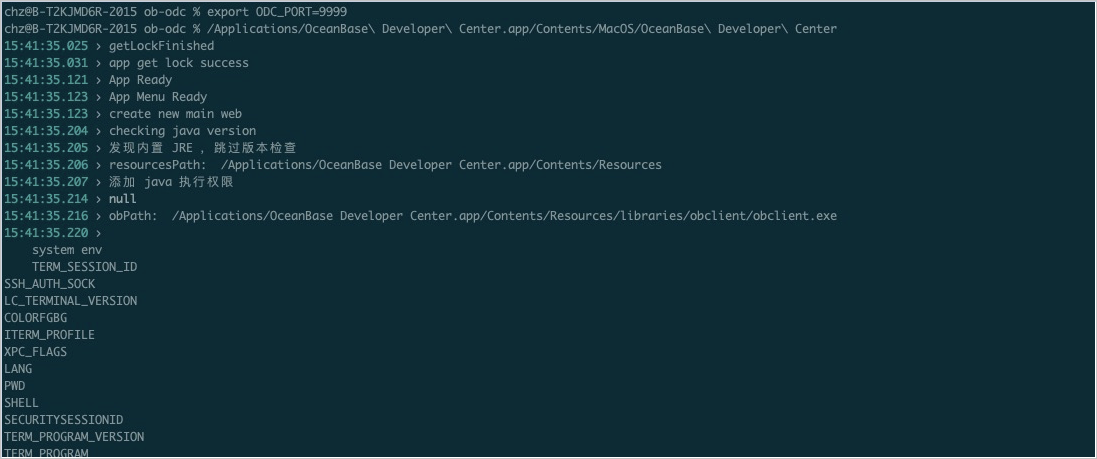
On Mac OS, set environment variables and run the corresponding command to enable the port:

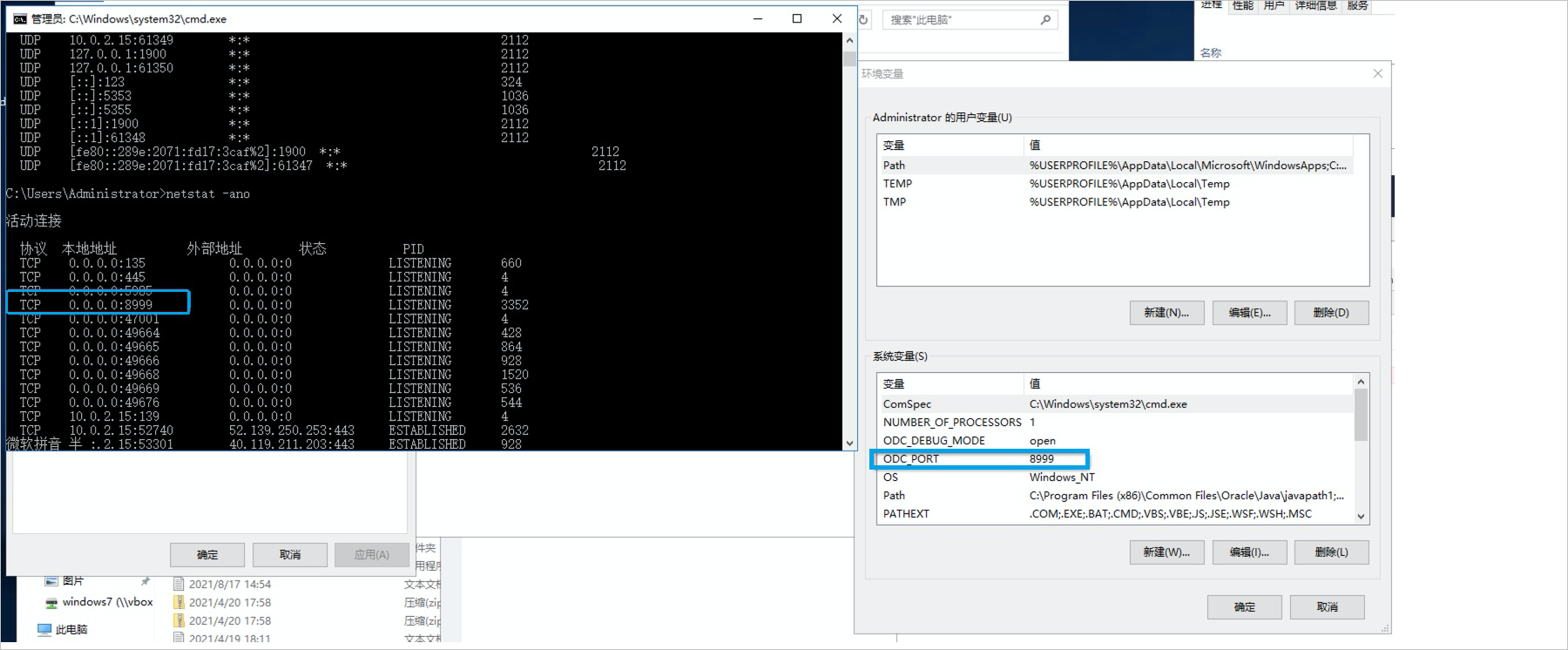
On Windows, set the ODC_PORT parameter to enable the specified port:
Q: What do I do when the installation or startup of the ODC client fails and an error message is returned indicating that the Java version is not supported?
A: You can run the following command to check the Java runtime environment. We recommend that you install JDK1.8.0_242 or a later version. If you have installed JDK of an earlier version, upgrade JDK, restart the computer, and then reinstall or restart the ODC client.
java -versionQ: What do I do when the installation or startup of the ODC client fails and an error message is returned indicating that the software package is damaged?
A: You can run the
sudo spctl --master-disablecommand and select any source.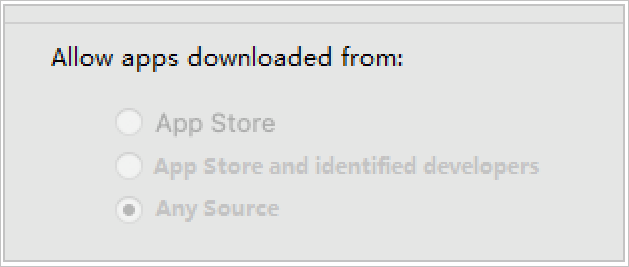
Q: What do I do when the following message appears while I am installing the ODC client on macOS?
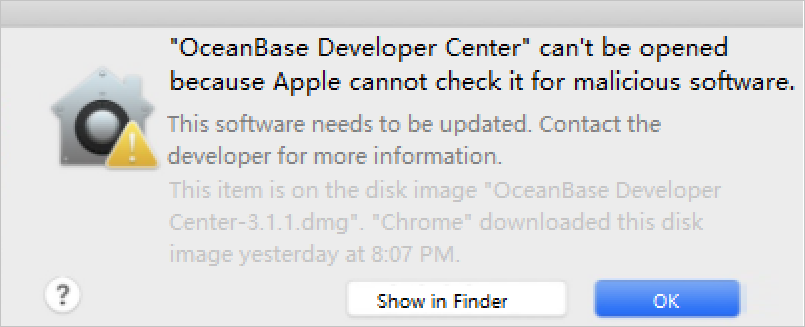 A: The ODC client cannot be directly installed on Mac OS because it is not downloaded from the App Store. For more information about how to safely open an app that is not downloaded from the Apple Store, see Safely open apps on your Mac.
Launch of Web ODC
Q: What do I do when the username (such as admin) conflict occurs during the upgrade of ODC from an earlier version to V3.2.0 or later, and the startup fails?
A:
Example error:

Solution :
This example shows how to solve the admin conflict.
Open the rename.properties file in the ../odc/static/tmp/ directory, and edit the rename.properties in the following format:
admin=a new usernameSave the change and start ODC again.
Connection information
Q: What do I do when ODC is disconnected during the execution of an SQL query?
A:
The disconnection is caused by a proxy server timeout. You can send an
sql-executerequest in the browser debugging mode and check the response.To ensure sufficient proxy server timeout, modify the load balancing configurations. The following example shows how to modify the NGINX configuration:
a. Add the following proxy configuration.
proxy_read_timeout 1800;
proxy_send_timeout 1800;
proxy_connect_timeout 75;
proxy_next_upstream off;
Note
We recommend that you set theproxy_connect_timeoutparameter to a value of no longer than 75 seconds. For more information, see proxy_connect_timeout. If you do not set theproxy_next_upstreamparameter to off, the NGINX proxy will forward your requests to the next ODC node. In this case, you need to log on to ODC again, and cannot use features related to file upload and download, such as downloading the result set of an asynchronous task.b. After the modification, restart the NGINX proxy.
Q: How do I back up the connection information in ODC?
A:
- A: If you are using Web ODC, you can directly migrate or back up the MetaDB that you created during ODC deployment.
- If you are using the ODC client, you can back up the
odc2.0.mv.dbfile in the user directory. When you need to restore the connection, you can copy this file to the original directory.
Q: What do I do when the execution of an SQL query times out?
A: When the execution of an SQL query times out, you can manually set the timeout value. In Advanced Configuration on the connection information editing page, you can set SQL Query Timeout Value to a larger value. This configuration item is supported in ODC since V2.2.0. If you are using an earlier version, upgrade to ODC V2.2.0 or a later version.
Q: What do I do when an error is returned indicating that the proxyro user does not exist?
A: You need to set Query sys Tenant View to a user with the permission to query sys tenant views in Advanced Configuration on the connection information editing page. This configuration item is supported in ODC since V2.2.0. If you are using an earlier version, upgrade to ODC V2.2.0 or later.
Command-line window
Q: After I connect to a database by using the ODC client on Windows, the connection is stuck and then disconnected, as shown in the following figure. How do I solve this problem?
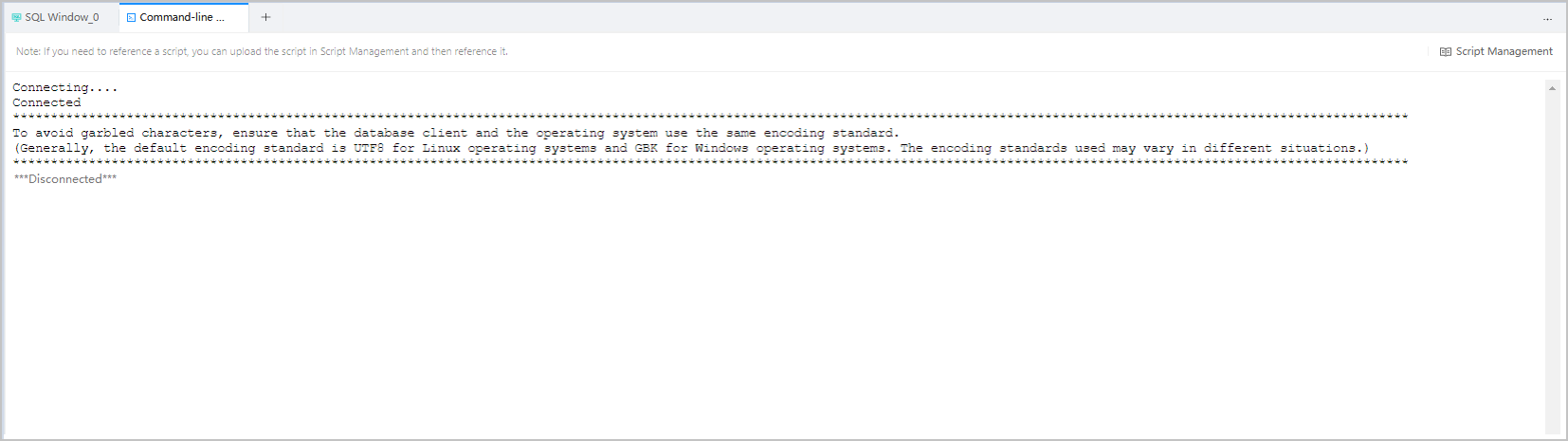 A: This problem is caused by the lack of the system library files of msvcp120.dll and msvcr120.dll. Please install the official Visual Studio patch.
Note
You do not need to restart ODC after installing the Visual Studio patch. It is recommended to update ODC to the latest version. The current ODC version has a corresponding DDL file, so you do not need to install the patch separately.
Encoding
Q: What do I do when the result set of a query is full of garbled characters?
A: This problem is caused by the inconsistency between the encoding format used by the ODC client and that expected by the database. The ODC client allows you to encode data in SQL windows or command-line windows
LocationLinuxmacOSWindowsSQL window UTF8 UTF8 UTF8 Command-line window UTF8 UTF8 GBK You can run the following command to query the encoding format expected by the database:
show variables like '%character_set_c%';
show variables like '%character_set_r%';
The following table shows the encoding formats.
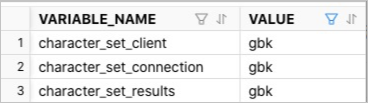
You can run the following command to modify the encoding format expected by the database:
set names gbk;ScenarioSolutionThe result set of an SQL statement executed in an SQL window contains garbled Chinese characters.
- OS on the server where the ODC client is installed: Mac OS
- Character set used by OBServer: GBK- Symptom Run the following command in the database:
sql show variables like '%character%';
The following variables are displayed:
sql character_set_client gbk character_set_connection gbk character_set_filesystem binary character_set_results gbk character_set_system gbk
It can be learned that the data is encoded in GBK format and the database expects that the ODC client uses the GBK character set.
- Cause The character set the database expects the client to use is GBK. However, the ODC client uses UTF8, which is different from GBK.
- Solution Modify the character set expected by the database so that it is compatible with the character set actually used by the ODC client.
sql set names utf8mb4;
After the character set is modified, execute the SQL statement in the current session again and view the result set. The result set contains no garbled Chinese characters.The result set of an SQL statement executed in a command-line window contains garbled Chinese characters.
- OS on the server where the ODC client is installed: Windows
- Character set used by OBServer: UTF8MB4- Symptom Run the following command in the database:
sql show variables like '%character%';The following variables are displayed:
sql character_set_client utf8mb4 character_set_connection utf8mb4 character_set_filesystem binary character_set_results utf8mb4 character_set_system utf8mb4
It can be learned that the data is encoded in UTF8MB4 and the database expects that the ODC client uses the UTF8MB4 character set.
- Cause The character set the database expects the client to use is UTF8MB4. However, the ODC client uses GBK, which is different from UTF8MB4.
- Solution Modify the character set expected by the database so that it is compatible with the character set actually used by the ODC client.
sql set names gbk;
After the character set is modified, execute the SQL statement in the current session again and view the result set. The result set contains no garbled Chinese characters.The result set of an SQL statement executed in a command-line window contains garbled Chinese characters.
- OS on the server where the ODC client is installed: Windows
- Character set used by OBServer: UTF8MB4- Symptom Run the following command in the database:
sql show variables like '%character%';
The following variables are displayed:
sql character_set_client utf8mb4 character_set_connection utf8mb4 character_set_filesystem binary character_set_results utf8mb4 character_set_system utf8mb4
It can be learned that the data is encoded in UTF8MB4 and the database expects that the ODC client uses the UTF8MB4 character set.
- Cause The character set the database expects the client to use is UTF8MB4. However, the ODC client uses GBK, which is different from UTF8MB4.
- Solution Modify the character set expected by the database so that it is compatible with the character set actually used by the ODC client.
sql set names gbk;
After the character set is modified, execute the SQL statement in the current session again and view the result set. The result set contains no garbled Chinese characters.The result set of an SQL statement executed in a command-line window contains garbled Chinese characters.
- OS on the server where the ODC client is installed: Windows
- Character set used by OBServer: UTF8MB4- Symptom Run the following command in the database:
sql show variables like '%character%';
The following variables are displayed:
sql character_set_client utf8mb4 character_set_connection utf8mb4 character_set_filesystem binary character_set_results utf8mb4 character_set_system utf8mb4
It can be learned that the data is encoded in UTF8MB4 and the database expects that the ODC client uses the UTF8MB4 character set.
- Cause The character set the database expects the client to use is UTF8MB4. However, the ODC client uses GBK, which is different from UTF8MB4.
- Solution Modify the character set expected by the database so that it is compatible with the character set actually used by the ODC client.
sql set names gbk;
After the character set is modified, execute the SQL statement in the current session again and view the result set. The result set contains no garbled Chinese characters.A file imported to the database contains garbled Chinese characters.
- Encoding standard: GBK
- OS on the server where the ODC client is installed: Mac OS
- Character set used by OBServer: UTF8MB4- Symptom Run the following command in the database:
sql show variables like '%character%';
The following variables are displayed:
sql character_set_client utf8mb4 character_set_connection utf8mb4 character_set_filesystem binary character_set_results utf8mb4 character_set_system utf8mb4
It can be learned that the data is encoded in UTF8MB4 and the database expects that the ODC client uses the UTF8MB4 character set.
- Cause In this case, the data is written into the database by importing a file, which is independent of the encoding of the ODC client. Instead, the encoding standard of the imported file must be consistent with the character set expected by the database.
- Solution Transcode the file from the GBK format to the UTF8 format, and import it again.
Data export and import
Q: When the data import or export fails and the task summary information includes the following error information:
javax.crypto.BadPaddingException: Given final block not properly padded. What do I do?A: This exception is caused because the OBProxy password failed to be decrypted. You can solve this problem in the following three ways:
DDL statement display
Q: What do I do when the DDL statements are incomplete in the table structure?
A: The existing DDL statements include those for querying indexes and constraints. You can use the
DBMS_METADATA.get_ddlfunction or run theSHOW CREATE TABLEcommand to query the DDL statements.Example:
-- Sample DDL statement for querying table indexes.
SELECT dbms_metadata.get_ddl('INDEX', 'indexname', 'username') from dual;
-- Sample DDL statement for querying table comments.
SELECT 'comment on table ' || table_name || ' is ' || '''' || comments  || ''';'
FROM all_tab_comments where owner='USER1' AND table_name='T_1' ;
-- Sample DDL statement for querying table comments.
comment on table T_1 is 'desc 2';

-- Sample DDL statement for querying column comments.
SELECT 'comment on column ' || table_name || '.' || column_name || ' is ' || '''' || comments  || ''';'
FROM all_col_comments where owner='USER1' AND table_name='T_1' ;
-- Sample DDL statement for querying column comments.
comment on column T_1.ID is 'ID 3';
Q: Why are the displayed statements truncated when I check the DDL statements of a view or table on the view or table management page?
A: This is because that the DDL tab of the database object management page calls the content of the
textfield in theall_viewstable. In versions earlier than OBServer V2.2.70, if the content of thetextfield in theall_viewstable is too long, it will be truncated. This problem has been solved in OBServer V2.2.70 and later versions. You can run theSHOW CREATE VIEW/TABLEstatement to directly query the complete structure statements of the target view or table.