

OceanBase logo

OceanBase

A unified distributed database ready for your transactional, analytical, and AI workloads.

DEPLOY YOUR WAY

OceanBase Cloud

The best way to deploy and scale OceanBase

OceanBase Enterprise

Run and manage OceanBase on your infra

TRY OPEN SOURCE

OceanBase Community Edition

The free, open-source distributed database

OceanBase seekdb

Open source AI native search database

Customer Stories

Real-world success stories from enterprises across diverse industries.

View All
BY USE CASES

Mission-Critical Transactions

Global & Multicloud Application

Elastic Scaling for Peak Traffic

Real-time Analytics

Active Geo-redundancy

Database Consolidation

Resources

Comprehensive knowledge hub for OceanBase.

Blog

Live Demos

Training & Certification

Documentation

Official technical guides, tutorials, API references, and manuals for all OceanBase products.

View All
PRODUCTS

OceanBase Cloud

OceanBase Database

Tools

Connectors and Middleware

QUICK START

OceanBase Cloud

OceanBase Database

BEST PRACTICES

Practical guides for utilizing OceanBase more effectively and conveniently

Company

Learn more about OceanBase – our company, partnerships, and trust and security initiatives.

About OceanBase

Partner

Trust Center

Contact Us

International - English
中国站 - 简体中文
日本 - 日本語
Sign In
Start on Cloud

A unified distributed database ready for your transactional, analytical, and AI workloads.

DEPLOY YOUR WAY

OceanBase Cloud

The best way to deploy and scale OceanBase

OceanBase Enterprise

Run and manage OceanBase on your infra

TRY OPEN SOURCE

OceanBase Community Edition

The free, open-source distributed database

OceanBase seekdb

Open source AI native search database

Customer Stories

Real-world success stories from enterprises across diverse industries.

View All
BY USE CASES

Mission-Critical Transactions

Global & Multicloud Application

Elastic Scaling for Peak Traffic

Real-time Analytics

Active Geo-redundancy

Database Consolidation

Comprehensive knowledge hub for OceanBase.

Blog

Live Demos

Training & Certification

Documentation

Official technical guides, tutorials, API references, and manuals for all OceanBase products.

View All
PRODUCTS
OceanBase CloudOceanBase Database
ToolsConnectors and Middleware
QUICK START
OceanBase CloudOceanBase Database
BEST PRACTICES

Practical guides for utilizing OceanBase more effectively and conveniently

Learn more about OceanBase – our company, partnerships, and trust and security initiatives.

About OceanBase

Partner

Trust Center

Contact Us

Start on Cloud
编组
All Products
    • Databases
    • iconOceanBase Database
    • iconOceanBase Cloud
    • iconOceanBase Tugraph
    • iconInteractive Tutorials
    • iconOceanBase Best Practices
    • Tools
    • iconOceanBase Cloud Platform
    • iconOceanBase Migration Service
    • iconOceanBase Developer Center
    • iconOceanBase Migration Assessment
    • iconOceanBase Admin Tool
    • iconOceanBase Loader and Dumper
    • iconOceanBase Deployer
    • iconKubernetes operator for OceanBase
    • iconOceanBase Diagnostic Tool
    • iconOceanBase Binlog Service
    • Connectors and Middleware
    • iconOceanBase Database Proxy
    • iconEmbedded SQL in C for OceanBase
    • iconOceanBase Call Interface
    • iconOceanBase Connector/C
    • iconOceanBase Connector/J
    • iconOceanBase Connector/ODBC
    • iconOceanBase Connector/NET
icon

OceanBase Migration Service

V4.2.13Community Edition

    Download PDF

    OceanBase logo

    The Unified Distributed Database for the AI Era.

    Follow Us
    Products
    OceanBase CloudOceanBase EnterpriseOceanBase Community EditionOceanBase seekdb
    Resources
    DocsBlogLive DemosTraining & Certification
    Company
    About OceanBaseTrust CenterLegalPartnerContact Us
    Follow Us

    © OceanBase 2026. All rights reserved

    Cloud Service AgreementPrivacy PolicySecurity
    Contact Us
    Document Feedback
    1. Documentation Center
    2. OceanBase Migration Service
    3. V4.2.13
    iconOceanBase Migration Service
    V 4.2.13Community Edition
    Enterprise Edition
    • V 4.3.2
    • V 4.3.1
    • V 4.3.0
    • V 4.2.5
    • V 4.2.4
    • V 4.2.3
    • V 4.0.2
    • V 3.4.0
    Community Edition
    • V 4.2.13
    • V 4.2.12
    • V 4.2.11
    • V 4.2.10
    • V 4.2.9
    • V 4.2.8
    • V 4.2.7
    • V 4.2.6
    • V 4.2.5
    • V 4.2.4
    • V 4.2.3
    • V 4.2.1
    • V 4.2.0
    • V 4.0.0
    • V 3.3.1

    Direct load

    Last Updated:2026-04-16 07:09:24  Updated
    share
    What is on this page
    Background information
    Limitations
    Parameters
    Query the status of a direct load task

    folded

    share

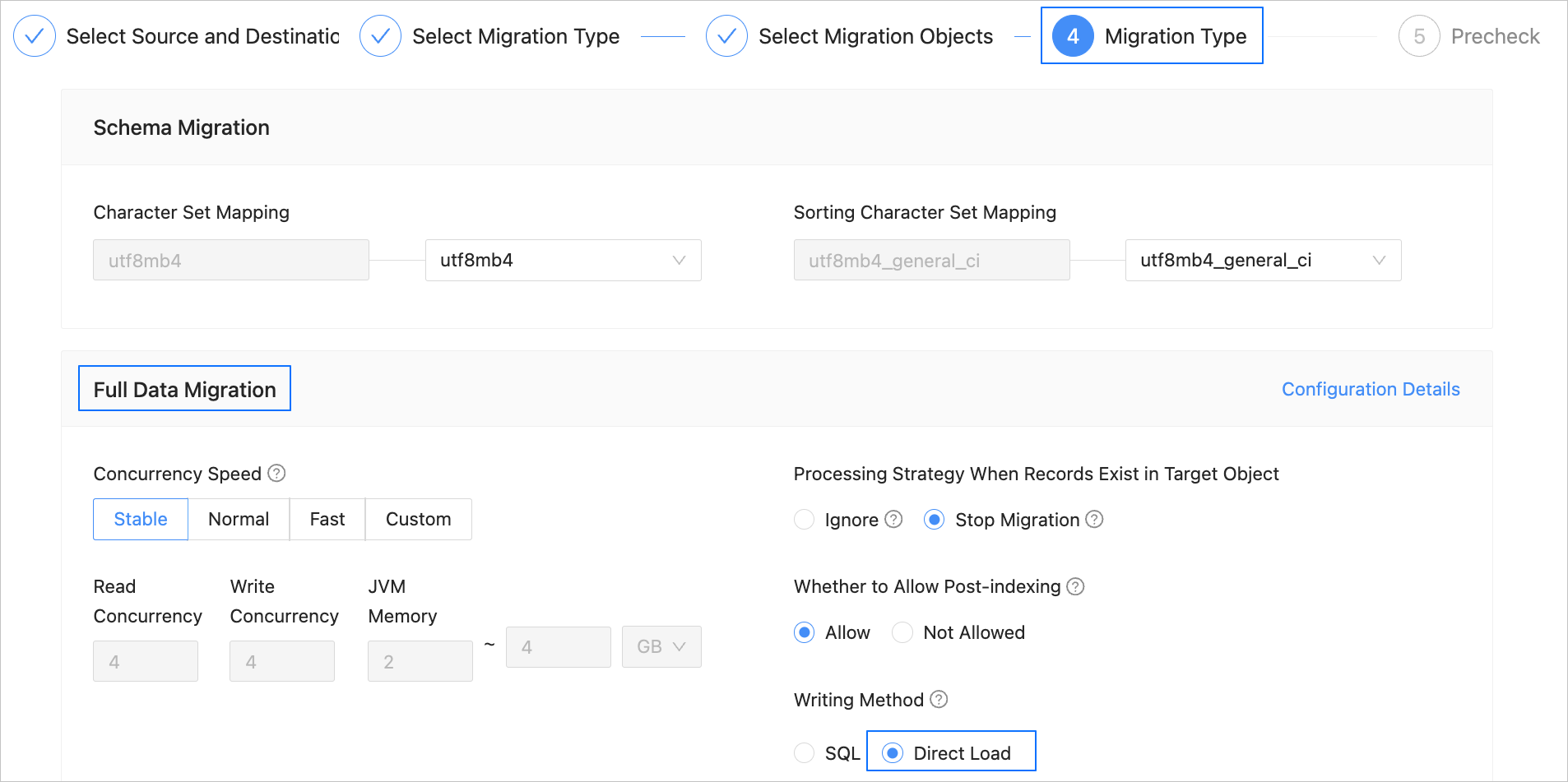
    OceanBase Migration Service (OMS) Community Edition allows you to write data by using direct load during data migration. This topic describes the limitations and parameters of direct load, as well as how to query the status of a direct load task.

    Background information

    OceanBase Database allows you to insert data into a database by using direct load. The direct load feature can get around conventional SQL-layer APIs and directly write data into files in a database, thereby improving the data import efficiency. For more information, see Overview.

    Notice

    Direct load does not support resumable transmission. After a migration task is interrupted and resumed, OMS Community Edition re-reads the source, but does not read the tables that are already migrated before the interruption.

    OMS Community Edition allows you to specify the direct load method when you create the following types of data migration tasks.
    direct-load-en

    • Migrate data from a MySQL database to OceanBase Database Community Edition

    • Migrate data from HBase to OBKV

    • Migrate data between instances of OceanBase Database Community Edition

    • Migrate data in active-active disaster recovery scenarios

    • Migrate data from a TiDB database to OceanBase Database Community Edition

    • Migrate data from a PostgreSQL database to OceanBase Database Community Edition

    Limitations

    • This write mode is supported for full migration only when the version of OMS Community Edition is V4.2.2 or later and the target is of OceanBase Database Community Edition V4.2.1 or later.

    • When you write data by using direct load, the host field of the user created at the target for data migration must be set to %.

    • Direct load does not support writing data in the Latin1 character set. Otherwise, an exception will be thrown.

    • The size of data in a single row cannot exceed 2 MB.

    • When the source is of OceanBase Database Community Edition V4.3.3, incremental synchronization of vector data is not supported.

    • At present, you cannot write vector data by using direct load.

    • Only data duplication caused by PRIMARY KEY constraints can be handled, and that caused by UNIQUE KEY constraints cannot be handled.

    • Generated columns, triggers, and user-defined types (UDTs) are not supported.

    • Direct load applies to empty tables and cannot be interrupted. In other words, resumable transmission is not supported. Therefore, if full migration by using direct load is interrupted, the data in the source is read again even after the task resumes normal.

    • If an imported table contains large object (LOB) columns, execute the following statement to disable the enable_rebalance parameter for OceanBase Database Community Edition:

      SHOW PARAMETERS LIKE 'enable_rebalance';
      ALTER SYSTEM SET enable_rebalance = false;
      
    • At present, direct load does not support concurrent operations. Make sure that direct load is used to write data only to one table in the target database at a time.

    • The number and order of columns in the source table must be the same as those in the target table.

    • You cannot write data to a table with a prefix index by using direct load.

    Parameters

    The following table describes the direct load parameters, which are in the Sink module of parameters of the Incr-Sync component.

    Parameter Description
    dbVersion The version of the database. Direct load is supported only for OceanBase Database Community Edition of a version later than V4.2.1. If you do not specify this parameter, OMS Community Edition automatically queries the database version by using the following statement: SHOW VARIABLES LIKE 'version_comment'.
    host The IP address of the remote procedure call (RPC) server. By default, OMS Community Edition automatically queries the address by using the SHOW PARAMETERS LIKE 'rpc_port' statement, and uses the first svr_ip value returned.
    port The RPC port of the server. By default, OMS Community Edition automatically queries the port number by using SHOW PARAMETERS LIKE 'rpc_port' statement, and uses the first svr_port value returned.
    username The username to be reused for the target database in the format of Username@Tenant name#Cluster name. The username and tenant name are parsed based on this parameter and are used for TableAPI.
    password The password to be reused for the target database.
    serverParallel The number of concurrent worker threads of the target database used to process the data writes of direct load. The default value is 8.
    maxErrors The maximum number of errors allowed. The default value is 0.
    replaceData Specifies whether to replace duplicate primary key columns. The default value is true. If you set this parameter to false, duplicate primary keys are ignored.
    serverTimeout The timeout period of a direct load task on an OBServer node, in μs. The default value is 1209600L * 1000 * 1000, which equals 14 days.
    rpcExecuteTimeout The timeout period for executing an RPC request, in ms. The default value is 600000, indicating 10 minutes.

    Query the status of a direct load task

    • Execute the following statement in the sys tenant to query the system table that records direct load statistics:

      SELECT * FROM oceanbase.__all_virtual_load_data_stat;
      
    • Execute the following statement to query logs of the OBServer node and troubleshoot issues of the direct load task:

      grep table_load observer.log*
      

    Previous topic

    Set an incremental synchronization timestamp
    Last

    Next topic

    Overview of DDL synchronization from a MySQL database to a MySQL-compatible tenant of OceanBase Database
    Next
    What is on this page
    Background information
    Limitations
    Parameters
    Query the status of a direct load task