







ODP provides database access and routing features for you to connect to and use OceanBase Database. When you use database features, ODP interacts with the OBServer in a transparent way. Connection management is crucial to the interaction process.
ODP has the following characteristics:
Proxy characteristic: ODP serves both as a client and as a server. It also ensures that the interaction behavior conforms to the MySQL protocol.
Connection characteristic: ODP provides various connection features, such as access to different clusters and tenants, support for the PreparedStatement (PS) protocol in primary/secondary cluster and distributed scenarios, and compatibility with the
killandshow processlistcommands.High availability characteristic: ODP can handle issues such as timeouts, machine status changes, and network status changes, to shield you from backend exceptions.
The following sections explain connection management in ODP operation steps.
Step 1: Logon
Logon information
To log on to ODP, you need to enter the IP address, port, user name, and password of the database. The username for logging on to an OBServer is in the format of user_name@tenant_name. ODP can also serve as a proxy of different clusters, so the username for logging on to ODP is in the format of user_name@tenant_name#cluster_name. The fields are described as follows:
user_name: the username for the logon. The password is stored in the OBServer. ODP only forwards logon packets but does not verify the passwords.tenant_name: the name of the tenant to access. OceanBase Database is deployed in a multi-tenant architecture.cluster_name: the name of the cluster. ODP allows you to access multiple clusters. Different clusters are distinguished by cluster name.
With the preceding information, you can access OceanBase Database through ODP by using the JDBC driver, MySQL command line, Navicat, and other tools.
Then, ODP locates the corresponding server in either of the following ways:
If you start ODP by using the RS list, ODP finds the corresponding server by using the configured RS list. However, note that ODP can connect only to one cluster in this mode.
If you start ODP by configuring
obproxy_config_server_url, ODP locates the server based on the OceanBase Cloud Platform (OCP) system. The URL of the OCP system is specified in theobproxy_config_server_urlparameter. OCP stores cluster names and lists of servers in these clusters, and ODP accesses OCP to obtain the list of servers, as shown in the following figure.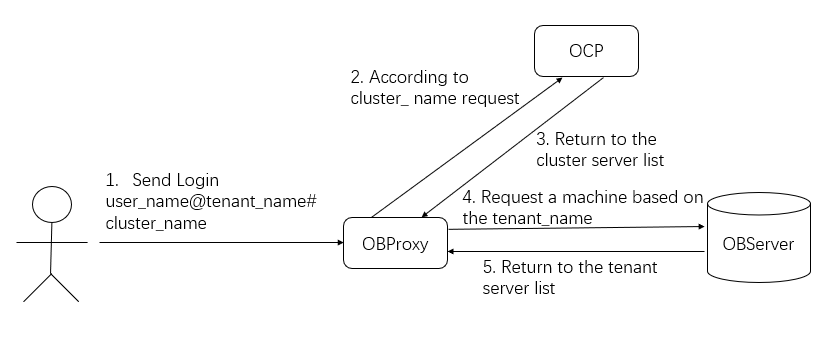
Logon authentication
After ODP finds the server, logon authentication is performed based on the username and password. The following figure shows the interaction process in the MySQL protocol. This picture shows only two steps, in which handshake packets are exchanged. However, in the actual process, the server needs to reply an OK or Error packet to the client after Step 2.
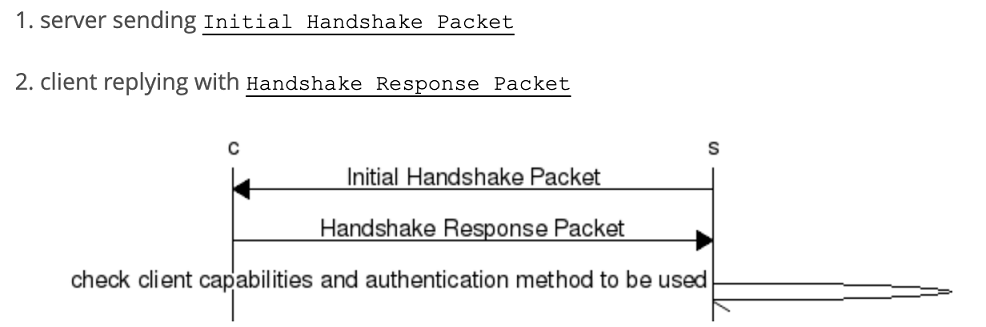
As a proxy component, ODP needs to be compatible with MySQL behaviors and therefore, involves more steps. The following describes how to connect a Java program to OceanBase Database, to illustrate a complete logon authentication process. This Java program has only one line of logon code:
conn = (Connection) DriverManager.getConnection(URL, USER_NAME, PASSWORD);
However, the implementation principle behind the code is more complex, as shown in the following figure.
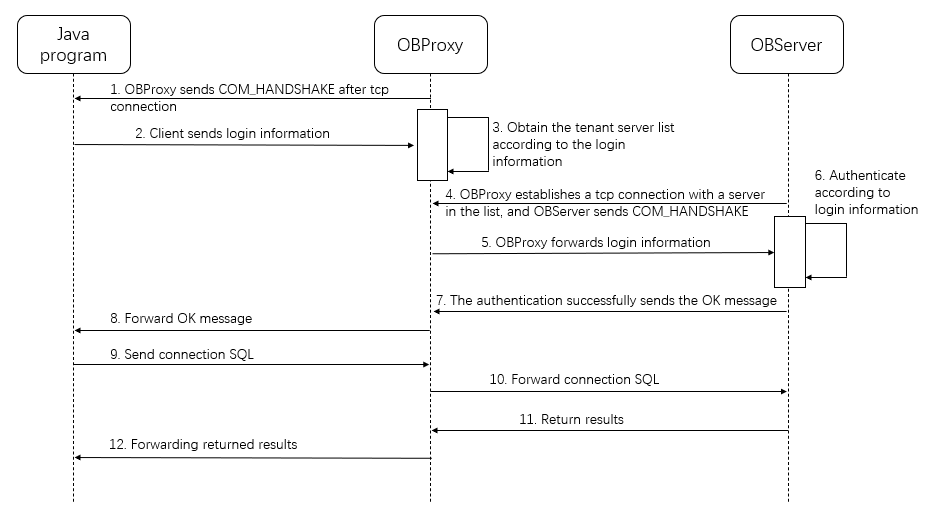
Logon interaction at the protocol layer is completed at the logon step (step 8) of the MySQL protocol. However, the JDBC driver will send some SQL statements for initialization, which is also part of the logon process. Step 9 in the figure indicates this step. The SQL statements for initialization are as follows:
set autocommit=1, sql_mode = concat(@@sql_mode,',STRICT_TRANS_TABLES')
set names utf8
SELECT @@max_allowed_packet,@@system_time_zone,@@time_zone,@@auto_increment_increment,@@tx_isolation AS tx_isolation,@@session.tx_read_only AS tx_read_only
select @@version_comment, @@version limit 1
After the preceding SQL statements are executed, the Java program can send business SQL statements.
Common logon issues
After understanding the logon implementation of ODP, you can quickly locate and solve the logon issues. Common issues and causes are as follows:
The username or password is incorrect. You can directly connect to the OBServer to check whether the username and password are correct.
OCP is faulty and fails to return the cluster server list. You can use the
curlcommand to access the URL of the OCP to check whether the logon failure arises from this cause.The OBServer fails to obtain the server list or execute the initialization SQL statements. To troubleshoot and locate issues arising from this cause, check the logs.
The maximum number of connections allowed is exceeded or the OBServer to be connected is not in the whitelist.
To troubleshoot the preceding issues, check obproxy_error.log. For more information, see Monitoring logs.
Step 2: Connection management
After successful logon, a network connection is established between the client and ODP and between ODP and the OBServer. However, ODP establishes a connection with only one OBServer. When a received request is routed to a new OBServer, ODP establishes a connection with the new OBServer. This process involves connection mapping, connection state synchronization, and connection characteristics.
Connection mapping
Connection mapping specifies the relationship between client connections and server connections.
After a client establishes a connection with ODP, ODP establishes connections with N OBServers. The following figure shows the relationship.
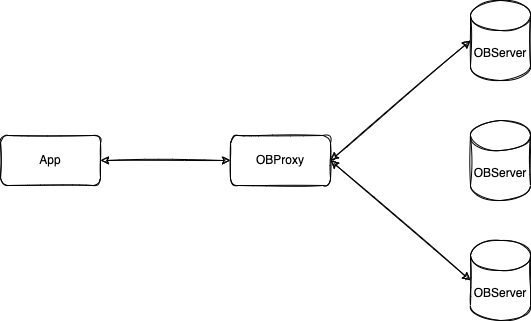
As can be seen from the figure, ODP establishes connections with two OBServers as needed. These two connections are exclusive to this client connection and will not be reused by other client connections. The key point of connection mapping is to identify each connection with an ID and record the mapping between IDs. In this way, you can use the proxy_sessid parameter to uniquely identify a connection between an application and ODP, and use the server_sessid parameter to uniquely identify a connection between ODP and an OBServer.
When SQL execution errors or slow execution occurs, ODP prints the connection mapping to the log. In this way, the applications are associated with the OBServers, facilitating full-link fault locating.
Status synchronization
A client connection corresponds to multiple server connections. To ensure the correctness of execution results, the session status of multiple server connections must be consistent.
The following example describes what happens when the session status of server connections is inconsistent. Assume that a user executes the following SQL command:
set autocommit=1;
insert into t1 values(1);
insert into t2 values(2);
The execution process is as follows:
Send
set autocommit=1to OBServer1.Send
insert into t1 values(1)to OBServer1.Switch to another connection and send
insert into t2 values(2)to OBServer2.
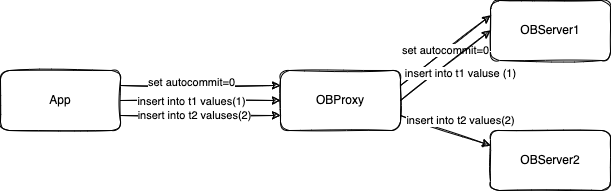
The connection status between ODP and OBServer2 is not synchronized with the connection status autocommit=1. As a result, the transaction of the third statement insert into t2 is not committed.
The correct step is that ODP synchronizes the value of the autocommit variable before sending the INSERT statement to OBServer2. ODP uses the version number mechanism to keep connection status synchronized, and implements status synchronization between the database, session variables, last_insert_id, and PreparedStatement to ensure correct implementation of features.
Connection characteristics
Unlike a standalone database, ODP uses a connection mapping relationship of M:N. Therefore, some connection features require additional processing.
For example, when a user uses the show processlist command to view the number of connections, the user wants to see the number of connections between the client and the ODP, rather than connections between the ODP and the OBServer.
The following describes several common connection characteristics:
Connection stickiness
ODP has not implemented status synchronization for all features, such as transactions, temporary tables, and cursors. For these features, ODP sends follow-up requests to the node where the status starts, so that status synchronization is not required. However, this does not fully utilize the advantages of distributed systems. Therefore, ODP will gradually support the distributed implementation of related features in the sequence of significance.
Coordinated use of the
show processlistandkillcommandsThe
show processlistcommand shows the connections between a client and servers. For ODP, this command shows only the connection between the client and the ODP, and does not show the connections between the ODP and OBServers.The
killcommand kills a client connection. After the client connection is closed, ODP closes the corresponding server connections. For ODP, you need to first obtain the corresponding connection ID for thekillcommand by using theshow processlistcommand.Correlation with load balancing components
The
show processlistandkillcommands are specially treated. Therefore, they can work properly only when they are sent to the same ODP.In a public cloud and other environments, a load balancing (LB) component is deployed before multiple ODPs. In this case, if the
show prcesslistandkillcommands are sent over two different connections, the LB component may send requests to different ODPs. Therefore, we recommend that you do not use these commands in such scenarios.