

OceanBase logo

OceanBase

A unified distributed database ready for your transactional, analytical, and AI workloads.

DEPLOY YOUR WAY

OceanBase Cloud

The best way to deploy and scale OceanBase

OceanBase Enterprise

Run and manage OceanBase on your infra

TRY OPEN SOURCE

OceanBase Community Edition

The free, open-source distributed database

OceanBase seekdb

Open source AI native search database

Customer Stories

Real-world success stories from enterprises across diverse industries.

View All
BY USE CASES

Mission-Critical Transactions

Global & Multicloud Application

Elastic Scaling for Peak Traffic

Real-time Analytics

Active Geo-redundancy

Database Consolidation

Resources

Comprehensive knowledge hub for OceanBase.

Blog

Live Demos

Training & Certification

Documentation

Official technical guides, tutorials, API references, and manuals for all OceanBase products.

View All
PRODUCTS

OceanBase Cloud

OceanBase Database

Tools

Connectors and Middleware

QUICK START

OceanBase Cloud

OceanBase Database

BEST PRACTICES

Practical guides for utilizing OceanBase more effectively and conveniently

Company

Learn more about OceanBase – our company, partnerships, and trust and security initiatives.

About OceanBase

Partner

Trust Center

Contact Us

International - English
中国站 - 简体中文
日本 - 日本語
Sign In
Start on Cloud

A unified distributed database ready for your transactional, analytical, and AI workloads.

DEPLOY YOUR WAY

OceanBase Cloud

The best way to deploy and scale OceanBase

OceanBase Enterprise

Run and manage OceanBase on your infra

TRY OPEN SOURCE

OceanBase Community Edition

The free, open-source distributed database

OceanBase seekdb

Open source AI native search database

Customer Stories

Real-world success stories from enterprises across diverse industries.

View All
BY USE CASES

Mission-Critical Transactions

Global & Multicloud Application

Elastic Scaling for Peak Traffic

Real-time Analytics

Active Geo-redundancy

Database Consolidation

Comprehensive knowledge hub for OceanBase.

Blog

Live Demos

Training & Certification

Documentation

Official technical guides, tutorials, API references, and manuals for all OceanBase products.

View All
PRODUCTS
OceanBase CloudOceanBase Database
ToolsConnectors and Middleware
QUICK START
OceanBase CloudOceanBase Database
BEST PRACTICES

Practical guides for utilizing OceanBase more effectively and conveniently

Learn more about OceanBase – our company, partnerships, and trust and security initiatives.

About OceanBase

Partner

Trust Center

Contact Us

Start on Cloud
编组
All Products
    • Databases
    • iconOceanBase Database
    • iconOceanBase Cloud
    • iconOceanBase Tugraph
    • iconInteractive Tutorials
    • iconOceanBase Best Practices
    • Tools
    • iconOceanBase Cloud Platform
    • iconOceanBase Migration Service
    • iconOceanBase Developer Center
    • iconOceanBase Migration Assessment
    • iconOceanBase Admin Tool
    • iconOceanBase Loader and Dumper
    • iconOceanBase Deployer
    • iconKubernetes operator for OceanBase
    • iconOceanBase Diagnostic Tool
    • iconOceanBase Binlog Service
    • Connectors and Middleware
    • iconOceanBase Database Proxy
    • iconEmbedded SQL in C for OceanBase
    • iconOceanBase Call Interface
    • iconOceanBase Connector/C
    • iconOceanBase Connector/J
    • iconOceanBase Connector/ODBC
    • iconOceanBase Connector/NET
icon

OceanBase Loader and Dumper

V4.2.5Community Edition

  • Document Overview
  • Introduction
  • Preparations
    • Prepare the environment
    • Download OBLOADER & OBDUMPER
  • Import data
    • Quick start
    • Command-line options
    • Data processing
      • Define control files
      • Preprocessing functions
      • Case expressions
    • Performance tuning
    • Error handling
    • FAQ
  • Export data
    • Quick start
    • Command-line options
    • Data processing
      • Define control files
      • Preprocessing functions
      • Case expressions
    • Performance tuning
    • FAQ
  • Security features
  • Connection settings
  • Self-service troubleshooting
  • Release Note
    • Release Note
      • 4.x
        • OBLOADER & OBDUMPER V4.2.5
        • OBLOADER & OBDUMPER V4.2.4
        • OBLOADER & OBDUMPER V4.2.1
        • OBLOADER \& OBDUMPER V4.1.0
        • OBLOADER \& OBDUMPER V4.0.0
      • 3.x
        • OBLOADER \& OBDUMPER V3.1.0
        • OBLOADER \& OBDUMPER V3.0.0
    • Version rules

Download PDF

Document Overview Introduction Prepare the environment Download OBLOADER & OBDUMPER Quick startCommand-line optionsDefine control filesPreprocessing functionsCase expressionsPerformance tuning Error handlingFAQ Quick start Command-line optionsDefine control filesPreprocessing functionsCase expressions Performance tuningFAQ Security features Connection settings Self-service troubleshooting Version rules
OceanBase logo

The Unified Distributed Database for the AI Era.

Follow Us
Products
OceanBase CloudOceanBase EnterpriseOceanBase Community EditionOceanBase seekdb
Resources
DocsBlogLive DemosTraining & Certification
Company
About OceanBaseTrust CenterLegalPartnerContact Us
Follow Us

© OceanBase 2026. All rights reserved

Cloud Service AgreementPrivacy PolicySecurity
Contact Us
Document Feedback
  1. Documentation Center
  2. OceanBase Loader and Dumper
  3. V4.2.5
iconOceanBase Loader and Dumper
V 4.2.5Community Edition
  • V 4.3.5
  • V 4.3.4.1
  • V 4.3.4
  • V 4.3.3.1
  • V 4.3.3
  • V 4.3.2.1
  • V 4.3.2
  • V 4.3.1
  • V 4.2.8
  • V 4.2.7
  • V 4.2.6
  • V 4.2.5 and earlier
Community Edition
  • V 4.2.5
  • V 4.2.4
  • V 4.1.0
  • V 4.0.0
  • V 3.0.0
Enterprise Edition
  • V 4.2.5
  • V 4.2.4

FAQ

Last Updated:2026-04-13 06:25:29  Updated
share
What is on this page
share

Q: How do I solve an out of memory (OOM) error when I use OBDUMPER to export data?

A: First, modify the memory parameter for the Java virtual machine (JVM) in the bin/obdumper script. Then, check whether an OpenJDK garbage collection (GC) bug occurs.


Q: How do I run OBDUMPER in debugging mode for troubleshooting?

A: Run the debugging script in the bin directory.
For example, you can run obdumper-debug.


Q: Why does the control file configured for a table fail to take effect when I import data to or export data from the table?

A: The name of the control file must be identical to the table name. By default, table names are in lowercase in MySQL mode and in uppercase in Oracle mode.


Q: Why does OBDUMPER not generate an empty data file when it exports an empty table?

A: By default, OBDUMPER does not generate an empty data file for an empty table. You can specify the --retain-empty-files option to generate an empty data file for an empty table.


Q: Why are command-line options not parsed as expected when I run the OBDUMPER script?

A: This issue may occur if command-line option values contain special characters. If you run OBDUMPER on Linux OS, a greater-than sign (>) in the password may cause the loss of all operational logs. This is because the greater-than sign (>) is a redirection operator. Therefore, you must use appropriate quotation marks on different OS platforms to resolve this issue.


Q: When OBDUMPER exports data, why do sec.avg and min.avg indicate similar export speeds?

A: sec.avg indicates the global average speed in seconds, and min.avg indicates the average speed of the last minute in seconds.


Q: In Oracle mode of OceanBase Database, OBDUMPER exports duplicate data when the primary key name and index name of a table are the same. What can I do?

A: Do not create multiple constraints with the same name on a table. If a table contains a unique index with the same name as the primary key, you can delete the unique index and create another one with a different name. For more information, see Overview.


Q: How do I customize the log file names for an export task?

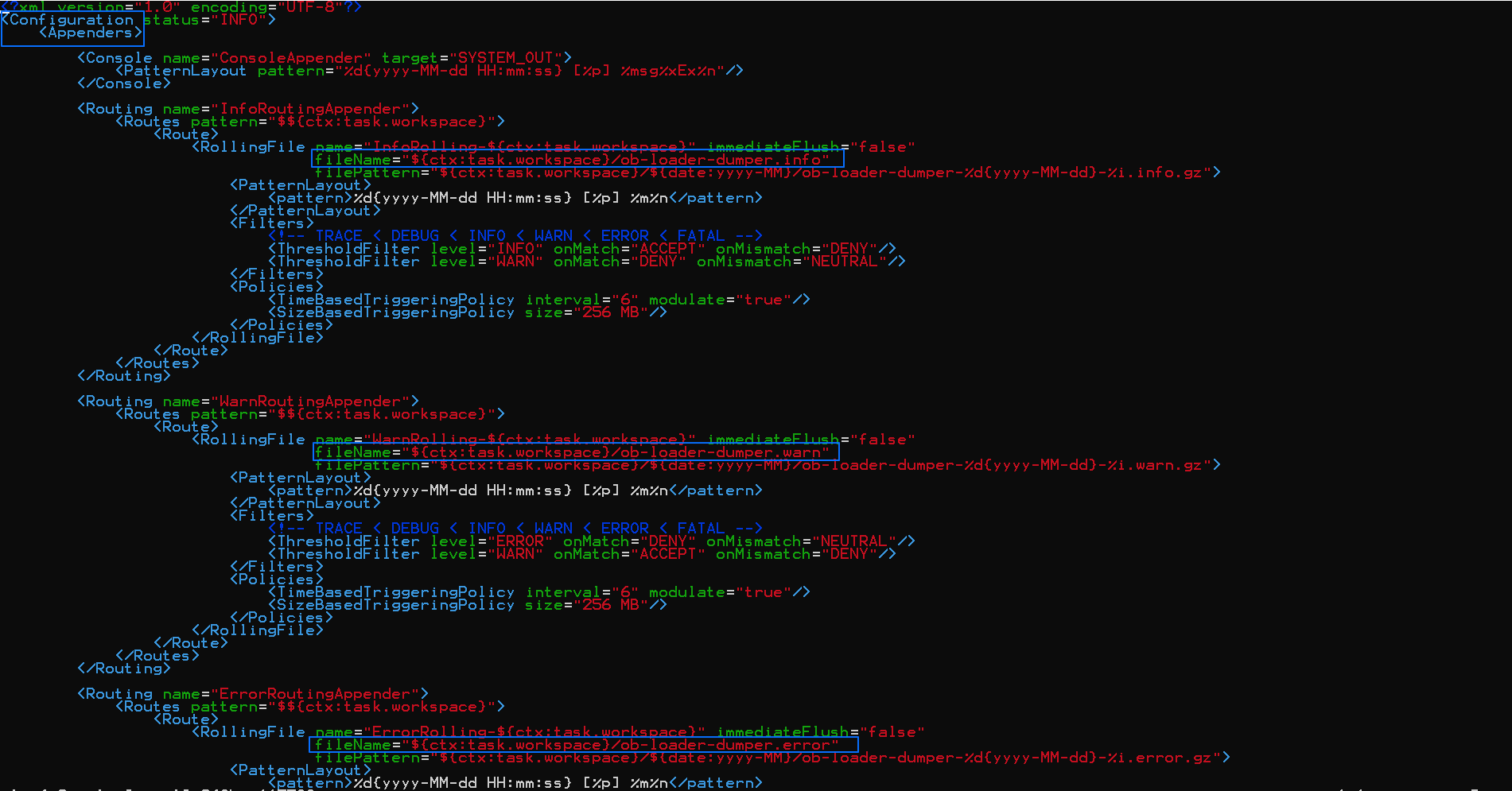
A: You can customize the log file names in the {ob-loader-dumper}/conf/log4j2.xml file. As shown in the following figure, you can modify the following names in the Routing tag:

  • ob-loader-dumper.info for INFO logs in InfoRoutingAppender

  • ob-loader-dumper.warn for WARN logs in WarnRoutingAppender

  • ob-loader-dumper.error for ERROR logs in ErrorRoutingAppender

Note

If you modify ob-loader-dumper.info, ob-loader-dumper.warn, and ob-loader-dumper.error to the same name, all logs are generated in the same file.
logs


Q: What do I do if the Connection reset error is reported after I use the --query-sql option to specify large query statements for OBDUMPER?

A: Log on to the sys tenant, and set the client_tcp_user_timeout and server_tcp_user_timeout parameters of OceanBase Database Proxy (ODP) to 0.


Q: What do I do if the following error is reported when I start OBDUMPER: Access denied for user 'root'@'xxx.xxx.xxx.xxx'?

A: By default, OBDUMPER requires the privileges of the root@sys user. If you have set a password for the root@sys user in the cluster, specify the password in the --sys-password option in the command.


Q: What do I do if the following error is reported when OBDUMPER is running: The target directory: "xxx" is not empty?

A: To prevent data overwriting, OBDUMPER checks whether the destination directory is empty before data export. You can specify the --skip-check-dir option to skip this check.


Q: What do I do if the following error is reported when OBDUMPER is running: Request to read too old versioned data?

A: The data version that the current query depends on has been recycled. You need to set an UNDO retention period based on the query.
For example, you can execute the set global undo_retention=xxx statement. The default unit is second.


Q: What do I do if OBDUMPER reports the ChunkServer out of disk space error?

A: This error is reported because the _temporary_file_io_area_size parameter is set to a small value, which results in memory overflow. You can modify the parameter to resolve this issue.
For example, you can query the _temporary_file_io_area_size parameter by executing the SELECT * FROM oceanbase.__all_virtual_sys_parameter_stat WHERE name='_temporary_file_io_area_size'; statement, and then modify the parameter by executing the ALTER SYSTEM SET _temporary_file_io_area_size = 20; statement.


Q: What do I do if the following error is reported when I query a view on OBDUMPER: SELECT command denied to user 'xxx'@'%' for table SYS.XXX?

A: This error is reported because you are not authorized to access internal tables or views. Execute the following statement to grant required privileges: GRANT SELECT SYS.XXX TO xxx;.

Previous topic

Performance tuning
Last

Next topic

Security features
Next