







This topic describes the concepts and usage of service names, including background information, version limitations, and scenarios and methods.
Background information
Starting from OCP V4.2.0, tenant-level primary/standby support is available. However, after you perform routine primary/standby switchover or disaster recovery switchover on tenants in OceanBase Database using OCP, you must modify the database connection strings of applications. This prevents the applications from automatically routing to the new primary tenant, as is done after the primary cluster is manually demoted. To address this, OceanBase has designed an automatic routing solution that requires collaboration among OCP, OBProxy, and OceanBase Database.
In OceanBase Database, a service name (also known as SERVICE_NAME) defines a service. You can execute an SQL instruction to specify a tenant as the service tenant. OCP ensures that the primary and standby tenants have the same service name, and different service names are assigned to non-primary/standby tenants. The following table describes the primary and standby tenants in this example.
Tenant |
Role |
OceanBase cluster |
Service name |
|---|---|---|---|
| TenantA | PRIMARY | ClusterA | ServiceTest |
| TenantB | STANDBY | ClusterB | ServiceTest |
The following figure describes how a business application accesses a tenant using a service name:
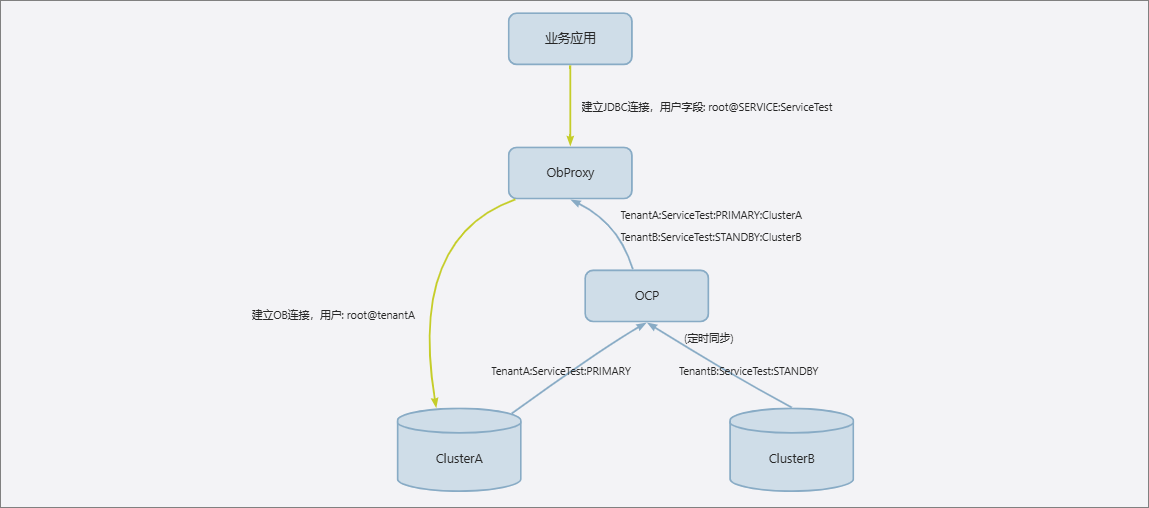
OceanBase provides four operations for you to manage service names for a tenant: create, start, stop, and delete. These four operations are performed using four SQL statements. After you create a service name, it is automatically started. After the service name of a tenant is started, you can establish a session with the tenant using the service name. Before you delete a service name, you must stop it.
Notice
OceanBase Database does not restrict you to assign a service name to only the primary and standby tenants. However, OCP prevents you from assigning a service name to tenants other than the primary and standby tenants.
Version restrictions
OCP, OceanBase, and OBProxy must meet the following version requirements:
- OCP: [V4.3.1, +∞).
- OceanBase: [4.2.1.9, 4.2.2.0), [V4.2.4.0, V4.3.0.0), [V4.3.3.0, +∞).
- OBProxy: [V4.3.1.0, +∞).
Prerequisites
Make sure that the user logged in to OCP has the following permissions:
- Cluster Maintenance or Tenant Maintenance permissions.
- Permissions to access the Tenant Overview menu.
Prerequisites
Make sure that you have the following permissions:
- Resource Permissions: Cluster Maintenance or Tenant Maintenance permission
- Menu Permissions: Permission on the Overview menu of Tenants
Features
Automatic primary switchover
To implement automatic primary switchover, the following two conditions must be met:
- The primary and standby tenants have the same service name.
- The OceanBase clusters to which the primary and standby tenants belong are associated with the same OBProxy cluster, which can implement automatic primary switchover.
Set a service name
After you set a service name for a tenant on OCP, you can connect to the tenant by using the service name.
obclient -hIP -PPORT -uroot@SERVICE_NAME:service1 -pPASSWORD
where SERVICE_NAME is a keyword. OCP offers three methods to set a service name for a tenant:
Specify when creating a tenant: You can specify a service name when you create a tenant.
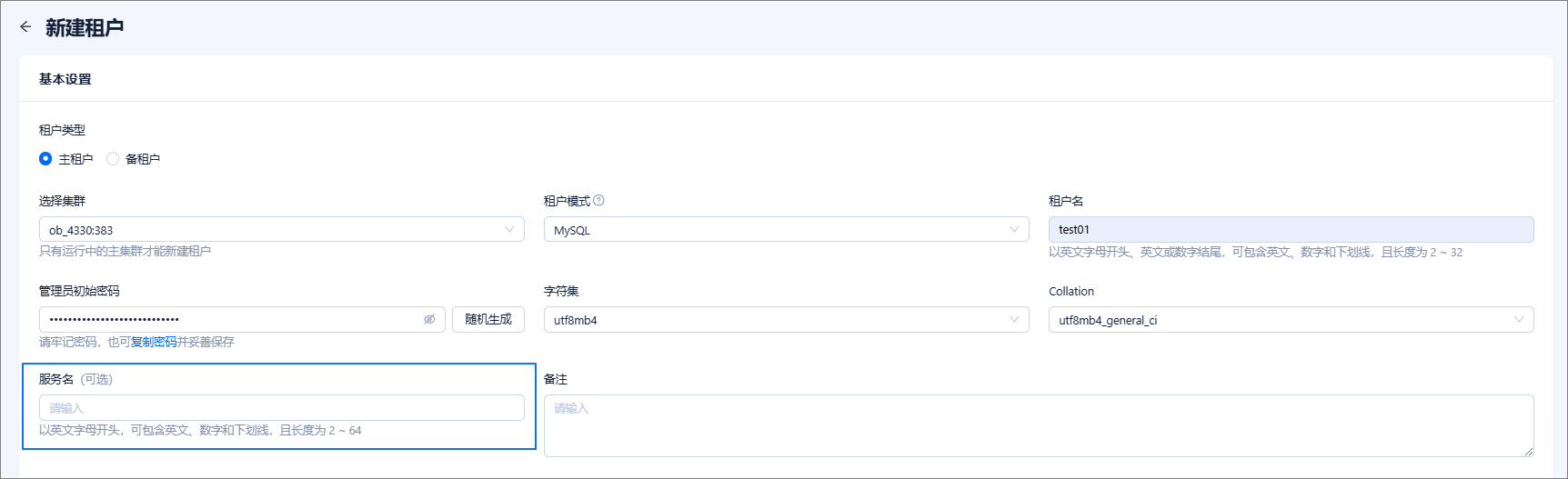
Set on the tenant details page: You can add a service name for a tenant on its details page, and edit or delete an existing service name.

Synchronize service names: OCP synchronizes tenant information with OCP every minute by comparing the information in OceanBase internal tables/views with the metadata in OCP and updating the information as needed. The service names of tenants are also updated during this process.
Primary switchover scenarios
Routine primary switchover
Routine primary switchover has the following two precheck items:
- Neither the primary nor the standby tenant has a service name, or they have the same service name.
- If both the primary and standby tenants have service names, the service names are different from those of other tenants without primary/standby relationships.
If the OceanBase cluster where the standby tenant resides is not associated with the same OBProxy cluster that is associated with the OceanBase cluster where the primary tenant resides, OCP will issue a clear warning: Automatic primary switchover may fail, but routine primary switchover is not prohibited. Routine primary switchover does not change the service names of tenants. Business applications can still connect to OceanBase tenants through OBProxy by using the format of [username]@SERVICE_NAME:[serviceName], without modifying the connection strings.
Disaster recovery primary switchover
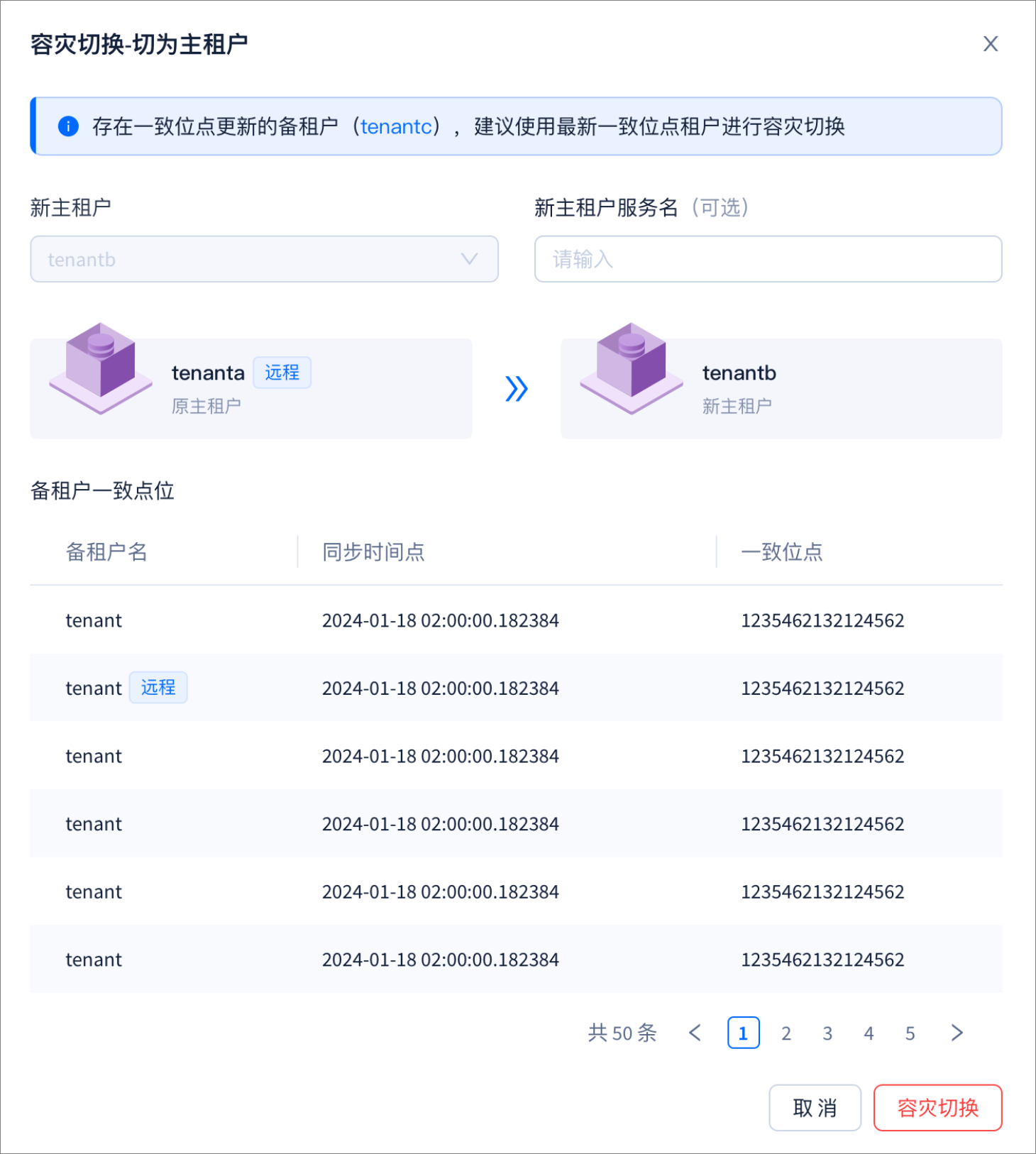
During disaster recovery primary switchover, the service name of the new primary tenant is deleted. After the switchover, business applications cannot connect to the new primary tenant by using the service name. Therefore, you must modify the connection string. To ensure that the connection string remains unchanged, OCP provides a feature wrapping method, as shown in the following figure:
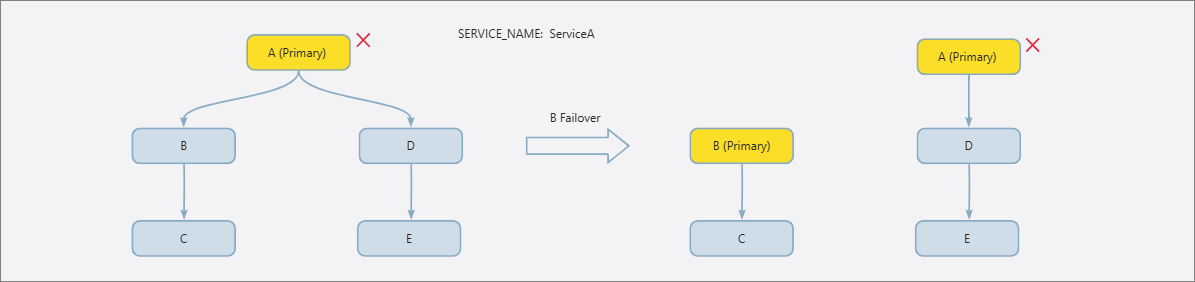
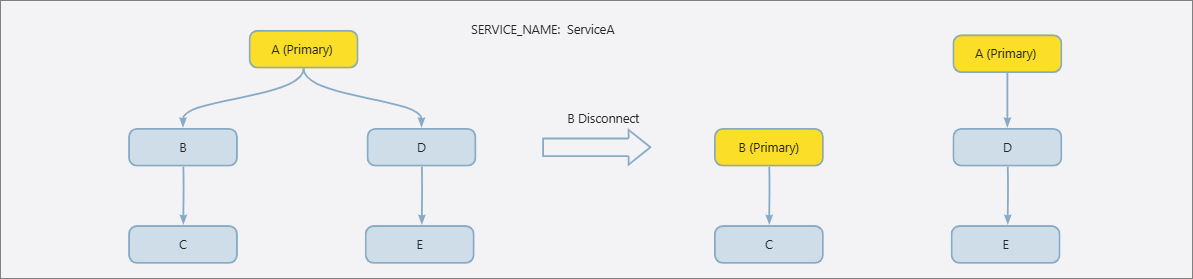
After tenant B undergoes disaster recovery primary switchover, the original primary/standby relationships are divided into two parts: (tenant B, tenant C) and (tenant A, tenant D, tenant E). The service names of tenant A, tenant C, tenant D, and tenant E remain ServiceA, and the service name of tenant B is deleted. To ensure that the connection string remains unchanged, OCP reassigns the service name of tenant B as ServiceA at the end of the disaster recovery primary switchover process, and sets the service names of tenant A, tenant D, and tenant E to INVALID. The INVALID state is an OCP concept that is used to shield the service name from OBProxy to prevent access to the old primary tenant. It also prevents Config Server from returning tenants whose service names are in the INVALID state. The following figure shows how the INVALID state is displayed in OCP.
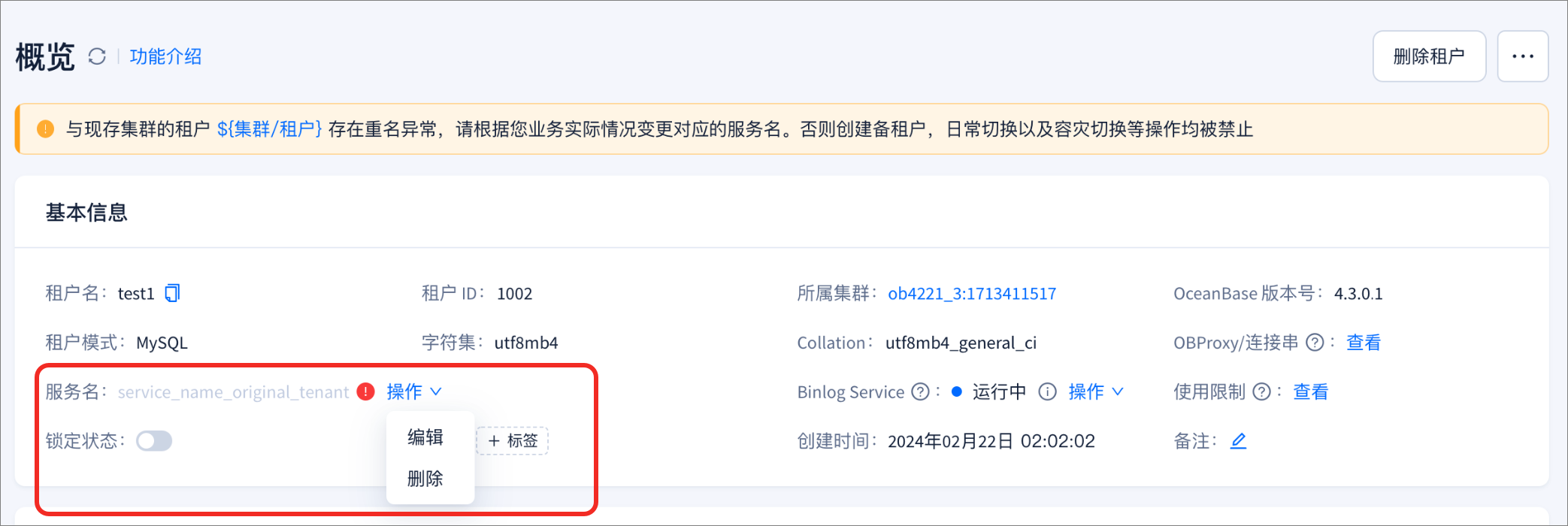
Before you perform disaster recovery primary switchover on OCP, you can choose whether to specify a service name for the new primary tenant. This is an optional step. If the service name of the new primary tenant is the same as before, when OBProxy automatically accesses the new primary tenant, data inconsistency may occur because the new primary tenant has RPO!=0.
Deregistration from the primary/standby relationship
For OceanBase, deregistration from the primary/standby relationship and tenant failover are the same instruction, but they are two different features in OCP. In the following figure, if the primary tenant is in a normal state, after deregistration from the primary/standby relationship, OceanBase will automatically delete the service name of the standby tenant B, and OCP will delete the service name of the tenant C that does not belong to the primary/standby relationship.
Multi-cluster mode adaptation
When the primary and standby OceanBase clusters are deployed in the primary and standby OCP clusters respectively, the primary and standby OCP clusters can return the RS lists of the primary and standby OceanBase clusters respectively. In this way, you do not need to modify the application connection strings when the primary and standby OceanBase clusters perform a switchover. The following diagram shows this setup:
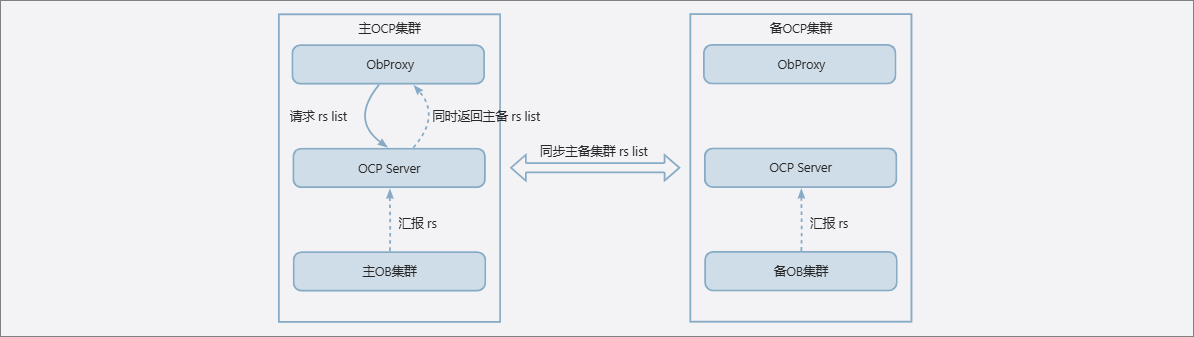
After an OceanBase cluster and an OBProxy cluster establish a relationship, the OBProxy cluster can obtain the RS lists of the OceanBase cluster and its standby OceanBase cluster, which depends on the following two conditions:
- The primary and standby OceanBase clusters have the same cluster name. Therefore, when the OBProxy cluster requests the RS list, it can use the cluster name.
- The primary and standby OceanBase clusters have the same proxyro@sys password. You can associate only one OceanBase cluster with the OBProxy cluster at a time, but the proxyro password can be shared.
To enable a similar functionality in multi-cluster scenarios as that in primary/standby OceanBase clusters, OCP V4.3.2 and later versions support establishing an association between an OceanBase cluster and a remote OBProxy cluster or creating an OceanBase cluster and associating it with a remote OBProxy cluster:
You can select a remote OBProxy cluster from the drop-down list to associate an OceanBase cluster with the remote OBProxy cluster.

You can select a remote OceanBase cluster from the drop-down list to associate an OBProxy cluster with the remote OceanBase cluster.

You can select a remote OBProxy cluster from the drop-down list when you create an OceanBase cluster to associate the OceanBase cluster with the remote OBProxy cluster.
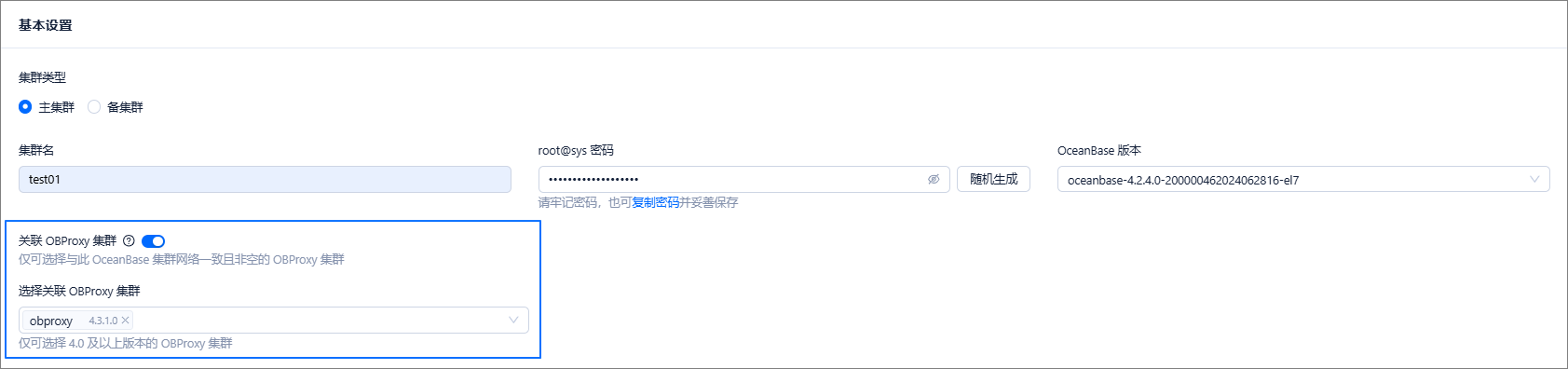
After a local OBProxy cluster is associated with a remote OceanBase cluster, you can access the remote OceanBase cluster through the local OBProxy cluster.