







After upgrading OceanBase Cloud Platform (OCP), you must log on to the OCP console to verify whether the password box feature is working properly.
Procedure
Log on to the OCP console by using the admin account.
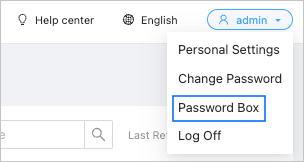
Click the account icon in the upper-right corner of the page and choose Password Box from the drop-down list.
Check whether information is properly displayed on the OceanBase Cluster and Host tabs.
