







This topic describes how to view and modify parameters in the OCP multi-cluster mode.
Applicability
This topic applies only to OceanBase Cloud Platform Enterprise Edition. OceanBase Cloud Platform Community Edition does not support the multi-cluster mode.
Prerequisite
You have enabled the multi-cluster mode for the current OCP cluster. For more information, see Enable the multi-cluster mode for common OCP clusters in Enable or disable the multi-cluster mode.
View OCP cluster parameters
Log on to the OCP console.
In the left-side navigation pane, choose System Management > OCP Multi-cluster Mode .
Click the Current OCP Parameters tab.
The tab displays the basic information of all OCP parameters, including the default values, current values, parameter descriptions, parameter types, and modification time.
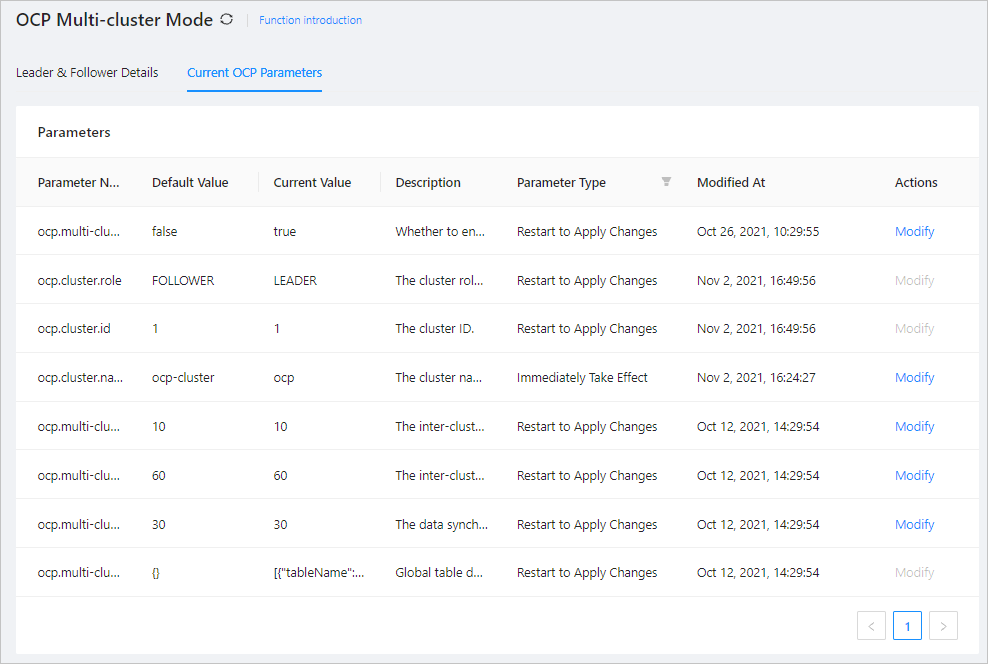
If the description of a parameter is too long, you can move the pointer over it to view the complete description.
Modify OCP cluster parameters
Log on to the OCP console.
In the left-side navigation pane, choose System Management > OCP Multi-cluster Mode .
Click the Current OCP Parameters tab.
The tab displays all OCP parameters.
Find the parameter to be modified and click Modify in the Actions column.
The parameter modification dialog box appears.

Modify the parameter in the dialog box.
Click Submit .
The system prompts the following message: The parameter value is modified.
In this case, Current Value of the parameter in Parameters changes to the modified value. To make the modification take effect, restart your system as required based on the value of Parameter Type .