







OceanBase Database contains a large number of rewrite rules and complex plan generation algorithms, which provide the database with powerful optimization capabilities. However, increased rewrite attempts and more complex plan generation algorithms will inevitably lead to longer plan generation times. In extreme TP scenarios, it may take 1 ms to generate a plan for a SQL statement that precisely matches a single value in the primary key, but 0.5 ms to execute the plan. In such a scenario, if a plan has to be regenerated for each SQL execution, most of the time will be consumed on plan generation for the statement. Therefore, OceanBase Database has introduced a plan cache mechanism to share execution plans for similar SQL queries.
How plan cache works
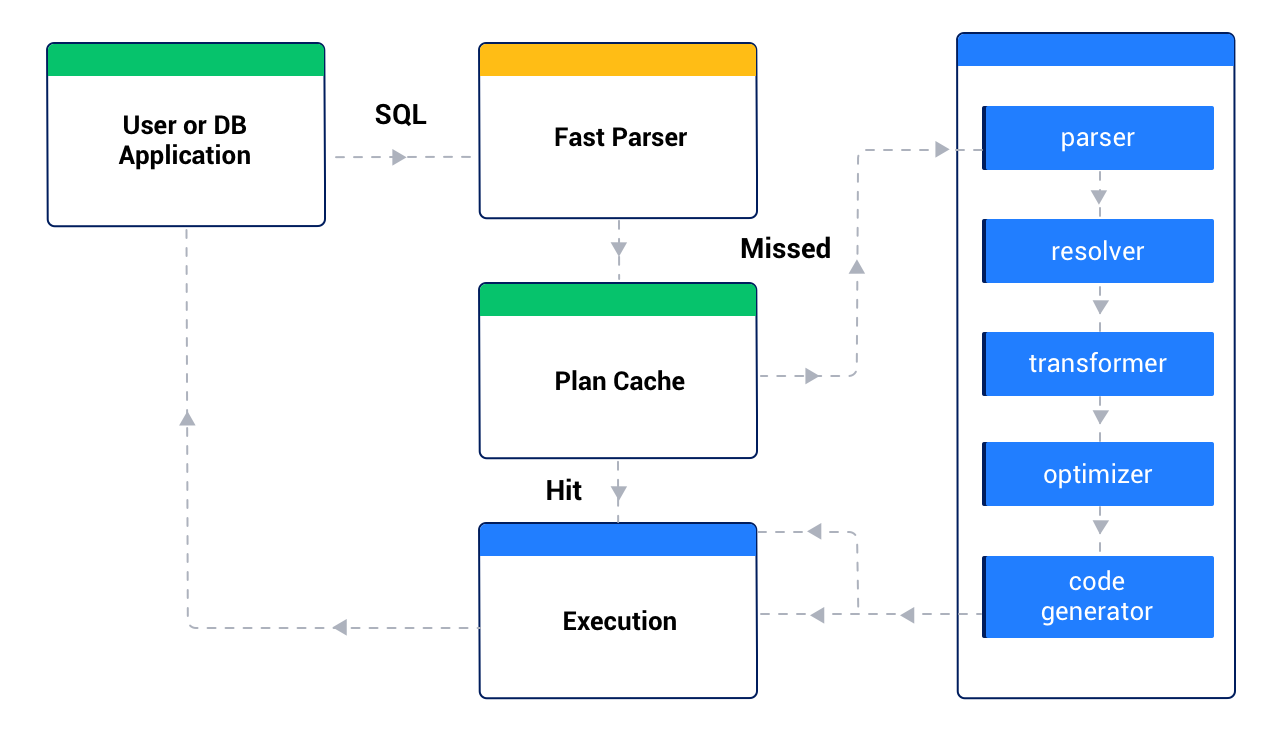
When OceanBase Database receives a SQL request, it first uses the fast parser module to perform rapid parameterization on the SQL text. The purpose of rapid parameterization is to replace constant parameters in the SQL text with a wildcard (?), such as replacing SELECT * FROM t1 WHERE c1 = 1 with SELECT * FROM t1 WHERE c1 = ?. Then, OceanBase Database checks the plan cache to see if there is an existing plan available for this parameterized SQL. If an available plan is found, the database directly executes this plan. If no plan is found, the database regenerates an execution plan for this SQL and saves the generated plan in the plan cache for subsequent SQL queries. Typically, retrieving an execution plan directly from the plan cache is at least an order of magnitude faster than regenerating the execution plan. Therefore, using the plan cache can significantly reduce the time needed to obtain an execution plan, thereby reducing the SQL response time.
Adaptive plan cache
The Plan Cache feature of OceanBase Database is enabled by default. In AP scenarios, disabling Plan Cache can often result in better performance. However, in HTAP mixed-load business scenarios, disabling Plan Cache can improve the performance of AP-oriented SQL statements, but it will severely affect TP-oriented SQL statements. Therefore, starting from OceanBase Database V4.3.5 BP2, the adaptive enablement of Plan Cache is supported. Plan Cache is enabled for TP SQL statements and disabled for AP SQL statements, to achieve better overall performance.
Control of adaptive plan cache
Starting from OceanBase Database V4.3.5 BP2, the following configuration items related to the adaptive plan cache are added:
enable_adaptive_plan_cache: a tenant-level configuration item that controls whether to enable the adaptive plan cache capability for the tenant. For more information, see enable_adaptive_plan_cache._pc_adaptive_min_exec_time_threshold: a tenant-level hidden configuration item that controls the minimum execution time threshold for enabling the adaptive plan cache. In other words, when the adaptive plan cache feature is enabled, only SQL statements whose execution time exceeds this threshold will enable the adaptive plan cache. Its attributes are described as follows:AttributeDescriptionParameter type TIME Default value 1s Value range [0, +∞] Modifiable Yes. You can modify the value of this configuration item by using the ALTER SYSTEM SETstatement. For example:ALTER SYSTEM SET _pc_adaptive_min_exec_time_threshold = '2s';.Note
In Oracle-compatible mode, hidden configuration items must be enclosed in double quotation marks in terms of syntax.
Effective immediately after OBServer node restart No. It takes effect immediately after being set. _pc_adaptive_effectiveness_ratio_threshold: a tenant-level hidden configuration item that controls the minimum ratio threshold for enabling the adaptive plan cache. In other words, when the adaptive plan cache feature is enabled, the adaptive plan cache is enabled only when the ratio of plan execution time to plan generation time is greater than or equal to this threshold. Its attributes are described as follows:AttributeDescriptionParameter type INT Default value 5 Value range [0, +∞] Modifiable Yes. You can modify the value of this configuration item by using the ALTER SYSTEM SETstatement. For example:ALTER SYSTEM SET _pc_adaptive_effectiveness_ratio_threshold = 6;.Note
In Oracle-compatible mode, hidden configuration items must be enclosed in double quotation marks in terms of syntax.
Effective immediately after OBServer node restart No. It takes effect immediately after being set. _force_enable_plan_tracing: a tenant-level hidden configuration item that controls whether to enable plan tracing when the plan cache is disabled. Its attributes are described as follows:AttributeDescriptionParameter type BOOL Default value TRUE, indicating that plan tracing is enabled when the plan cache is disabled. Value range - TRUE
- FALSE
Modifiable Yes. You can modify the value of this configuration item by using the ALTER SYSTEM SETstatement. For example:ALTER SYSTEM SET _force_enable_plan_tracing = FALSE;.Note
In Oracle-compatible mode, hidden configuration items must be enclosed in double quotation marks in terms of syntax.
Effective immediately after OBServer node restart No. It takes effect immediately after being set.
When the adaptive Plan Cache is enabled, after a SQL statement is executed, the Plan Cache is disabled for the SQL statement based on the execution feedback if all the following three conditions are met:
- The SQL execution time exceeds the threshold set by the hidden configuration item
_pc_adaptive_min_exec_time_threshold. - The ratio of the SQL execution time to the plan generation time exceeds the threshold set by the hidden configuration item
_pc_adaptive_effectiveness_ratio_threshold. - The preceding two conditions are met for five consecutive executions.