







This topic introduces partitioning and partition types in OceanBase Database.
Partition introduction
OceanBase Database can divide the data of a regular table into different blocks based on certain rules, where data within the same block is stored together physically. A table divided in this way is called a partitioned table, and each block is called a partition. In the MySQL-compatible mode of OceanBase Database, the maximum number of partitions supported for a single table is controlled by the tenant-level parameter max_partition_num, with a default value of 8,192.
As shown in the following figure, a table is divided into five partitions, distributed across two servers:
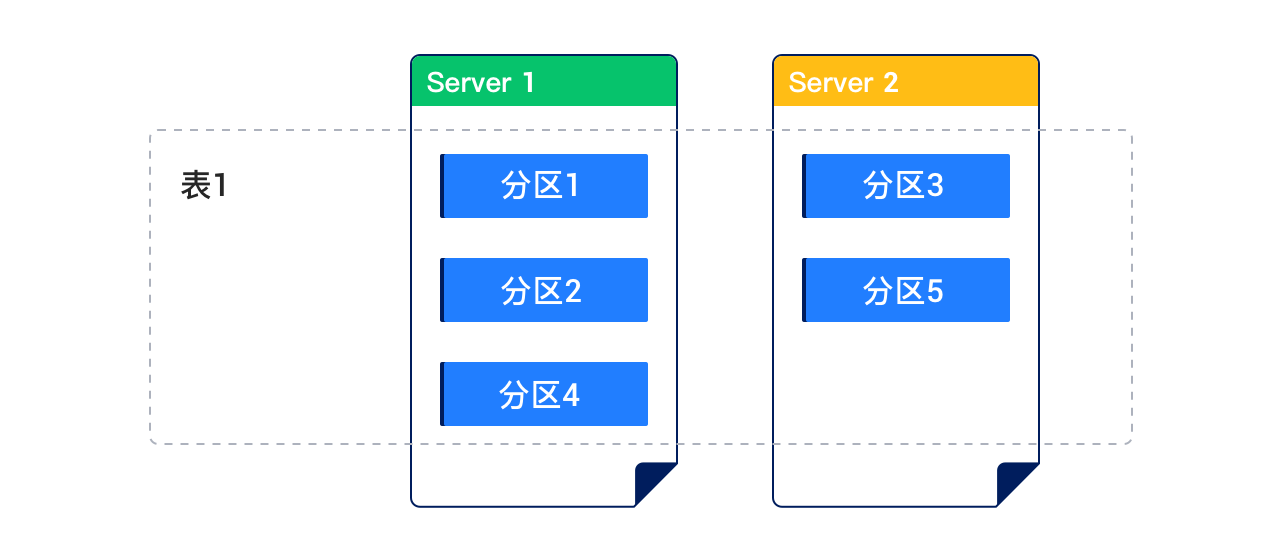
Each partition of the partitioned table shown above can be further split into multiple partitions based on certain rules. Such a table is called a subpartitioned table.
Partitioning key
The partitioning key is a set of columns used to determine which partition a data row belongs to. In the MySQL-compatible mode of OceanBase Database, its definition must follow these rules:
- If the table has a primary key, the partitioning key must be a subset of the primary key.
- If the table has a unique key but no primary key, the partitioning key must be a subset of the unique key.
- If the table has neither a primary key nor a unique key, the partitioning key can be any combination of columns, without being restricted by a primary or unique key.
Partitioning expression
A partitioning expression is a computational logic built on the partitioning key, used to map data rows to specific partitions.
Partition types
The partition types currently supported in the MySQL-compatible mode of OceanBase Database are as follows:
RANGE partitioning
RANGE COLUMNS partitioning
LIST partitioning
LIST COLUMNS partitioning
HASH partitioning
KEY partitioning
Composite partitioning
RANGE partitioning
RANGE partitioning maps data to partitions based on ranges of partitioning key values that you set up for each partition when you define the partitioned table. It is the most common partitioning type and is often used with dates. For example, you can partition business log tables by day, week, or month.
In RANGE partitioning, the partitioning key must be of an integer or YEAR type. If partitioning a date field of other types, functions are required for conversion. The partitioning key in RANGE partitioning supports only one column.
RANGE COLUMNS partitioning
RANGE COLUMNS partitioning works similarly to RANGE partitioning, but differs in that:
In RANGE COLUMNS partitioning, the values of the partitioning key do not necessarily need to be integers. The following data types are supported:
All integer types:
TINYINT,SMALLINT,MEDIUMINT,INT(INTEGER), andBIGINTFloating-point types:
DOUBLE,FLOAT, andDECIMAL, including:DECIMAL、DECIMAL[(M[,D])]DEC、NUMERIC、FIXEDFLOAT[(M,D)]、FLOAT(p)DOUBLE、DOUBLE[(M,D)]DOUBLE PRECISION、REAL
Time types:
DATE,DATETIME, andTIMESTAMPColumns of other date or time data types cannot be used as the partitioning key.
Character types:
CHAR,VARCHAR,BINARY, andVARBINARYColumns of the TEXT or BLOB data type cannot be used as the partitioning key.
You cannot use an expression as the partitioning key for RANGE COLUMNS partitioning.
The partitioning key for RANGE COLUMNS partitioning can contain multiple columns (column vectors).
LIST partitioning
Unlike RANGE partitioning and HASH partitioning, LIST partitioning enables you to explicitly control how rows map to partitions by specifying a list of discrete values for the partitioning key in the description for each partition. The advantage of LIST partitioning is that you can partition unordered and unrelated data.
In LIST partitioning, the partitioning key can be a column name or an expression. However, the data type of the partitioning key must be integer or YEAR.
LIST COLUMNS partitioning
LIST COLUMNS partitioning is similar to LIST partitioning, but they are different in the following aspects:
In LIST COLUMNS partitioning, the values of the partitioning key do not necessarily need to be integers. The following data types are supported:
All integer types:
TINYINT,SMALLINT,MEDIUMINT,INT(INTEGER), andBIGINTColumns of other numeric data types (for example, DECIMAL or FLOAT) cannot be used as the partitioning key.
Time types:
DATEandDATETIMEColumns of other date or time data types cannot be used as the partitioning key.
Character types:
CHAR,VARCHAR,BINARY, andVARBINARYColumns of the TEXT or BLOB data type cannot be used as the partitioning key.
The partitioning key for LIST COLUMNS partitioning cannot be an expression.
LIST COLUMNS partitioning supports multiple partitioning keys, whereas LIST partitioning supports only one partitioning key.
HASH partitioning
HASH partitioning applies to scenarios where RANGE partitioning or LIST partitioning cannot be used. HASH partitioning enables easy partitioning of data by distributing records over partitions based on a HASH function on the partitioning key. HASH partitioning is a better choice in the following cases:
You cannot identify an obvious partitioning key for the data.
The sizes of range partitions differ substantially or are difficult to balance manually.
Data becomes heavily clustered after using RANGE partitioning.
Performance aspects such as parallel DML, partition pruning, and partition joins are critical.
In HASH partitioning, the partitioning key must be of an integer or YEAR type and can be an expression.
KEY partitioning
KEY partitioning is similar to HASH partitioning. It determines which partition the data belongs to by applying a hash algorithm to the partitioning key and then performing a modulo operation on the resulting integer value.
KEY partitioning has the following characteristics:
The partitioning key in KEY partitioning is not required to be an integer; it can be of any data type except TEXT and BLOB.
Expressions cannot be used for the partitioning key in KEY partitioning.
The partitioning key in KEY partitioning supports vectors.
If you do not specify any column as the partitioning key, the primary key is used as the partitioning key.
Example:
obclient> CREATE TABLE tbl1 (col1 INT PRIMARY KEY, col2 INT) PARTITION BY KEY() PARTITIONS 5; Query OK, 0 rows affected
Composite partitioning
Composite partitioning partitions a table using one partitioning strategy and partitions each partition using a different partitioning strategy. It is suitable for business tables containing large amounts of data. Composite partitioning gives full play to the advantages of the two partitioning strategies that you use in combination.
Considerations
Take note of the following considerations if you use auto-increment columns as the partitioning key in MySQL-compatible mode:
In OceanBase Database, the values of auto-increment columns are globally unique but are not guaranteed to be incremental within a partition.
For a partitioned table that uses auto-increment columns as the partitioning key, insert operations may initiate cross-server transactions due to the lack of efficient routing. This degrades the performance.
Partition naming conventions
For a LIST- or RANGE-partitioned table, the partition names are specified when the table is created.
For a HASH- or KEY-partitioned table, if no partition names are specified when the table is created, the system generates the names based on the following naming conventions: The specific process is as follows:
For HASH or KEY partitions that are PRIMARY PARTITIONS, they are named p0, p1, ..., pn respectively.
For HASH or KEY partitions that are SUBPARTITIONS, they are named sp0, sp1, ..., spn respectively.
For a template-based subpartitioned table, after you define subpartitions, the system names the subpartitions in the ($part_name)s($subpart_name) format. For a non-template-based subpartitioned table, the subpartitions are named by yourself.
Functions allowed in partition expressions
For RANGE, LIST, and HASH partitions, expressions are allowed for the partitioning key. In the MySQL-compatible mode of OceanBase Database, only the following functions are allowed as partition expressions: