







This section describes how to apply table group weight balancing in typical business scenarios.
Scenario 1: Automatic aggregation of tables created under the same database
Scenario description
Business requirements dictate creating a new batch of user tables, which must be managed by database to avoid distributed reads and writes within that database.
Procedure
You can first enable automatic aggregation for user tables created under the new database (set the parameter enable_database_sharding_none to True), and then create the database and tables separately. The specific steps are as follows:
Connect to the database as the tenant administrator of a MySQL-compatible tenant.
The following is an example connection string. Please use the actual environment settings when connecting to the database.
obclient -h10.xx.xx.xx -P2883 -uroot@mysql_tenant#obdemo -p***** -ASet the tenant-level parameter
enable_database_sharding_nonetoTrue.obclient(root@mysql001)[(none)]> ALTER SYSTEM SET enable_database_sharding_none = True;Create multiple databases as needed.
After each database is successfully created, it will be bound to a new table group with
Sharding = 'NONE'by default.For detailed operations and descriptions on creating a database, see Create a database.
Create user tables in batches by database. User tables under the same database will be automatically bound to the same log stream.
Scenario 2: Aggregation of tables created under multiple databases
Scenario description
Business requirements dictate creating a new batch of user tables that are closely associated with user tables under another database A (assuming database A was already bound to a table group with Sharding = 'NONE' during creation). Now, you need to aggregate the newly created tables with those under database A to avoid distributed reads and writes across multiple databases.
Procedure
You can create a new database B and bind it to the same Sharding = 'NONE' table group as database A, and then create the tables. The specific steps are as follows:
Connect to the database as the tenant administrator of a MySQL-compatible tenant.
The following is an example connection string. Please use the actual environment settings when connecting to the database.
obclient -h10.xx.xx.xx -P2883 -uroot@mysql_tenant#obdemo -p***** -ARetrieve the table group information bound to database A.
obclient(root@mysql001)[(none)]> SELECT * FROM oceanbase.DBA_OB_DATABASES WHERE DATABASE_NAME = 'databse_name';Use the following statement to create a new database B and specify its table group as the one bound to database A.
CREATE DATABASE databae_name DEFAULT tablegroup = tablegroup_name;For more information about the
CREATE DATABASEstatement, see CREATE DATABASE.Create a user table in the new Database B. The newly created user table will automatically be bound to the same log stream as the user table in Database A.
Scenario 3: Re-aggregation of multiple databases
Scenario description
The user tables have already been created. Now, you need to re-aggregate the user tables from multiple associated databases to avoid distributed read and write operations across multiple databases.
Procedure
Connect to the database as the tenant administrator of the MySQL-compatible tenant.
The following is an example connection string. Please use the actual environment settings when connecting to the database.
obclient -h10.xx.xx.xx -P2883 -uroot@mysql_tenant#obdemo -p***** -AUse the following statement to create a table group with
Sharding = 'NONE'.CREATE TABLEGROUP tablegroup_name Sharding = 'NONE';Use the following statement to bind multiple databases to the newly created table group.
ALTER DATABASE database_name tablegroup [=] tablegroup_name;For more information about the
ALTER DATABASEstatement, see ALTER DATABASE.Manually trigger partition balancing.
obclient(root@mysql001)[(none)]> CALL DBMS_BALANCE.TRIGGER_PARTITION_BALANCE();For more information about how to manually trigger partition balancing, see Manually trigger partition balancing.
Wait for the partition balancing task to complete to finalize the aggregation of user tables across multiple databases.
During partition balancing, you can view the progress of the balancing task using the following statement:
obclient(root@mysql001)[(none)]> SELECT * FROM oceanbase.DBA_OB_BALANCE_JOBS WHERE JOB_TYPE = 'PARTITION_BALANCE';For more information about how to view the progress of a partition balancing task, see View background partition balancing tasks.
Scenario 4: Exclusive log stream for hotspot table groups
Scenario description
After enabling automatic aggregation for user tables in new databases (by setting the parameter enable_database_sharding_none to True), a table group with Sharding = 'NONE' is created by default for each new database (with a weight of 1 by default). Now, based on business requirements, you want to ensure that hotspot table groups exclusively use a log stream.
Procedure
Assume the current tenant has nine table groups with Sharding = 'NONE', named TG_DB_1 through TG_DB_9. Among them, TG_DB_1 becomes a hotspot table group because it aggregates user tables from multiple databases and is expected to exclusively occupy one log stream.
Currently, the weight distribution of these table groups is as follows.
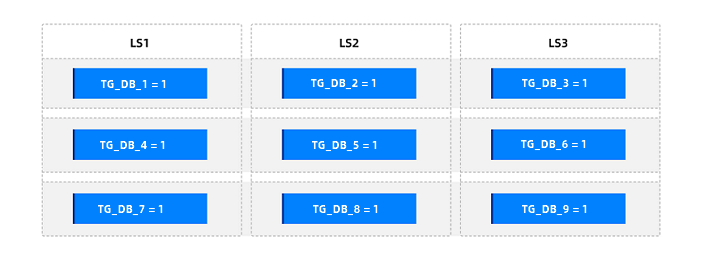
You can set the weight of the hotspot table group TG_DB_1 to 100% (100% * the total number of table groups with Sharding = 'NONE') to achieve exclusive occupation. The specific procedure is as follows:
Connect to the database as the tenant administrator of the MySQL-compatible tenant.
The following is an example connection string. Please adjust it according to your actual environment when connecting to the database.
obclient -h10.xx.xx.xx -P2883 -uroot@mysql_tenant#obdemo -p***** -ADetermine the total number of table groups with
Sharding = 'NONE'that have weights in the tenant.obclient(root@mysql001)[(none)]> SELECT * FROM oceanbase.DBA_OB_OBJECT_BALANCE_WEIGHT;Set the weight for the hotspot table group.
Suppose the query returns a total of 9 table groups with
Sharding = 'NONE'that have weights. Then, the statement to set the weight of the hotspot table group to 9 is as follows:obclient(root@mysql001)[(none)]> CALL DBMS_BALANCE.SET_TABLEGROUP_BALANCE_WEIGHT(9,'TG_DB_1');Manually trigger partition balancing.
obclient(root@mysql001)[(none)]> CALL DBMS_BALANCE.TRIGGER_PARTITION_BALANCE();For detailed operations on manually triggering partition balancing, see Manually trigger partition balancing.
Wait for the partition balancing task to complete to aggregate user tables from multiple databases.
During the partition balancing process, you can view the progress of the balancing task using the following statement:
obclient(root@mysql001)[(none)]> SELECT * FROM oceanbase.DBA_OB_BALANCE_JOBS WHERE JOB_TYPE = 'PARTITION_BALANCE';For detailed operations on viewing the progress of a partition balancing task, see View the background partition balancing task.
After balancing is complete, the weight distribution of these table groups is as follows:
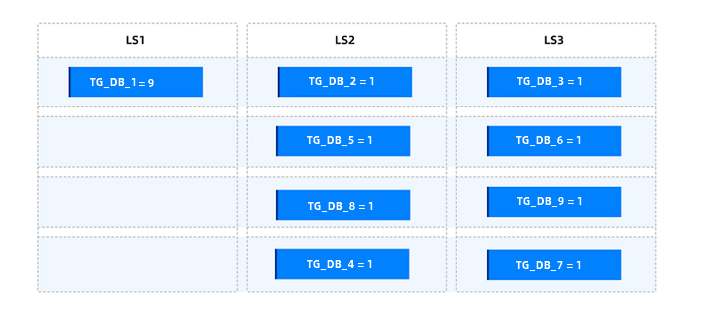
Scenario 5: Distribute table groups by weight
Scenario description
After enabling automatic aggregation for user tables in a new database (by setting the parameter enable_database_sharding_none to True), a table group with Sharding = 'NONE' is created by default for each database. The weight of such a table group is set to 1 by default. Now, based on business requirements, you want to disperse table groups that contain many user tables, have large data volumes, or receive heavy access traffic.
Procedure
Assume the current tenant has nine Sharding = 'NONE' table groups named TG_DB_1 through TG_DB_9. Among them, the tables in TG_DB_1, TG_DB_2, and TG_DB_4 have large data volumes but do not warrant occupying a dedicated log stream.
The current weight distribution of these table groups is as follows.
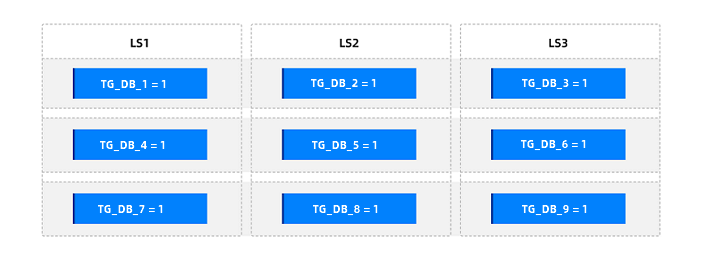
You can set the weights of TG_DB_1, TG_DB_2, and TG_DB_4 to 50% of the total number of Sharding = 'NONE' table groups. The specific steps are as follows:
Connect to the database as the tenant administrator of the MySQL-compatible tenant.
The following is an example connection string. Please use the actual environment settings when connecting to the database.
obclient -h10.xx.xx.xx -P2883 -uroot@mysql_tenant#obdemo -p***** -ADetermine the total number of weighted
Sharding = 'NONE'table groups in the tenant.obclient(root@mysql001)[(none)]> SELECT * FROM oceanbase.DBA_OB_OBJECT_BALANCE_WEIGHT;Set the weights for the table groups
TG_DB_1,TG_DB_2, andTG_DB_4.Assuming the query returns a total of 9 weighted
Sharding = 'NONE'table groups, the SQL statements to set their weights to 4 (the result of50% * 9rounded down) are as follows:obclient(root@mysql001)[(none)]> CALL DBMS_BALANCE.SET_TABLEGROUP_BALANCE_WEIGHT(4,'TG_DB_1');obclient(root@mysql001)[(none)]> CALL DBMS_BALANCE.SET_TABLEGROUP_BALANCE_WEIGHT(4,'TG_DB_2');obclient(root@mysql001)[(none)]> CALL DBMS_BALANCE.SET_TABLEGROUP_BALANCE_WEIGHT(4,'TG_DB_4');Manually trigger partition balancing.
obclient(root@mysql001)[(none)]> CALL DBMS_BALANCE.TRIGGER_PARTITION_BALANCE();For detailed operations on manually triggering partition balancing, see Manually trigger partition balancing.
Wait for the partition balancing task to complete to finish aggregating user tables across multiple databases.
During partition balancing, you can view the progress of the balancing task using the following statement:
obclient(root@mysql001)[(none)]> SELECT * FROM oceanbase.DBA_OB_BALANCE_JOBS WHERE JOB_TYPE = 'PARTITION_BALANCE';For detailed operations on viewing the progress of a partition balancing task, see View the background partition balancing task.
After balancing, the weight distribution of these table groups is as follows:
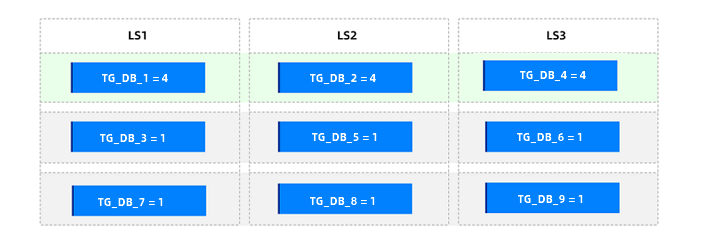
Scenario 6: Application of table group weights for SHARDING = 'NONE' and SCOPE = 'ZONE'
Scenario description
If your business requires a group of user tables to be aggregated in a specific zone to avoid cross-zone distributed read/write operations, you can add these user tables to a SHARDING = NONE + SCOPE = ZONE table group. If you need to configure multiple SHARDING = NONE + SCOPE = ZONE table groups and the access traffic between different table groups varies significantly, you can set table group-level weights.
Procedure
If you have already created user tables and need to modify their table group attributes by configuring a SHARDING = NONE + SCOPE = ZONE table group, you can follow these steps:
Connect to the database as the tenant administrator of a MySQL-compatible mode tenant.
The following is an example connection string. Please use the actual environment settings when connecting to the database.
obclient -h10.xx.xx.xx -P2883 -uroot@mysql_tenant#obdemo -p***** -ASet the value of the tenant-level parameter
enable_transfertoFalseto disable the transfer feature.obclient(root@mysql001)[(none)]> ALTER SYSTEM SET enable_transfer = False;For each group of user tables, create a
SHARDING = 'NONE'+SCOPE = 'ZONE'table group and add the corresponding tables to it.The following sample statements show how to create a table group and add tables to it:
obclient(root@mysql001)[test]> CREATE TABLEGROUP TG_DB_1 SHARDING = 'NONE', SCOPE = 'ZONE';obclient(root@mysql001)[test]> ALTER TABLEGROUP TG_DB_1 ADD tbl1,tbl2;For detailed operations on creating a table group and adding tables to it, see Create a table group and Add tables to a table group.
Set weights for the hotspot table groups.
A sample statement is as follows:
obclient(root@mysql001)[test]> CALL DBMS_BALANCE.SET_TABLEGROUP_BALANCE_WEIGHT(10,'TG_DB_1');For detailed operations on setting table group weights, see Set table group weights.
Select zones for distributing each hotspot table group and ensure that the table with the smallest
table_idwithin the hotspot table group resides in the target zone. You can achieve this by manually executing a transfer partition to adjust the partition leader to the target zone. The selection criteria are as follows:Each hotspot table group selects a different zone to avoid hotspots concentrating in the same zone.
Most tables within a hotspot table group are already located in the target zone, reducing the number of partitions that need to be transferred to align the partition leaders of the table group to the same zone.
(Optional) For other non-hotspot table groups, adjust the table with the smallest
table_idwithin them so that it remains in the same zone as most of the tables in the group.Set the tenant-level parameter
enable_transfertoTrueto re-enable the transfer feature.obclient(root@mysql001)[(none)]> ALTER SYSTEM SET enable_transfer = True;Manually trigger a round of partition balancing.
obclient(root@mysql001)[(none)]> CALL DBMS_BALANCE.TRIGGER_PARTITION_BALANCE();For detailed steps on manually triggering partition balancing, see Manually trigger partition balancing.
After successful execution, the partitions within each table group will first be aligned with the table having the smallest
table_id, and then weight, quantity, and disk balancing will be performed across zones.