







Background information
OceanBase currently uses three main methods for data import: LOAD DATA, obloader, and OMS, all of which write data via INSERT statements. However, the INSERT operation involves processes such as SQL query, transaction processing, and LSM-Tree storage. Since OceanBase employs an LSM-Tree storage structure, inserted data is first written to a memory table (MemTable), then stored in the final SSTable through multiple rounds of flushes and compactions. This process consumes significant CPU resources, resulting in slow import speeds.
To address this issue, OceanBase introduces direct load technology, which bypasses intermediate processing steps and directly writes data to the underlying Major SSTable. This technology is applicable not only to data import but also to SQL operations that require extensive writing (such as INSERT INTO SELECT).
ClickBench is an AP benchmark proposed by ClickHouse. This benchmark tests the query performance of OceanBase Database in AP scenarios. Before running this benchmark, you must first import data. The data import step allows you to experience the performance of OceanBase Database's data import capabilities. Of course, direct load can also be used to prepare data for AP benchmarks such as TPCH and TPC-DS. This tutorial guides you through using direct load technology to accelerate massive data import and experience OceanBase's high efficiency.
Application scenarios
- Data preparation for AP scenarios: Such as analysis tests like ClickHouse Benchmark, TPC-H/TPC-DS.
- Batch write acceleration: To replace high-throughput write operations like
INSERT INTO SELECT.
Using direct load technology can significantly improve data import efficiency and is suitable for scenarios requiring rapid loading of massive amounts of data.
Technical architecture
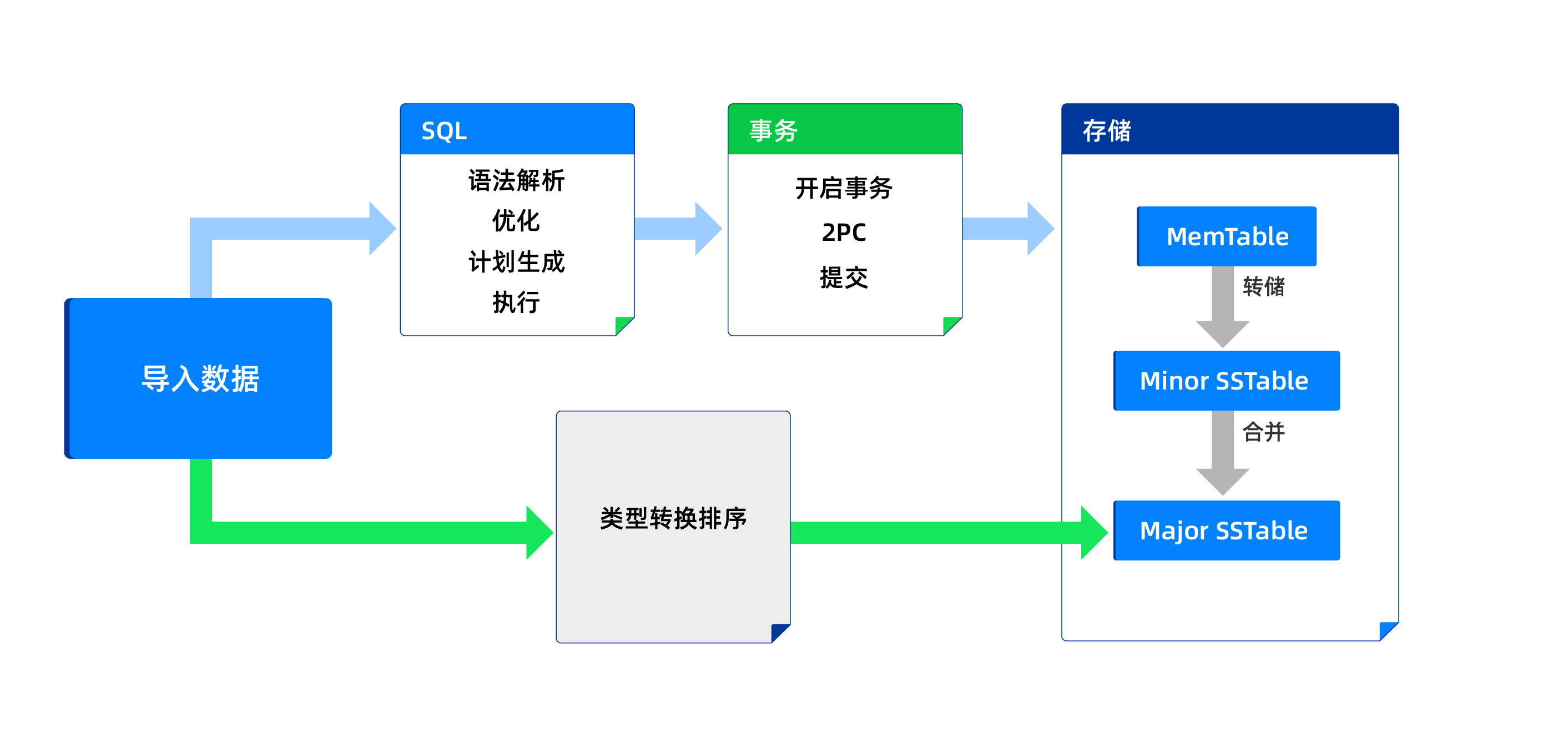
Data import can follow two paths.
Traditional path: The traditional path shown by the blue arrow goes through a series of modules including SQL query, transaction processing, and data storage.
Direct load path: The direct load path shown by the green arrow mainly involves type conversion of the imported data, then sorting by primary key (if present), and finally writing the sorted data to the Major SSTable. Direct load is a shorter path that reduces system resource consumption and speeds up import times.
As shown below:
Prerequisites
Environment preparation
Environment requirements:
- Ensure a cluster of OceanBase Database V4.3 or later has been deployed, and a tenant environment in MySQL-compatible mode has been created.
- This experiment uses a resource specification of 16c32g. All subsequent steps and test results are based on this configuration.
To learn how to deploy an OceanBase cluster, see Deployment overview. After deployment, you can execute the following SQL statement in the sys tenant to view cluster and tenant information:
-- Verify cluster information SELECT * FROM GV$OB_SERVERS; -- Verify Tenant Information SELECT * FROM oceanbase.DBA_OB_TENANTS;Permission requirements:
Ensure the created tenant has the
INSERTandSELECTprivileges. For more details about OceanBase Database privileges, see Privilege types in MySQL-compatible mode.
Data preparation
Download the test data
Visit the ClickHouse official website to download the hits dataset.
Extract the data to a specified path (for example,
/path/to/hits.tsv).
Procedure
Step 1: Create a columnstore table
Execute the table creation statement (columnstore tables are defined using
WITH COLUMN GROUP):CREATE TABLE hits ( WatchID BIGINT NOT NULL, JavaEnable SMALLINT NOT NULL, Title TEXT NOT NULL, GoodEvent SMALLINT NOT NULL, EventTime TIMESTAMP NOT NULL, EventDate Date NOT NULL, CounterID INTEGER NOT NULL, ClientIP INTEGER NOT NULL, RegionID INTEGER NOT NULL, UserID BIGINT NOT NULL, CounterClass SMALLINT NOT NULL, OS SMALLINT NOT NULL, UserAgent SMALLINT NOT NULL, URL TEXT NOT NULL, Referer TEXT NOT NULL, IsRefresh SMALLINT NOT NULL, RefererCategoryID SMALLINT NOT NULL, RefererRegionID INTEGER NOT NULL, URLCategoryID SMALLINT NOT NULL, URLRegionID INTEGER NOT NULL, ResolutionWidth SMALLINT NOT NULL, ResolutionHeight SMALLINT NOT NULL, ResolutionDepth SMALLINT NOT NULL, FlashMajor SMALLINT NOT NULL, FlashMinor SMALLINT NOT NULL, FlashMinor2 TEXT NOT NULL, NetMajor SMALLINT NOT NULL, NetMinor SMALLINT NOT NULL, UserAgentMajor SMALLINT NOT NULL, UserAgentMinor VARCHAR(255) NOT NULL, CookieEnable SMALLINT NOT NULL, JavascriptEnable SMALLINT NOT NULL, IsMobile SMALLINT NOT NULL, MobilePhone SMALLINT NOT NULL, MobilePhoneModel TEXT NOT NULL, Params TEXT NOT NULL, IPNetworkID INTEGER NOT NULL, TraficSourceID SMALLINT NOT NULL, SearchEngineID SMALLINT NOT NULL, SearchPhrase TEXT NOT NULL, AdvEngineID SMALLINT NOT NULL, IsArtifical SMALLINT NOT NULL, WindowClientWidth SMALLINT NOT NULL, WindowClientHeight SMALLINT NOT NULL, ClientTimeZone SMALLINT NOT NULL, ClientEventTime TIMESTAMP NOT NULL, SilverlightVersion1 SMALLINT NOT NULL, SilverlightVersion2 SMALLINT NOT NULL, SilverlightVersion3 INTEGER NOT NULL, SilverlightVersion4 SMALLINT NOT NULL, PageCharset TEXT NOT NULL, CodeVersion INTEGER NOT NULL, IsLink SMALLINT NOT NULL, IsDownload SMALLINT NOT NULL, IsNotBounce SMALLINT NOT NULL, FUniqID BIGINT NOT NULL, OriginalURL TEXT NOT NULL, HID INTEGER NOT NULL, IsOldCounter SMALLINT NOT NULL, IsEvent SMALLINT NOT NULL, IsParameter SMALLINT NOT NULL, DontCountHits SMALLINT NOT NULL, WithHash SMALLINT NOT NULL, HitColor CHAR NOT NULL, LocalEventTime TIMESTAMP NOT NULL, Age SMALLINT NOT NULL, Sex SMALLINT NOT NULL, Income SMALLINT NOT NULL, Interests SMALLINT NOT NULL, Robotness SMALLINT NOT NULL, RemoteIP INTEGER NOT NULL, WindowName INTEGER NOT NULL, OpenerName INTEGER NOT NULL, HistoryLength SMALLINT NOT NULL, BrowserLanguage TEXT NOT NULL, BrowserCountry TEXT NOT NULL, SocialNetwork TEXT NOT NULL, SocialAction TEXT NOT NULL, HTTPError SMALLINT NOT NULL, SendTiming INTEGER NOT NULL, DNSTiming INTEGER NOT NULL, ConnectTiming INTEGER NOT NULL, ResponseStartTiming INTEGER NOT NULL, ResponseEndTiming INTEGER NOT NULL, FetchTiming INTEGER NOT NULL, SocialSourceNetworkID SMALLINT NOT NULL, SocialSourcePage TEXT NOT NULL, ParamPrice BIGINT NOT NULL, ParamOrderID TEXT NOT NULL, ParamCurrency TEXT NOT NULL, ParamCurrencyID SMALLINT NOT NULL, OpenstatServiceName TEXT NOT NULL, OpenstatCampaignID TEXT NOT NULL, OpenstatAdID TEXT NOT NULL, OpenstatSourceID TEXT NOT NULL, UTMSource TEXT NOT NULL, UTMMedium TEXT NOT NULL, UTMCampaign TEXT NOT NULL, UTMContent TEXT NOT NULL, UTMTerm TEXT NOT NULL, FromTag TEXT NOT NULL, HasGCLID SMALLINT NOT NULL, RefererHash BIGINT NOT NULL, URLHash BIGINT NOT NULL, CLID INTEGER NOT NULL, PRIMARY KEY (CounterID, EventDate, UserID, EventTime, WatchID) ) with column group (each column);
Step 2: Perform direct load
Direct load
LOAD DATA
/*+
query_timeout(10000000000)
parallel(32)
direct(true, 0) -- Enable direct load mode
*/
INFILE '/path/to/hits.tsv'
INTO TABLE hits
FIELDS TERMINATED BY '\t'
ENCLOSED BY ''
ESCAPED BY '';
After execution is complete, you can observe the execution time for direct load.
Non-direct load comparison
LOAD DATA
/*+
query_timeout(10000000000)
parallel(32)
*/
INFILE '/path/to/hits.tsv'
INTO TABLE hits
FIELDS TERMINATED BY '\t'
ENCLOSED BY ''
ESCAPED BY '';
After execution is complete, you can observe the execution time for non-direct load.
Performance comparison
Scenarios |
Execution Time (s) |
|---|---|
| Direct load | 249 |
| Non-direct load | 767 |
Note
This experiment uses a resource specification of 16c32g. Execution times may vary due to differences in the environment. The execution times in the table above are for reference only.
Conclusion: Direct load improves speed by more than 3 times and is suitable for large-scale data import scenarios (such as preparing test data for TPC-H/TPC-DS).