







You can deploy an OceanBase cluster by using obshell in the following two ways:
Call an API.
Run an obshell command.
Prerequisites
Before you deploy OceanBase Database, make sure that the following conditions are met:
Your server meets the hardware and software requirements. For more information, see Hardware and software requirements.
In a production environment, you need to check the environment and configuration.
Glossary
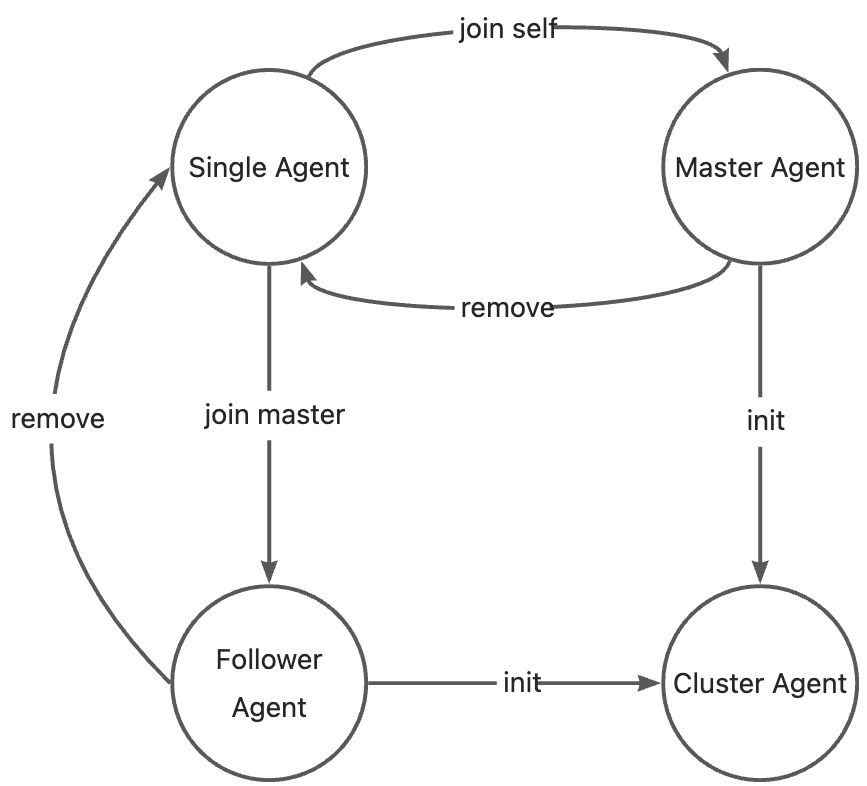
Single Agent: The initial identity of obshell Agent. It can be converted to Master Agent or Follower Agent by using the join command.
Master Agent: An identity of obshell Agent. It can be converted to Cluster Agent by using the init command, or to Single Agent by using the remove command.
Follower Agent: An identity of obshell Agent. It can be converted to Cluster Agent by using the init command, or to Single Agent by using the remove command.
Cluster Agent: An identity of obshell Agent.
OceanBase cluster initialization (init) is a centralized task. During this phase, obshell Agent has two identities: Master Agent and Follower Agent. The init task is led by the Master Agent. After the init task is completed, the cluster becomes decentralized, and all obshell Agents have only one identity: Cluster Agent.
The state machine for identity conversion is shown in the following figure:
Deployment mode
This topic describes the deployment mode of three OBServer nodes. You can choose a deployment mode based on your business requirements. The following table describes the three OBServer nodes.
Role |
IP address |
Remarks |
|---|---|---|
| OBServer node | 10.10.10.1 | The node is the master agent of OceanBase Database zone1 before the initialization is completed. |
| OBServer node | 10.10.10.2 | The node is the follower agent of OceanBase Database zone2 before the initialization is completed. |
| OBServer node | 10.10.10.3 | The node is the follower agent of OceanBase Database zone3 before the initialization is completed. |
Deploy by using the API
Note
When you call an API by using CLI commands, note the following information:
Some APIs create an asynchronous task after they are called. Therefore, you must confirm that the task is completed before proceeding to the next step. For more information, see Obtain the details of a task.
obshell performs security checks on the called API. Therefore, before you call an API, you must encrypt the request by following the instructions in API hybrid encryption, and configure the encrypted request header (
${request_headers}) and request body (${request_body}) in the curl command.
Step 1: Start obshell
obshell is located in the installation directory of OceanBase Database (i.e.,
/home/admin/oceanbase/bin/obshell).Start obshell on each node. For more information, see obshell agent start.
Run the following command on the
10.10.10.1node:[admin@test001 ~]$ /home/admin/oceanbase/bin/obshell agent start --ip 10.10.10.1 -P 2886Run the following command on the
10.10.10.2node:[admin@test002 ~]$ /home/admin/oceanbase/bin/obshell agent start --ip 10.10.10.2 -P 2886Run the following command on the
10.10.10.3node:[admin@test003 ~]$ /home/admin/oceanbase/bin/obshell agent start --ip 10.10.10.3 -P 2886
Step 2: Change the role of the Single Agent to the Master Agent
Call the /api/v1/agent/join API on the Single Agent (10.10.10.1) and specify the obshell as itself (10.10.10.1:2886) in the request. This way, the role of the Single Agent is changed to the Master Agent.
For more information about how to call the corresponding API in the CLI, see Add a node before cluster initialization.
[admin@test001 ~]$ curl -H "Content-Type: application/json" -H 'X-OCS-Header:${request_headers}' -X POST -d '${request_body}' http://10.10.10.1:2886/api/v1/agent/join
For more information about how to call the corresponding API by using the obshell-sdk-python, see Add a node before cluster initialization.
···
client = ClientSet("10.10.10.1", 2886)
client.v1.join_sync("10.10.10.1", 2886, "zone1") # Call the /api/v1/agent/join API.
···
For more information about how to call the corresponding API by using the obshell-sdk-go, see Add a node before cluster initialization.
···
client, err := services.NewClient("10.10.10.1", 2886)
joinRequest1 := client.V1().NewJoinRequest("10.10.10.1", 2886, "zone1")
dag, err := client.V1().JoinSyncWithRequest(joinRequest1) // Call the /api/v1/agent/join API.
···
Step 3: Change the role of the Single Agent to the Follower Agent
Call the /api/v1/agent/join API on the Single Agent (10.10.10.2 and 10.10.10.3) and specify the obshell as the Master Agent (10.10.10.1:2886) in the request. This way, the role of the Single Agent is changed to the Follower Agent.
For more information about how to call the corresponding API in the CLI, see Add a node before cluster initialization.
Run the following command on any node:
Change the role of the
10.10.10.2node to the Follower Agent.[admin@test001 ~]$ curl -H "Content-Type: application/json" -H 'X-OCS-Header:${request_headers}' -X POST -d '${request_body}' http://10.10.10.2:2886/api/v1/agent/joinChange the role of the
10.10.10.3node to the Follower Agent.[admin@test001 ~]$ curl -H "Content-Type: application/json" -H 'X-OCS-Header:${request_headers}' -X POST -d '${request_body}' http://10.10.10.3:2886/api/v1/agent/join
For more information about how to call the corresponding API by using the obshell-sdk-python, see Add a node before cluster initialization.
···
client = ClientV1("10.10.10.1", 2886)
client.v1.join_sync("10.10.10.2", 2886, "zone2") # Call the /api/v1/agent/join API.
client.v1.join_sync("10.10.10.3", 2886, "zone3") # Call the /api/v1/agent/join API.
···
For more information about how to call the corresponding API by using the obshell-sdk-go, see Add a node before cluster initialization.
···
client, err := v1.NewClient("10.10.10.1", 2886)
joinRequest2 := client.V1().NewJoinRequest("10.10.10.2", 2886, "zone2")
dag, err := client.V1().JoinSyncWithRequest(joinRequest2) // Call the /api/v1/agent/join API.
joinRequest3 := client.V1().NewJoinRequest("10.10.10.3", 2886, "zone3")
dag, err = client.V1().JoinSyncWithRequest(joinRequest3) // Call the /api/v1/agent/join API.
···
Step 4: Set cluster-level configurations
You can set cluster-level configurations by calling the /api/v1/obcluster/config API on the node that is the Master Agent.
For more information about how to call the corresponding API in the CLI, see Set cluster-level configurations.
[admin@test001 ~]$ curl -H "Content-Type: application/json" -H 'X-OCS-Header:${request_headers}' -X PUT -d '${request_body}' http://10.10.10.1:2886/api/v1/obcluster/config
For more information about how to call the corresponding API by using the obshell-sdk-python, see Set cluster-level configurations.
···
client = ClientSet("10.10.10.1", 2886)
client.v1.config_obcluster_sync("ob-test", 1, "****") # Call the /api/v1/obcluster/config API.
···
For more information about how to call the corresponding API by using the obshell-sdk-go, see Set cluster-level configurations.
···
client, err := services.NewClientWithPassword("10.10.10.1", 2886)
configObclusterReq := client.V1().NewConfigObclusterRequest("ob-test", 1).SetRootPwd("****")
dag, err := client.V1().ConfigObclusterSyncWithRequest(configObclusterReq) // Call the /api/v1/obcluster/config API.
···
Step 5: Set server-level configurations
You can set server-level configurations for a specified obshell by calling the /api/v1/observer/config API on the node that is the Master Agent and specifying the scope in the request.
For more information about how to call the corresponding API in the CLI, see Set server-level configurations.
[admin@test001 ~]$ curl -H "Content-Type: application/json" -H 'X-OCS-Header:${request_headers}' -X PUT -d '${request_body}' http://10.10.10.1:2886/api/v1/observer/config
For more information about how to call the corresponding API by using the obshell-sdk-python, see Set server-level configurations.
···
client = ClientSet("10.10.10.1", 2886, PasswordAuth("****"))
configs = {"redoDir":"/data/workspace/redo", "dataDir":"/data/workspace/data",
"datafile_size":"24G", "cpu_count":"16", "memory_limit":"16G",
"system_memory":"4G", "log_disk_size":"40G"}
client.v1.config_observer_sync(configs, "GLOBAL", []) # Call the /api/v1/observer/config API.
···
For more information about how to call the corresponding API by using the obshell-sdk-go, see Set server-level configurations.
···
client, err := services.NewClientWithPassword("10.10.10.1", 2886, "****")
configs := map[string]string{
"redoDir":"/data/workspace/redo", "dataDir":"/data/workspace/data",
"datafile_size":"24G", "cpu_count":"16", "memory_limit":"16G",
"system_memory":"4G", "log_disk_size":"40G"}
configObserverReq := client.V1().NewConfigObserverRequest(configs, v1.SCOPE_GLOBAL)
dag, err := client.V1().ConfigObserverSyncWithRequest(configObserverReq) // Call the /api/v1/observer/config API.
···
Step 6: Initialize the cluster
You can initialize the cluster by calling the /api/v1/ob/init API on the node that is the Master Agent.
For more information about how to call the corresponding API in the CLI, see Initialize the cluster.
[admin@test001 ~]$ curl -H 'X-OCS-Header:${request_headers}' -X POST http://10.10.10.1:2886/api/v1/ob/init
For more information about how to call the corresponding API by using the obshell-sdk-python, see Initialize the cluster.
···
client = ClientSet("10.10.10.1", 2886, PasswordAuth("****"))
client.v1.init_sync() # Call the /api/v1/ob/init API.
···
For more information about how to call the corresponding API by using the obshell-sdk-go, see Initialize the cluster.
···
client, err := services.NewClientWithPassword("10.10.10.1", 2886, "****")
initReq := client.V1().NewInitRequest()
dag, err := client.V1().InitSyncWithRequest(initReq) // Call the /api/v1/ob/init API.
···
Step 7: Connect to the OceanBase cluster
In this example, we use OBClient to connect to OceanBase Database. The command is as follows:
[admin@test001 ~]$ obclient -h10.10.10.1 -uroot@sys -P2881 -p -A
-h: specifies the IP address for connecting to OceanBase Database, which is the IP address specified when obshell is started, for example,10.10.10.1.-u: specifies the username of the tenant, in the format of username@tenant name. The default username of the administrator of a MySQL tenant isroot.-P: specifies the port for connecting to OceanBase Database. If not specified in Step 5, the default port2881is used.-p: specifies the password of the account for connecting to OceanBase Database.-A: specifies that OBClient does not automatically obtain statistics when connecting to the database.
For more information about how to connect to an OceanBase cluster, see Connect to OceanBase Database.
Complete code example
from obshell import ClientSet
from obshell.auth import PasswordAuth
client = ClientSet("10.10.10.1", 2886)
# Join and become the master
client.v1.join_sync("10.10.10.1", 2886, "zone1")
# Add a follower to the cluster
client.v1.join_sync("10.10.10.2", 2886, "zone2")
client.v1.join_sync("10.10.10.3", 2886, "zone3")
# Configure the parameters of the OceanBase cluster.
client.v1.config_obcluster_sync("test-sdk", 11, "****")
# Configure parameters on each OBServer node.
configs = {
"datafile_size": "24G", "log_disk_size": "24G",
"cpu_count": "16", "memory_limit": "16G", "system_memory": "8G",
"enable_syslog_recycle": "true", "enable_syslog_wf": "true"}
client.v1.config_observer_sync(configs, "GLOBAL", [])
# Initialize cluster
client.v1.init_sync()
# Query the status of the current cluster.
status = client.v1.get_status()
print(status)
package main
import (
"github.com/oceanbase/obshell-sdk-go/services"
"github.com/oceanbase/obshell-sdk-go/services/v1"
)
func main() {
client, err := services.NewClient("10.10.10.1", 2886)
if err != nil {
return
}
// Join and become the master
joinRequest1 := client.V1().NewJoinRequest("10.10.10.1", 2886, "zone1")
dag, err := client.V1().JoinSyncWithRequest(joinRequest1) // Handle errors in a production environment. The same applies below.
// Add a follower to the cluster
joinRequest2 := client.V1().NewJoinRequest("10.10.10.2", 2886, "zone2")
dag, err = client.V1().JoinSyncWithRequest(joinRequest2)
joinRequest3 := client.V1().NewJoinRequest("10.10.10.3", 2886, "zone3")
dag, err = client.V1().JoinSyncWithRequest(joinRequest3)
// Configure the parameters of the OceanBase cluster.
configObclusterReq := client.V1().NewConfigObclusterRequest("obshell-sdk-test", 12358).SetRootPwd("****")
dag, err = client.V1().ConfigObclusterSyncWithRequest(configObclusterReq)
// obshell prior to 4.2.3.0 should use mysqlPort(rpcPort) instead of mysql_port(rpc_port).
configs := map[string]string{
"datafile_size": "24G", "cpu_count": "16", "memory_limit": "16G", "system_memory": "8G", "log_disk_size": "24G",
}
// Configure parameters on each OBServer node.
configObserverReq := client.V1().NewConfigObserverRequest(configs, v1.SCOPE_GLOBAL)
dag, err = client.V1().ConfigObserverSyncWithRequest(configObserverReq)
// Initialize cluster
initReq := client.V1().NewInitRequest()
dag, err = client.V1().InitSyncWithRequest(initReq)
}
Deploy by using the command line
Step 1: Start obshell
obshell is located in the installation directory of OceanBase Database (
/home/admin/oceanbase/bin/obshell).Start obshell on each node. For more information, see Start obshell.
Run the following commands on the
10.10.10.1node:[admin@test001 ~]$ /home/admin/oceanbase/bin/obshell agent start --ip 10.10.10.1 -P 2886Run the following commands on the
10.10.10.2node:[admin@test002 ~]$ /home/admin/oceanbase/bin/obshell agent start --ip 10.10.10.2 -P 2886Run the following commands on the
10.10.10.3node:[admin@test003 ~]$ /home/admin/oceanbase/bin/obshell agent start --ip 10.10.10.3 -P 2886
Step 2: Make the Single Agent the Master Agent and set the server-level configurations
Call the obshell cluster join command on the current node and set the -s parameter to obshell itself to switch the Single Agent to the Master Agent. For more information, see obshell cluster join.
Run the following command on the 10.10.10.1 node:
[admin@test001 ~]$ /home/admin/oceanbase/bin/obshell cluster join -s "10.10.10.1:2886" -z zone1 -p 2881 -P 2882 -o 'memory_limit=16G,system_memory=8G,log_disk_size=24G,datafile_size=24G'
Step 3: Make the Single Agent the Follower Agent and set the server-level configurations
Call the obshell cluster join command on the current node and set the -s parameter to the Master Agent ( 10.10.10.1:2886) to switch the Single Agent to the Follower Agent. For more information, see obshell cluster join.
Run the following command on the 10.10.10.2 node:
[admin@test002 ~]$ /home/admin/oceanbase/bin/obshell cluster join -s "10.10.10.1:2886" -z zone2 -p 2881 -P 2882 -o 'memory_limit=16G,system_memory=8G,log_disk_size=24G,datafile_size=24G'
Run the following command on the 10.10.10.3 node:
[admin@test003 ~]$ /home/admin/oceanbase/bin/obshell cluster join -s "10.10.10.1:2886" -z zone3 -p 2881 -P 2882 -o 'memory_limit=16G,system_memory=8G,log_disk_size=24G,datafile_size=24G'
Step 4: Set the cluster-level configurations and initialize the cluster
Call the obshell cluster init command on any node to set the cluster-level configurations and initialize the cluster. For more information, see obshell cluster init.
[admin@test001 ~]$ /home/admin/oceanbase/bin/obshell cluster init -n ob-test --rp ********
Step 5: Connect to the OceanBase cluster
Here is an example of connecting to OceanBase Database by using OBClient. The command is as follows:
[admin@test001 ~]$ obclient -h10.10.10.1 -uroot@sys -P2881 -p -A
-h: specifies the IP address for connecting to OceanBase Database, which is the IP address specified when obshell was started, such as10.10.10.1.-u: specifies the tenant account. The format is username@tenant name. The default username of the administrator of a MySQL tenant isroot.-P: specifies the port for connecting to OceanBase Database. If not specified in Step 4, the default port2881is used.-p: specifies the password for connecting to OceanBase Database.-A: specifies that OBClient does not automatically obtain statistical information when connecting to the database.
For more information about how to connect to the OceanBase cluster, see Connect to OceanBase Database.