







In OceanBase Database V3.x, replicas are distributed by partition across multiple nodes. The load balancing module can achieve tenant-level partition balancing by switching the primary partition or migrating partition replicas. After upgrading to the single-node log stream architecture in V4.x, replicas are distributed by log stream, with each log stream carrying a large number of partitions. Therefore, in V4.2.x, the load balancing module cannot directly control partition distribution. Instead, it needs to first balance the number of log streams (LS) and their leaders, and then perform partition balancing based on the log stream distribution.
Notice
Partition balancing applies only to user tables.
The priority order for log stream balancing and partition balancing is as follows:
Log stream balancing > Partition balancing
LS balancing (homogeneous zone mode)
LS number balancing
When you change the UNIT_NUM value, modify the first priority of PRIMARY_ZONE, or modify the locality (which affects PRIMARY_ZONE), the background thread of the load balancing module immediately changes the number and location of LSs by splitting or merging LSs or changing the LS group, to meet the new tenant status. Each tenant has a log stream group, and the number of log streams in the group is equal to the number of first priority zones specified by PRIMARY_ZONE. The leaders of the log streams are evenly distributed across the zones.
Note
- An LS group is an attribute of an LS. Log streams with the same LS group ID are grouped together.
- In the homogeneous zone mode of OceanBase Database V4.x, the number of units in each zone of a tenant must be consistent. To facilitate the unified management of units in different zones, OceanBase Database introduces the concept of unit groups. Units with the same unit group ID (UNIT_GROUP_ID) in different zones belong to the same unit group. All units in a unit group have the same data distribution, the same log stream replicas, and serve the same partition data. From the perspective of resource containers, a unit group defines a set of data that is served by one or more log streams. The read and write capabilities of the unit group can be expanded to multiple units within the group.
- In the homogeneous zone mode, an LS group uniquely corresponds to a unit group. In other words, log streams with the same LS group ID are distributed in the same unit group.
In the homogeneous zone mode, the number of LSs is calculated as follows:
LS number = UNIT_NUM * first_level_primary_zone_num
Note
The LS number here refers to the number of user log streams, excluding system log streams and broadcast log streams.
The following table describes the scenarios of LS number balancing.
Triggering scenario |
Balancing condition |
Balancing algorithm |
LS balancing strategy |
|---|---|---|---|
PRIMARY_ZONE: changed from z1, z2 to z1and UNIT_NUM: changed from 1 to 2 |
Some LS groups are missing LSs and some LS groups have redundant LSs, but the total number of LSs meets the final state. | Migrate redundant LSs to LS groups that are missing LSs. | LS_BALANCE_BY_MIGRATE |
PRIMARY_ZONE: changed from z1 to z1,z2 or UNIT_NUM: changed from 2 to 3 |
Only some LS groups are missing LSs | Assume that the current number of LSs is M and the number of LSs after expansion is N (M < N). Each missing LS must be assigned with M/N tablets. |
LS_BALANCE_BY_EXPAND |
PRIMARY_ZONE: changed from z1,z2 to z1 or UNIT_NUM: changed from 3 to 2 |
Only some LS groups have redundant LSs | Assume that the current number of LSs is M and the number of LSs after shrink is N (M > N). Each remaining LS must receive (M-N)/N tablets. |
LS_BALANCE_BY_SHRINK |
Example 1: As shown in the following figure, PRIMARY_ZONE is changed from Z1, Z2 to Z1, and UNIT_NUM is changed from 1 to 2. The number of LSs remains unchanged before and after the change. The LS2 is migrated to the new unit, and then the leader of LS2 is switched to Z1 based on the change of PRIMARY_ZONE. Finally, the LS number balancing is completed.
Example 2: As shown in the following figure, PRIMARY_ZONE = Z1, and UNIT_NUM is changed from 1 to 2. To ensure that each unit has an LS, the LS2 is split, and 1/2 of the tablets are migrated to the new unit.
Example 3: As shown in the following figure, UNIT_NUM = 1, and PRIMARY_ZONE is changed from RANDOM to Z1,Z2. To ensure that leaders are only located in the zones specified by PRIMARY_ZONE, the number of tablets on each log stream must also be balanced. Since LS3 is in the same LS group as the other LSs, 1/2 of the tablets on LS3 are transferred to LS1, and then LS3 is merged into LS2 to bear the remaining 1/2 of the tablets. This way, the number of LSs is reduced while the number of tablets is balanced.
LS leader balancing
After the number of LSs is balanced, the LS leaders are evenly distributed across the primary zones. For example, after you change the PRIMARY_ZONE value of a tenant, the background thread of the load balancing module dynamically adjusts the number of LSs based on the first priority zone specified by PRIMARY_ZONE, and then switches the leader of each LS to ensure that each primary zone has exactly one LS leader.
The automatic balancing of LS leaders is controlled by the tenant-level parameter enable_ls_leader_balance. By default, this parameter is enabled.
Example 1: As shown in the following figure, UNIT_NUM = 1, and PRIMARY_ZONE is changed from Z1 to Z1,Z2. To ensure that each primary zone has a leader, a new LS is split in the same unit, and then the leader of the new LS is switched to Z2 through LS leader balancing.
Example 2: As shown in the following figure, when UNIT_NUM = 1 and PRIMARY_ZONE is changed from RANDOM to Z1,Z2, the number of LSs is balanced by merging LS3 into other LSs. After the number of LSs is balanced, the remaining LS leaders are evenly distributed across Z1 and Z2 without the need for additional LS leader balancing.
LS balancing (heterogeneous zone mode)
In the current version, OceanBase Database also supports heterogeneous zone mode for tenants. In this mode, the number of units in each zone of a tenant can vary, but a tenant can have at most two types of UNIT_NUM.
In heterogeneous zone mode, the load balancing algorithm controls the distribution of log streams at the unit level:
Within each zone of a tenant, the number of log streams per unit is equal.
Log streams are aggregated in a homogeneous manner within zones that have the same
UNIT_NUM.
The formula for calculating the number of LSs in heterogeneous zone mode is as follows:
LS number = (least common multiple of all UNIT_NUMs of the tenant) * first_level_primary_zone_num
Partition distribution when creating a table
When you create a user table, OceanBase Database evenly distributes or aggregates partitions to or from the user log streams based on a balanced distribution strategy.
User tables in a table group
You can specify a table group to configure the aggregation and distribution rules between different tables. When you create a user table and specify a table group with the corresponding sharding attribute, the partitions of the new user table are distributed to the corresponding log streams based on the rules of the table group. The rules of the table group are described in the following table.
Sharding attribute of the table group |
Description |
Partitioning requirements |
Alignment rules |
|---|---|---|---|
| NONE | All partitions of all tables are aggregated on the same server. | No restrictions. | All partitions of the tables in the table group are aggregated on the same log stream as the partitions of the table with the smallest table_id value. |
| PARTITION | Partitions are distributed based on the primary partitions. If the table is a composite partitioned table, all secondary partitions under each primary partition are aggregated. | All tables must have the same partitioning method for primary partitions. If the table is a composite partitioned table, only the partitioning method for primary partitions is checked. Therefore, a table group can contain both primary partitioned tables and composite partitioned tables, as long as their primary partitions have the same partitioning method. | Partitions with the same primary partition value are aggregated. This includes the primary partitions of primary partitioned tables and the secondary partitions under the corresponding primary partitions of composite partitioned tables. |
| ADAPTIVE | Adaptive distribution. If the table group contains only primary partitioned tables, partitions are distributed based on the primary partitions. If the table group contains only composite partitioned tables, partitions are distributed based on the secondary partitions under each primary partition. |
|
|
Notice
If a table group already contains user tables before you create a new user table, the new user table will be aligned with the partition distribution of the table with the smallest `table_id` value in the table group.
For more information about table groups, see Table groups.
Regular user tables
When you create a regular user table without specifying a table group, OceanBase Database evenly distributes the new partitions to all user log streams. The rules are as follows:
For non-partitioned tables: the new partition is allocated to the user log stream with the fewest partitions.
For primary partitioned tables: the primary partitions are evenly distributed to all user log streams using the round-robin algorithm.
For composite partitioned tables: the secondary partitions under each primary partition are evenly distributed to all user log streams using the round-robin algorithm.
The following examples illustrate these rules.
Example 1: Create four non-partitioned tables named
tt1,tt2,tt3, andtt4in MySQL mode.obclient [test]> CREATE TABLE tt1(c1 int);obclient [test]> CREATE TABLE tt2(c1 int);obclient [test]> CREATE TABLE tt3(c1 int);obclient [test]> CREATE TABLE tt4(c1 int);Query the partition distribution of these four tables.
obclient [test]> SELECT table_name,partition_name,subpartition_name,ls_id,zone FROM oceanbase.DBA_OB_TABLE_LOCATIONS WHERE table_name in('tt1','tt2','tt3','tt4') AND role='LEADER';The query result is as follows.
+------------+----------------+-------------------+-------+------+
| table_name | partition_name | subpartition_name | ls_id | zone |
+------------+----------------+-------------------+-------+------+
| tt1        | NULL           | NULL              |  1001 | z1   |
| tt2        | NULL           | NULL              |  1002 | z2   |
| tt3        | NULL           | NULL              |  1003 | z3   |
| tt4        | NULL           | NULL              |  1001 | z1   |
+------------+----------------+-------------------+-------+------+
4 rows in set
Example 2: Create a primary partitioned table named
tt5.obclient [test]> CREATE TABLE tt5(c1 int) PARTITION BY HASH(c1) PARTITIONS 6;Query the partition distribution of this table.
obclient [test]> SELECT table_name,partition_name,subpartition_name,ls_id,zone FROM oceanbase.DBA_OB_TABLE_LOCATIONS WHERE table_name ='tt5' AND role='LEADER';The query result is as follows. The primary partitions of this table are evenly distributed to the log streams
1001,1002, and1003using the round-robin algorithm.+------------+----------------+-------------------+-------+------+ | table_name | partition_name | subpartition_name | ls_id | zone | +------------+----------------+-------------------+-------+------+ | tt5 | p0 | NULL | 1003 | z3 | | tt5 | p1 | NULL | 1001 | z1 | | tt5 | p2 | NULL | 1002 | z2 | | tt5 | p3 | NULL | 1003 | z3 | | tt5 | p4 | NULL | 1001 | z1 | | tt5 | p5 | NULL | 1002 | z2 | +------------+----------------+-------------------+-------+------+ 6 rows in setExample 3: Create a composite partitioned table named
tt8.obclient [test]> CREATE TABLE tt8 (c1 int, c2 int, PRIMARY KEY(c1, c2)) PARTITION BY HASH(c1) SUBPARTITION BY RANGE(c2) SUBPARTITION TEMPLATE (SUBPARTITION p0 VALUES LESS THAN (1990), SUBPARTITION p1 VALUES LESS THAN (2000), SUBPARTITION p2 VALUES LESS THAN (3000), SUBPARTITION p3 VALUES LESS THAN (4000), SUBPARTITION p4 VALUES LESS THAN (5000), SUBPARTITION p5 VALUES LESS THAN (MAXVALUE)) PARTITIONS 2;Query the partition distribution of this table.
obclient [test]> SELECT table_name,partition_name,subpartition_name,ls_id,zone FROM oceanbase.DBA_OB_TABLE_LOCATIONS WHERE table_name ='tt8' AND role='LEADER';The query result is as follows. The secondary partitions under each primary partition of this table are evenly distributed to all user log streams using the round-robin algorithm.
+------------+----------------+-------------------+-------+------+
| table_name | partition_name | subpartition_name | ls_id | zone |
+------------+----------------+-------------------+-------+------+
| tt8        | p0             | p0sp0             |  1001 | z1   |
| tt8        | p0             | p0sp1             |  1002 | z2   |
| tt8        | p0             | p0sp2             |  1003 | z3   |
| tt8        | p0             | p0sp3             |  1001 | z1   |
| tt8        | p0             | p0sp4             |  1002 | z2   |
| tt8        | p0             | p0sp5             |  1003 | z3   |
| tt8        | p1             | p1sp0             |  1002 | z2   |
| tt8        | p1             | p1sp1             |  1003 | z3   |
| tt8        | p1             | p1sp2             |  1001 | z1   |
| tt8        | p1             | p1sp3             |  1002 | z2   |
| tt8        | p1             | p1sp4             |  1003 | z3   |
| tt8        | p1             | p1sp5             |  1001 | z1   |
+------------+----------------+-------------------+-------+------+
12 rows in set
Special user tables
In addition to regular user tables, there are special user tables such as local index tables, global index tables, and replicated tables, which have specific distribution rules. The rules are as follows:
Local index tables: The partition distribution of a local index table is the same as that of its base table. Each partition of the local index table is aligned with the corresponding partition of the base table.
Global index tables: By default, a global index table is a non-partitioned table. When you create a global index table, it is allocated to the user log stream with the fewest partitions.
Replicated tables: A replicated table exists only on broadcast log streams.
Partition balancing
Based on LS balancing, the load balancing module uses Transfer to distribute or aggregate partition tablets across different LSs to achieve partition balancing within a tenant. The partition balancing task SCHEDULED_TRIGGER_PARTITION_BALANCE is controlled by the DBMS_BALANCE.TRIGGER_PARTITION_BALANCE subprogram. By default, the partition balancing task is triggered at 00:00 every day.
The priority of the partition balancing strategies is as follows:
Partition attribute alignment > Table group and partition weight balancing > Partition count balancing > Partition disk balancing
Align partition attributes
Table group alignment
When you modify the table group attribute or the sharding attribute of a table by using an SQL statement, you need to wait for the partition balancing task to complete to achieve the expected partition distribution. You can manually call the DBMS_BALANCE.TRIGGER_PARTITION_BALANCE procedure to trigger a partition balancing task to quickly align the partitions.
For information about the partition distribution rules of tables in a table group, see the Specify the user tables of a table group section.
For more information about table groups, see Table groups.
duplicate_scope alignment
In the current version of OceanBase Database, you can modify the duplicate_scope attribute of a replicated table. A replicated table can exist only in a broadcast log stream. After you modify the duplicate_scope attribute, you need to wait for the partition balancing task to complete to use the table as expected. You can manually call the DBMS_BALANCE.TRIGGER_PARTITION_BALANCE procedure to trigger a partition balancing task to quickly align the partitions.
For more information about how to modify the duplicate_scope attribute of a replicated table, see Modify the duplicate_scope attribute of a replicated table (MySQL mode) and Modify the duplicate_scope attribute of a replicated table (Oracle mode).
Table group and partition weight balancing
Table group weight balancing
In MySQL mode of OceanBase Database, you can aggregate user tables by binding a database to a table group with the Sharding = 'NONE' attribute. Currently, you can automatically aggregate user tables in the same database and aggregate user tables in multiple databases.
You can set the weight of a table group with the Sharding = 'NONE' attribute to balance the weights of table groups. This helps distribute user tables in the database that is automatically aggregated based on the weights. Table group weight balancing is a process in the partition balancing (PARTITION_BALANCE) task. You can manually trigger it or wait for the scheduled partition balancing task to trigger it.
Partition weight balancing (non-table group)
Partition weight is the relative proportion of resources such as CPU, memory, and disk occupied by partitions set by users. Only integer values are supported, and the value range is [1, +∞). By default, partitions have no weight.
Partition weight balancing is a process in partition balancing tasks. After users set partition weights for a table, they can manually trigger a partition balancing task or wait for a scheduled partition balancing task to be triggered. The partition weight balancing algorithm uses partition movement and exchange to minimize the variance of the sum of partition weights across different user log streams.
Only tables with partition weights are involved in partition weight balancing. For partitions without weights, the balancing is still performed based on the number of partitions.
Applications of partition weight balancing
Partition weight balancing is mainly used to disperse partition hotspots in non-table groups. It supports the following two scenarios:
Dispersing hotspots in primary partitions of a primary partition table
Dispersing hotspots between partitions of non-partitioned tables
Note
- Currently, balancing within secondary partition tables is not supported.
- When non-partitioned tables and partitioned tables are mixed, it is considered as inter-table weight balancing.
When setting partition weights, it is recommended to divide them into at most three tiers:
High weight = 100% * number of partitions
Medium weight = 50% * number of partitions
Low weight = 1
The following examples illustrate the applications of partition weight balancing.
Dispersing hotspots in primary partitions of a primary partition table
For example, consider a primary partition table named t1 with six partitions. After the table is created, its partition distribution is as follows.
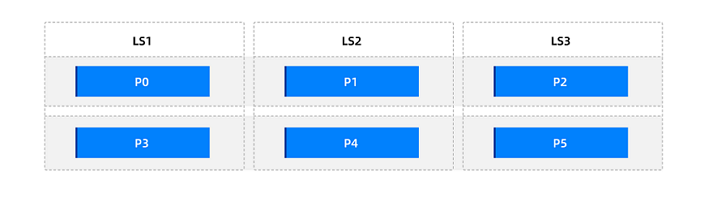
Consider the following scenarios:
Scenario 1: Dispersing a small number of hotspots
Assume that only partitions
p0andp3in the primary partition tablet1are hotspots and need to be dispersed. To minimize the number of weight tiers, you can use only one weight tier, "Low weight = 1".Set the partition weights to
p0 = 1andp3 = 1. During partition balancing, only these two partitions are balanced for weight, while the remaining partitions are not involved in weight balancing and are balanced based on the number of partitions. After manual triggering or waiting for a scheduled partition balancing task, the overall partition distribution is as follows.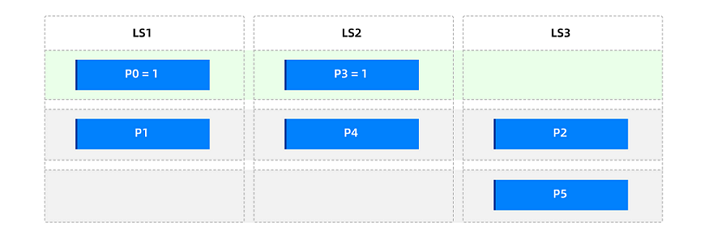
Scenario 2: Distributing all partitions based on weights
Assume that in the primary partition table
t1, partitionp0has the highest traffic, followed byp1,p2, andp3, and the other partitions have relatively low traffic. To disperse the traffic, you can use the following three weight tiers:High weight = 100% * number of partitions in the primary partition table = 6
Medium weight = 50% * number of partitions in the primary partition table = 3
Low weight = 1
Set the table-level partition weight to 1, and define the partition weight balancing range as the entire table. Then, set the partition weights to
p0 = 6,p1 = 3,p2 = 3, andp3 = 3. After partition balancing, the overall partition distribution is as follows.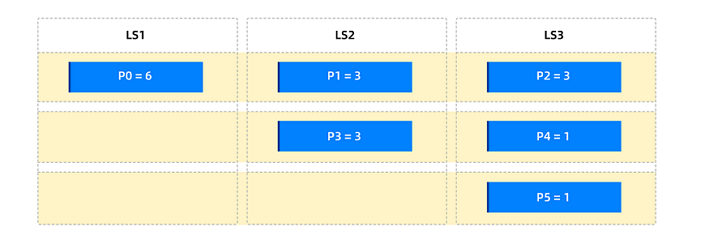
Scenario 3: Isolating hot partitions within the group
Assume that in the primary partition table t1, the traffic is extremely uneven among the six partitions, with two very large partitions, p0 and p3. You want to ensure that these two large partitions are not affected by the other partitions. You can use the following two weight tiers:
High weight = 100% * number of partitions in the primary partition table = 6
Low weight = 1
Set the table-level partition weight to 1, and define the partition weight balancing range as the entire table. Then, set the partition weights to
p0 = 6andp3 = 6. After partition balancing, the overall partition distribution is as follows.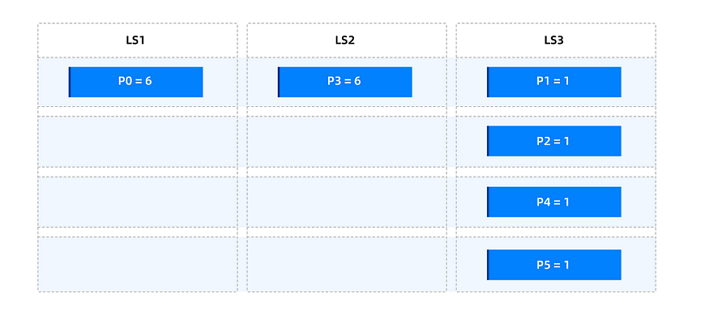
Dispersing hotspots in non-partitioned tables
For example, consider six non-partitioned tables. After the tables are created, their distribution is as follows.
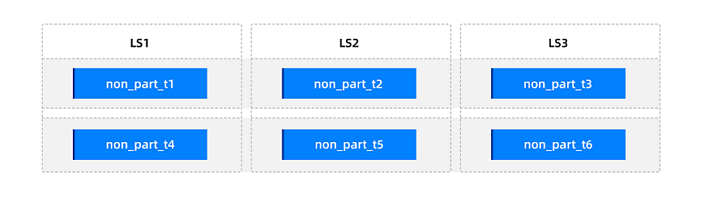
Consider the following scenarios:
Scenario 1: Dispersing a small number of hotspots
Assume that non-partitioned tables
non_part_t1andnon_part_t4are hotspots on the same log stream and need to be dispersed. To minimize the number of weight tiers, you can use only one weight tier, "Low weight = 1".Set the table-level weights to
non_part_t1 = 1andnon_part_t4 = 1. After partition balancing, the distribution is as follows.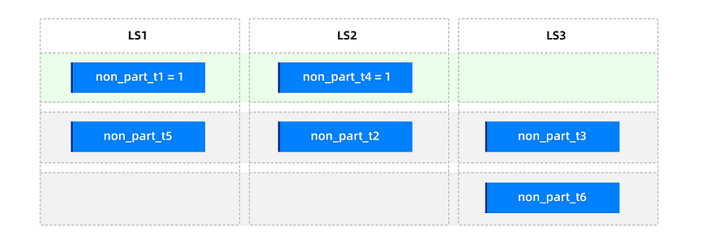
Scenario 2: Distributing based on traffic
Assume that the traffic of the non-partitioned tables is known.
non_part_t1has the highest traffic, followed bynon_part_t2andnon_part_t3, andnon_part_t4,non_part_t5, andnon_part_t6have the lowest traffic. You want to disperse the traffic based on the traffic. You can use the following three weight tiers:High weight = 100% * number of partitions in the primary partition table = 6
Medium weight = 50% * number of partitions in the primary partition table = 3
Low weight = 1
Set the table-level partition weights to
non_part_t1 = 6,non_part_t2 = 3,non_part_t3 = 3,non_part_t4 = 1,non_part_t5 = 1, andnon_part_t6 = 1. After partition balancing, the distribution is as follows.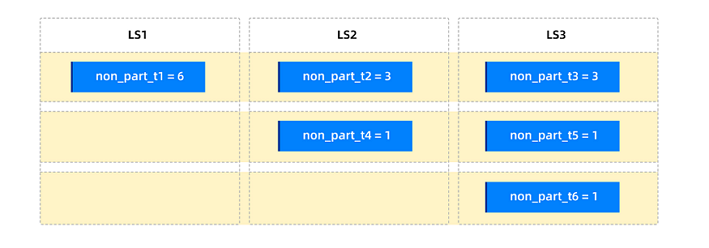
Impact of partition weights on table groups
Tables with partition weights can be added to a table group. For a table group, if it contains tables with partition weights, partition balancing is performed based on the weighted sum within the partition group. The specific impact of adding a table with partition weights to a table group is shown in the following table.
SHARDING attribute of the table group |
Original partition distribution method |
Impact after setting partition weights |
|---|---|---|
| NONE | All partitions are aggregated. | No impact. |
| PARTITION | Partitions with the same value in the primary partitions of each table are aggregated (same partition group); primary partitions are dispersed. | A few weighted partitions may affect the overall distribution of the table group. |
| ADAPTIVE |
|
If all tables in the table group are primary partition tables, a few weighted partitions may affect the overall distribution of the table group. Currently, setting partition weights for secondary partition tables is not supported. |
The following example illustrates the impact of setting partition weights for a table in a table group on the overall distribution of the table group.
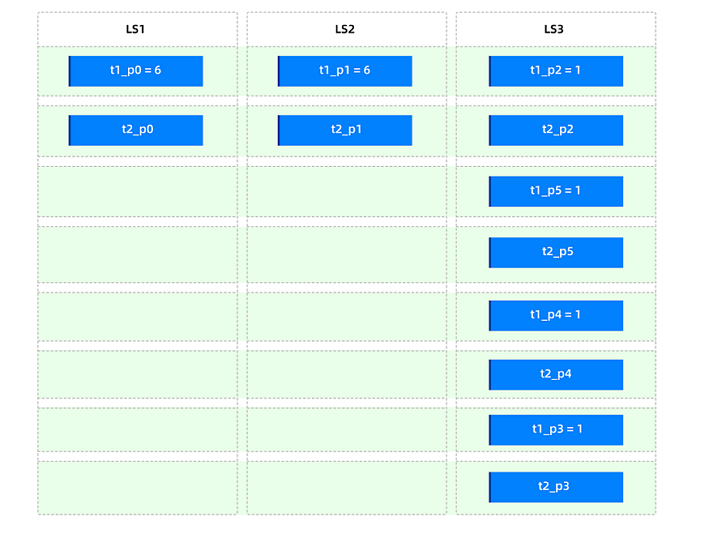
Assume that there is a table group with SHARDING = PARTITION, containing two primary partition tables, t1 and t2. Each table has six partitions, and the primary partitions of each table are bound to a partition group. The original partition distribution is as follows.
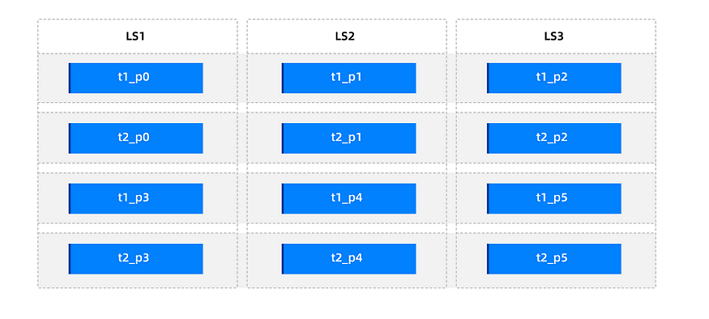
First, set the weights of all partitions in the primary partition table t1 to 1, and then set t1_p0=6 and t1_p1=6. After partition balancing, the partition distribution in the table group is as follows.
Partition count balance
The goal of partition count balance is to ensure that the number of partitions of user tables on the leader servers (LSs) is evenly distributed (with a deviation of no more than 1).
In OceanBase Database, the concept of "balance group" is used to describe the distribution of partitions. Partitions that need to be distributed are grouped into the same balance group. Then, the system performs intra-group and inter-group balancing to achieve partition count balance.
In the absence of table groups, the balance groups are divided as follows:
Table type |
Balance group division |
Distribution method (without table groups) |
|---|---|---|
| Non-partitioned tables | All non-partitioned tables under the tenant form one balance group. | All non-partitioned tables under the tenant are evenly distributed across all LSs of the user (with a deviation of no more than 1). |
| Partitioned tables | All partitions of each table form one balance group. | Partitions of each table are evenly distributed across all LSs of the user. |
| Subpartitioned tables | All subpartitions under each partition of a single table form one balance group. | All subpartitions under each partition of a single table are evenly distributed across all LSs of the user. |
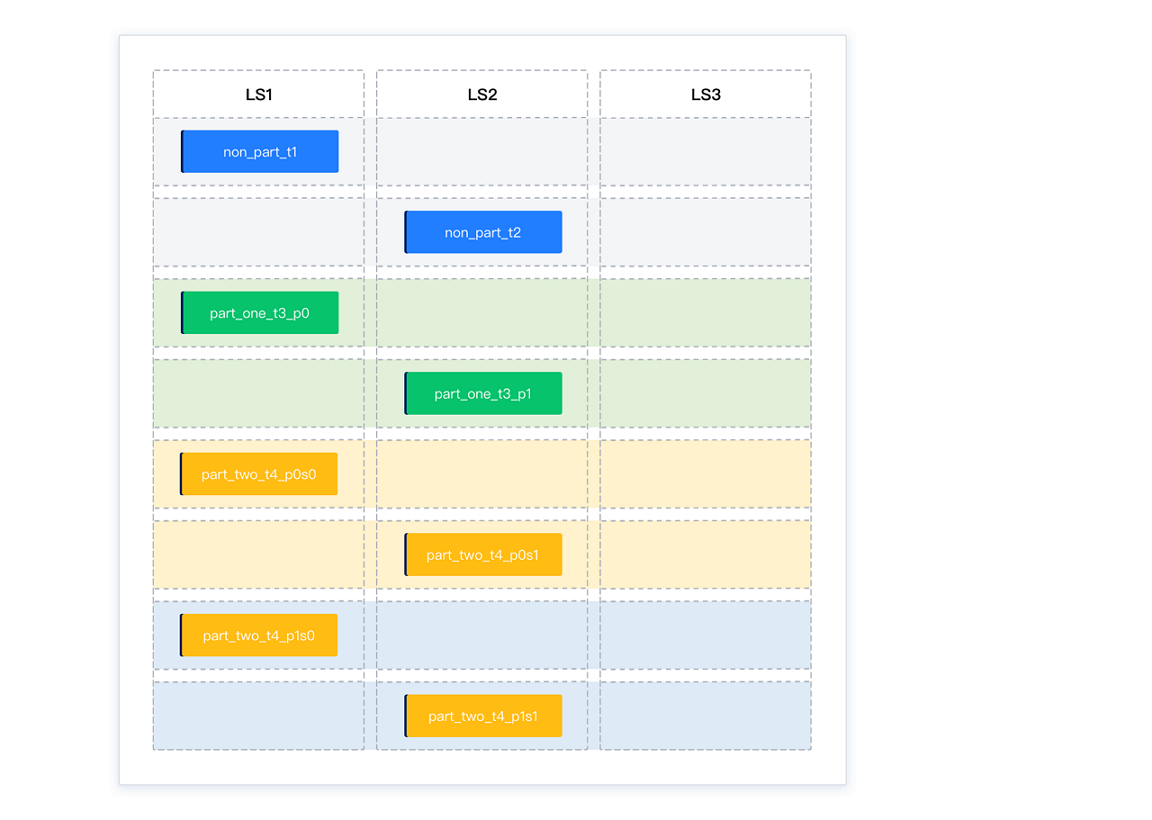
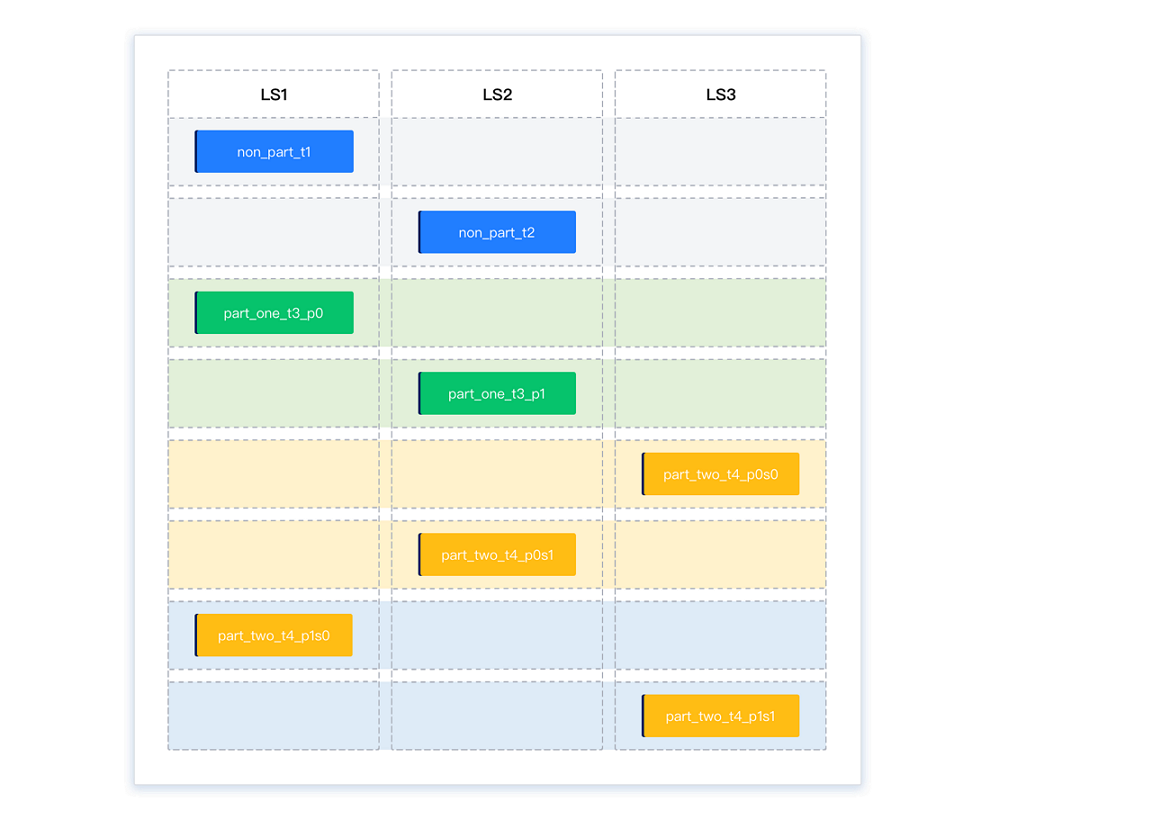
During the balancing phase, the system first performs intra-group balancing, distributing partitions evenly within each balance group. Then, it performs inter-group balancing by transferring partitions from the LS with the most partitions to the LS with the fewest partitions, thereby achieving overall partition count balance.
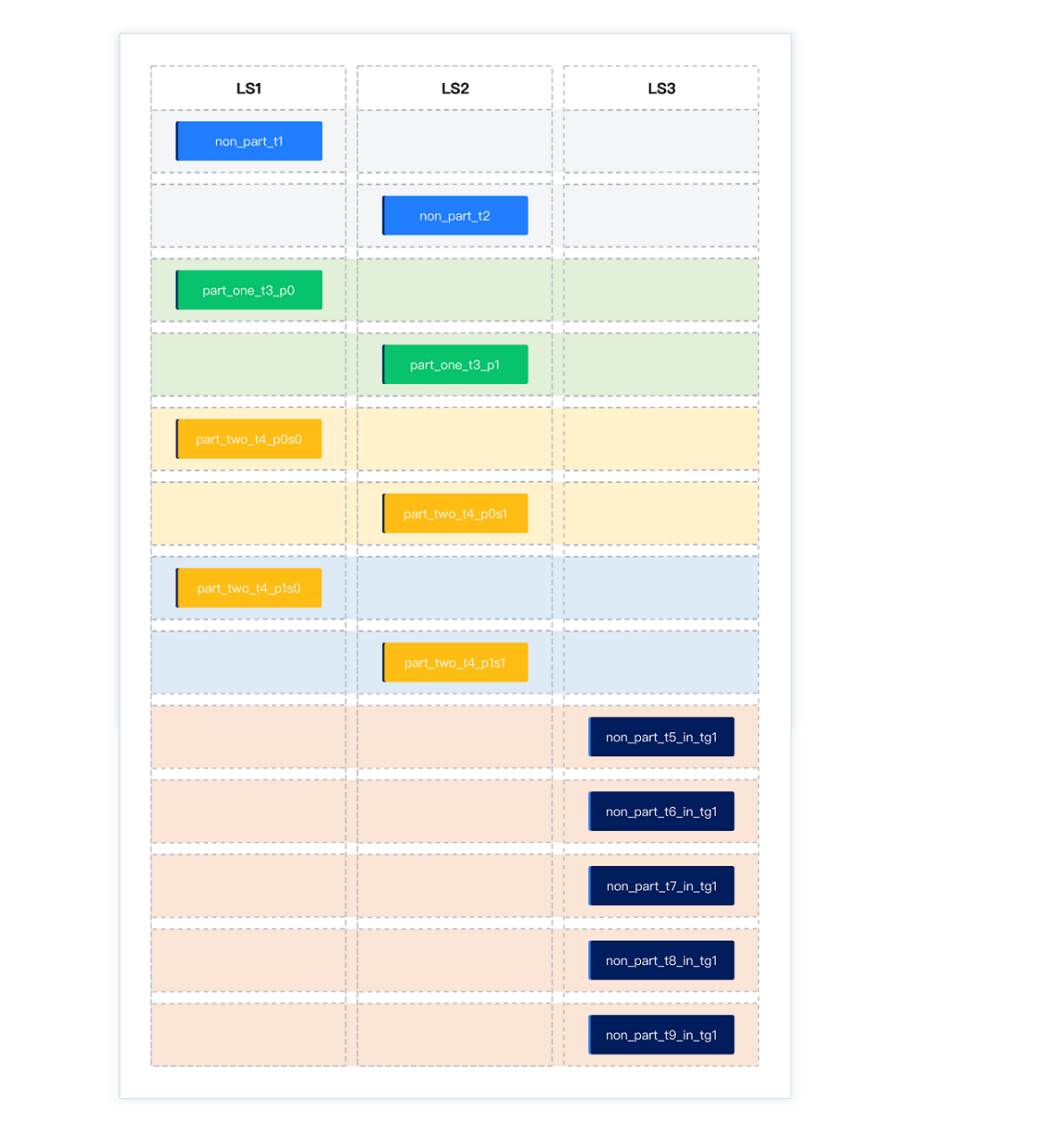
For example, suppose all partitions of four tables are initially located on LS1, divided into three balance groups:
Balance group 1: Non-partitioned tables
non_part_t1andnon_part_t2Balance group 2: Two partitions of a partitioned table,
part_one_t3_p0andpart_one_t3_p1Balance group 3: Four partitions of a subpartitioned table,
part_two_t4_p0s0,part_two_t4_p0s1,part_two_t4_p1s0, andpart_two_t4_p1s1
Initially, the partitions are distributed as 8-0-0.
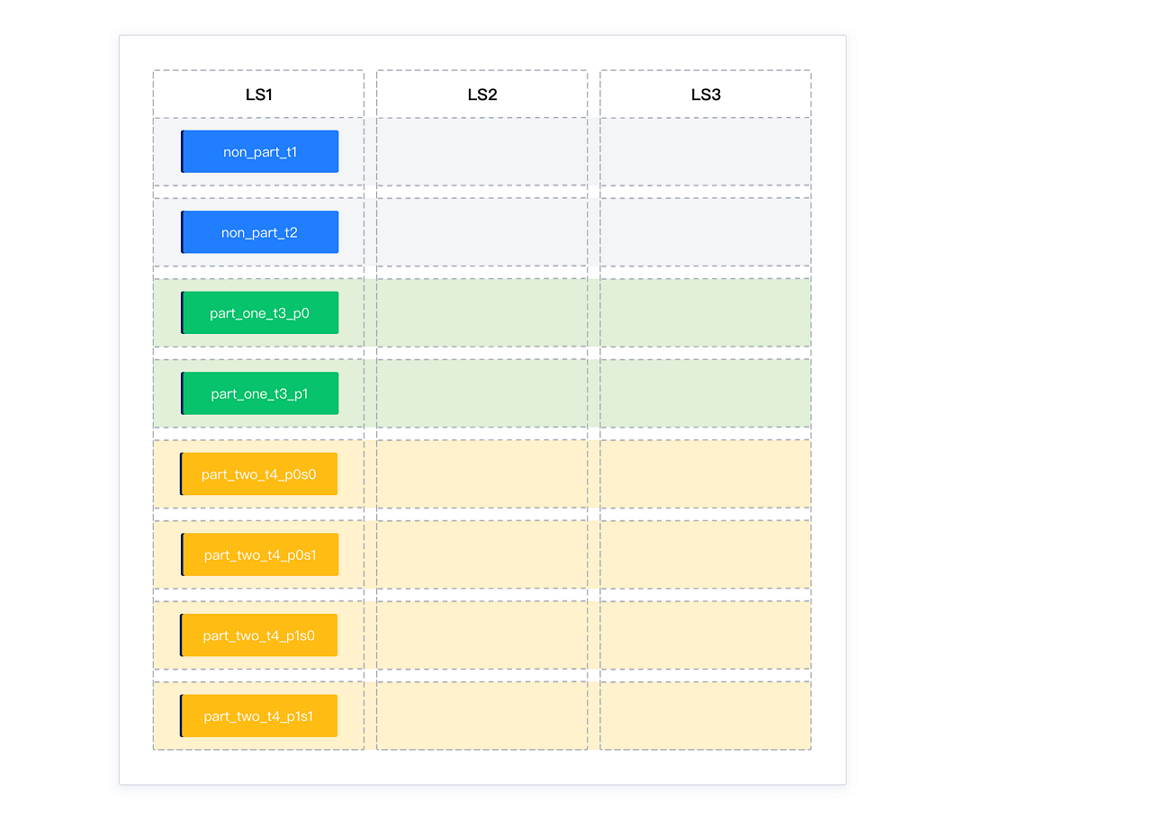
After intra-group balancing, the partitions are distributed as 4-4-0. Each balance group is balanced, but the overall distribution is not.
After inter-group balancing, the partitions are distributed as 3-3-2. Partitions are transferred from LS1 and LS2 (which have the most partitions) to LS3 (which has the fewest partitions), achieving overall balance.
When table groups exist, each table group forms an independent balance group. The system binds the partitions that need to be aggregated within the table group and treats them as a single partition. Then, it performs intra-group and inter-group balancing to achieve partition count balance. In this case, the number of partitions may not be perfectly evenly distributed across all LSs.
In the presence of table groups, the balance groups are divided as follows:
Table type |
Balance group division |
Distribution method |
|---|---|---|
Tables with the Sharding attribute of NONE in a table group |
Form one balance group | All partitions of the table group are distributed on one log stream. |
Partitioned tables with the Sharding attribute of PARTITION or ADAPTIVE in a table group |
All partitions of all tables form one balance group | The partitions of the first table are evenly distributed across all log streams. The partitions of subsequent tables are aggregated with those of the first table. |
Subpartitioned tables with the Sharding attribute of ADAPTIVE in a table group |
All subpartitions under all partitions of all tables form one balance group | The subpartitions under each partition of the first table are evenly distributed across all log streams. The subpartitions of subsequent tables are aggregated with those of the first table. |
For example, after the above balancing, a new table group tg1 with the Sharding attribute NONE is added, containing five non-partitioned tables: non_part_t5_in_tg1, non_part_t6_in_tg1, non_part_t7_in_tg1, non_part_t8_in_tg1, and non_part_t9_in_tg1. Since all tables in tg1 must be bound together, the partition distribution after balancing is 4-4-5.
Partition disk balance
Based on partition count or partition weight balance, the load balancing module exchanges partitions as needed to ensure that the disk usage difference between log streams does not exceed the percentage specified by the cluster-level parameter balancer_tolerance_percentage. If a single partition occupies too much disk space, this balance may not be achieved.
To avoid frequent balancing in scenarios with small data volumes, the current version triggers partition disk balancing only when the disk usage of a single LS exceeds "50GB". If the disk usage is below this threshold, no disk balancing is performed.
Methods for determining partition balance
Partition balance refers to the balance of user table partitions. When querying, you must specify table_type='USER TABLE'. Partition disk balance is primarily determined by the data_size field in the CDB_OB_TABLET_REPLICAS view.
Query method for partition count balance
obclient [test]> SELECT svr_ip,svr_port,ls_id,count(*) FROM oceanbase.CDB_OB_TABLE_LOCATIONS WHERE tenant_id=xxx AND role='leader' AND table_type='USER TABLE' GROUP BY svr_ip,svr_port,ls_id;Query method for partition disk balance
obclient [test]> SELECT a.svr_ip,a.svr_port,b.ls_id,sum(data_size)/1024/1024/1024 as total_data_size FROM oceanbase.CDB_OB_TABLET_REPLICAS a, oceanbase.CDB_OB_TABLE_LOCATIONS b WHERE a.tenant_id=b.tenant_id AND a.svr_ip=b.svr_ip AND a.svr_port=b.svr_port AND a.tablet_id=b.tablet_id AND b.role='leader' AND b.table_type='USER TABLE' AND a.tenant_id=xxxx GROUP BY svr_ip,svr_port,ls_id;
Scenario of sharding reorganization after sharding aggregation
Sharding reorganization is a continuous process to maintain system load balance dynamically. In actual business operations, the system performs sharding aggregation and reorganization based on real-time load status to achieve the optimal balance between resource utilization efficiency and performance. Common scenarios of sharding reorganization after sharding aggregation are as follows:
A tenant is horizontally scaled in and out. For example, the number of
UNIT_NUMof a tenant is changed from N to 1 and then from 1 to N.The number of
PRIMARY_ZONEwith the highest priority of a tenant is changed from a small number to a larger number. For example, thePRIMARY_ZONEof a tenant is changed fromRANDOMtozone1and then fromzone1toRANDOM.A large number of tables are added to a table group with the Sharding attribute set to
NONE, and then removed from the table group.
Based on the existing log stream balancing and sharding reorganization algorithms, after sharding aggregation and reorganization, continuous partitions may be aggregated on the same log stream, or non-partitioned tables in the same database may be aggregated on the same log stream. To address this issue, OceanBase Database has optimized the sharding reorganization algorithm:
For non-partitioned tables, after sharding aggregation and reorganization, multiple non-partitioned tables in the same database are evenly distributed across different user log streams based on the number of partitions, avoiding the scenario where non-partitioned tables in the same database are continuously aggregated on the same log stream.
For partitioned tables, after sharding aggregation and reorganization, continuous partitions of the same partitioned table are evenly distributed across different user log streams in a Round Robin manner, avoiding the scenario where partitions of the same partitioned table are continuously aggregated on the same log stream.