

OceanBase logo

OceanBase

A unified distributed database ready for your transactional, analytical, and AI workloads.

Product Overview
DEPLOY YOUR WAY

OceanBase Cloud

The best way to deploy and scale OceanBase

OceanBase Enterprise

Run and manage OceanBase on your infra

TRY OPEN SOURCE

OceanBase Community Edition

The free, open-source distributed database

OceanBase seekdb

Open source AI native search database

Customer Stories

Real-world success stories from enterprises across diverse industries.

View All
BY USE CASES

Mission-Critical Transactions

Global & Multicloud Application

Elastic Scaling for Peak Traffic

Real-time Analytics

Active Geo-redundancy

Database Consolidation

Resources

Comprehensive knowledge hub for OceanBase.

Blog

Live Demos

Training & Certification

Documentation

Official technical guides, tutorials, API references, and manuals for all OceanBase products.

View All
PRODUCTS

OceanBase Cloud

OceanBase Database

Tools

Connectors and Middleware

QUICK START

OceanBase Cloud

OceanBase Database

BEST PRACTICES

Practical guides for utilizing OceanBase more effectively and conveniently

Company

Learn more about OceanBase – our company, partnerships, and trust and security initiatives.

About OceanBase

Partner

Trust Center

Contact Us

International - English
中国站 - 简体中文
日本 - 日本語
Sign In
Start on Cloud

OceanBase

A unified distributed database ready for your transactional, analytical, and AI workloads.

Product Overview
DEPLOY YOUR WAY

OceanBase Cloud

The best way to deploy and scale OceanBase

OceanBase Enterprise

Run and manage OceanBase on your infra

TRY OPEN SOURCE

OceanBase Community Edition

The free, open-source distributed database

OceanBase seekdb

Open source AI native search database

Customer Stories

Real-world success stories from enterprises across diverse industries.

View All
BY USE CASES

Mission-Critical Transactions

Global & Multicloud Application

Elastic Scaling for Peak Traffic

Real-time Analytics

Active Geo-redundancy

Database Consolidation

Comprehensive knowledge hub for OceanBase.

Blog

Live Demos

Training & Certification

Documentation

Official technical guides, tutorials, API references, and manuals for all OceanBase products.

View All
PRODUCTS
OceanBase CloudOceanBase Database
ToolsConnectors and Middleware
QUICK START
OceanBase CloudOceanBase Database
BEST PRACTICES

Practical guides for utilizing OceanBase more effectively and conveniently

Learn more about OceanBase – our company, partnerships, and trust and security initiatives.

About OceanBase

Partner

Trust Center

Contact Us

Start on Cloud
编组
All Products
    • Databases
    • iconOceanBase Database
    • iconOceanBase Cloud
    • iconOceanBase Tugraph
    • iconInteractive Tutorials
    • iconOceanBase Best Practices
    • Tools
    • iconOceanBase Cloud Platform
    • iconOceanBase Migration Service
    • iconOceanBase Developer Center
    • iconOceanBase Migration Assessment
    • iconOceanBase Admin Tool
    • iconOceanBase Loader and Dumper
    • iconOceanBase Deployer
    • iconKubernetes operator for OceanBase
    • iconOceanBase Diagnostic Tool
    • iconOceanBase Binlog Service
    • Connectors and Middleware
    • iconOceanBase Database Proxy
    • iconEmbedded SQL in C for OceanBase
    • iconOceanBase Call Interface
    • iconOceanBase Connector/C
    • iconOceanBase Connector/J
    • iconOceanBase Connector/ODBC
    • iconOceanBase Connector/NET
icon

OceanBase Database

SQL - V4.6.0

    Download PDF

    OceanBase logo

    The Unified Distributed Database for the AI Era.

    Follow Us
    Products
    OceanBase CloudOceanBase EnterpriseOceanBase Community EditionOceanBase seekdb
    Resources
    DocsBlogLive DemosTraining & Certification
    Company
    About OceanBaseTrust CenterLegalPartnerContact Us
    Follow Us

    © OceanBase 2026. All rights reserved

    Cloud Service AgreementPrivacy PolicySecurity
    Contact Us
    Document Feedback
    1. Documentation Center
    2. OceanBase Database
    3. SQL
    4. V4.6.0
    iconOceanBase Database
    SQL - V 4.6.0
    SQL
    KV
    • V 4.6.0
    • V 4.4.2
    • V 4.3.5
    • V 4.3.3
    • V 4.3.1
    • V 4.3.0
    • V 4.2.5
    • V 4.2.2
    • V 4.2.1
    • V 4.2.0
    • V 4.1.0
    • V 4.0.0
    • V 3.1.4 and earlier

    Overview

    Last Updated:2026-05-07 11:26:25  Updated
    share
    What is on this page
    Log archiving-based physical standby database
    Network-based physical standby database
    Comparison between the two deployment modes

    folded

    share

    The log transmission service synchronizes redo logs between the primary and standby tenants in real time for the physical standby database solution. Specifically, the primary tenant does not actively push logs to the standby tenant. Instead, the standby tenant pulls logs from the primary tenant.

    The log transmission service automatically addresses the log location and handles high availability issues such as log lag and node failure in the cluster where the primary tenant is located. The standby tenant can obtain logs either through log archiving from the primary tenant or by directly connecting to the cluster where the primary tenant is located.

    The log transmission service provides two different usage modes, which determine the deployment approach for the physical standby database: log archiving-based and network-based.

    Log archiving-based physical standby database

    In the log archiving-based physical standby database, the redo logs of the standby tenant come from log archiving of the primary tenant or other standby tenants, similar to Oracle database's Far Sync. The standby tenant only interacts with log archiving and does not have any other form of interaction with the upstream primary tenant or other standby tenants.

    In this deployment mode, the standby tenant does not require network connectivity with the upstream tenant, but its synchronization performance and availability are affected by the log archiving medium.

    The following figure shows the deployment architecture of the log archiving-based physical standby database. In this figure, Log Archive, Log Archive Dest, and Log Restore collectively form the log transmission service in this deployment mode.
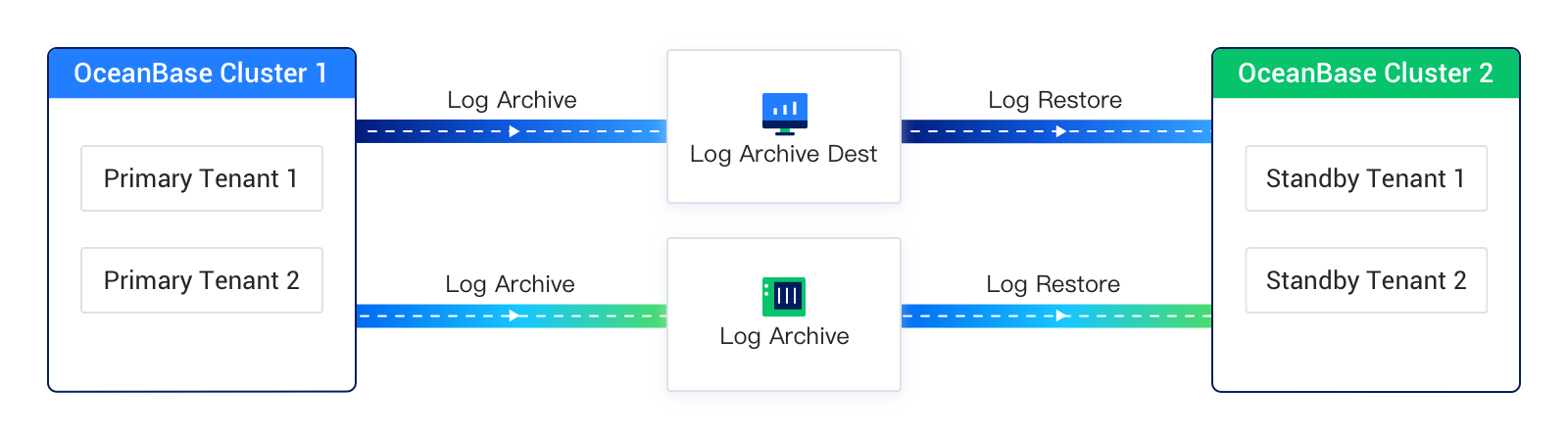
    Physical Standby Database solution based on log archiving

    Network-based physical standby database

    In a network-based physical standby database, the standby tenant reads logs directly from the primary tenant or other standby tenants over the network, similar to the replication feature in MySQL Database.

    In this deployment mode, the standby tenant and the primary tenant must have a reachable network connection. The standby tenant sends RPC requests over the network to retrieve redo logs from the primary tenant's cluster. To ensure high availability in scenarios such as primary tenant node failures or log recycling, the standby tenant also requires minimal query privileges for certain system views on the primary tenant.

    Notably, in this deployment mode, the standby tenant continuously requests logs from the primary tenant's log transfer service. The logs returned by the log transfer service can either be the primary tenant's online logs or archived logs (if the primary tenant has enabled log archiving mode). The log source automatically switches between the two, and this process is completely transparent to both the standby tenant and its users.

    The following diagram illustrates the deployment architecture of the network-based physical standby mode. In the diagram, Primary Tenant 1 has not enabled log archiving, so Standby Tenant 1 can only synchronize Primary Tenant 1's online logs through the log transfer service. On the other hand, Primary Tenant 2 has enabled log archiving, allowing Standby Tenant 2 to synchronize Primary Tenant 2's online logs through the log transfer service. Once the online logs are recycled, the log transfer service automatically switches the log source to archived logs, enabling the standby tenant to continue synchronizing Primary Tenant 2's archived logs. This ensures that log synchronization remains uninterrupted as much as possible.
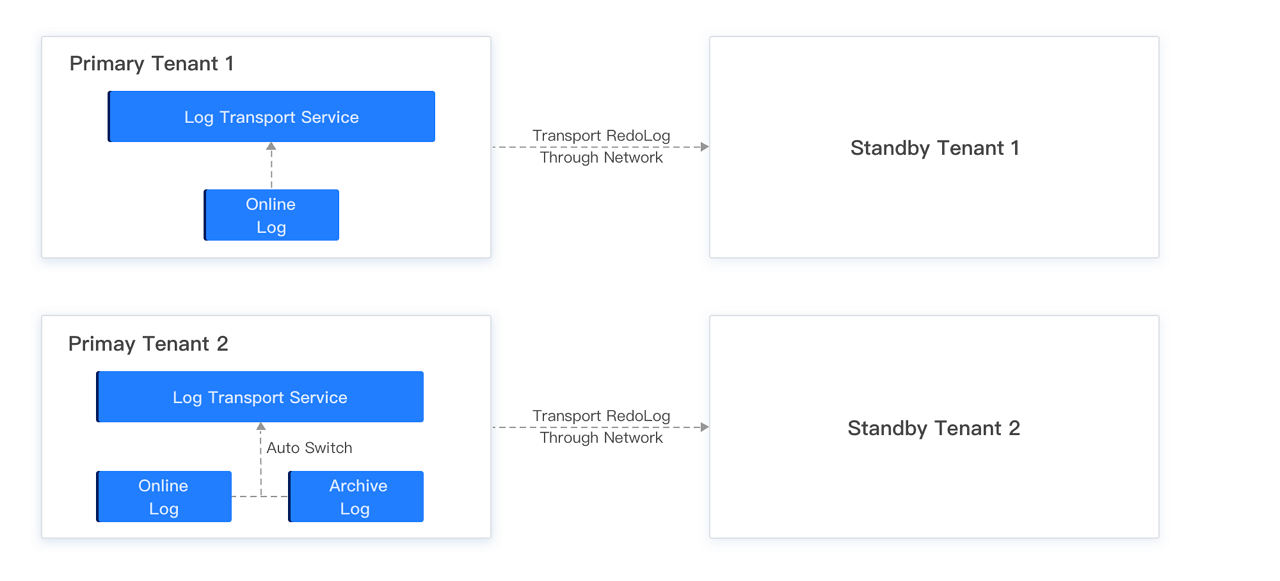
    Network-based Physical Standby Database solution

    Comparison between the two deployment modes

    The log archiving-based physical standby database and the network-based physical standby database have some differences in terms of feature usage, as shown in the following table.

    Feature Log archiving-based physical standby database Network-based physical standby database
    Switchover Supported Supported
    Failover Supported Supported
    Mapping between one primary tenant and multiple standby tenants Supported Supported
    Cascading standby tenants Supported Supported
    Asynchronous mode Yes Yes
    Maximum availability or maximum protection mode Not supported Not supported
    Standby tenant bandwidth limiting Not supported Supported, cluster-level limiting
    Data source for standby tenant Archived logs Online logs or archived logs of primary tenant, supports automatic switching
    Enabling log archiving for primary tenant Required Not required
    Enabling log archiving for standby tenant Required for switchover Not required
    Real-time performance Seconds to minutes Seconds
    Storage medium supported by log archiving OSS/NFS N/A

    Previous topic

    Create a standby tenant by using the BACKUP DATABASE PLUS ARCHIVELOG feature
    Last

    Next topic

    Set a log restore source
    Next
    What is on this page
    Log archiving-based physical standby database
    Network-based physical standby database
    Comparison between the two deployment modes