







OceanBase Cloud Platform (OCP) supports two deployment modes: single-node deployment and high-availability deployment. This topic describes how to deploy OCP on a single node.
Overview
In single-node deployment, all OCP components are deployed on a single node. This node provides all OCP capabilities. The OCP components include OCP-Server, MetaDB, MonitorDB, and OBProxy.
This deployment mode has the following benefits:
All services are deployed on one host, which minimizes the required resources.
All requests are handled on one host without distributed processing, which facilitates log lookup and debugging.
OCP depends on fewer services and does not require server load balancing.
Note
Single-node deployment applies to scenarios with low availability and fast verification requirements.
Deployment process
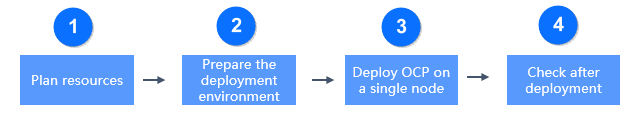
The deployment process is divided into four steps: planning resources, preparing the deployment environment, deploying OCP on a single node, and check after deployment, as shown in the following figure.
Sequence |
Step |
Description |
|---|---|---|
| 1 | Plan resources | For more information, see Host resources, OCP-Server specifications, MetaDB resources, and MonitorDB resources. |
| 2 | Prepare the deployment environment | For more information, see Install OAT, Add a server, and Check the environment. |
| 3 | Deploy OCP | For more information, see Prepare installation media, Create MetaDB, Install OCP, and Initialize system parameters. |
| 4 | Check after deployment | After you deploy OCP, you can verify the installation by checking the OCP features, log files, OCP version, time, and Docker container. |