







Different request links (traces) are available for different requests. A complete request link consists of multiple request procedures (spans). In OceanBase Database, an internal processing procedure is defined as a span. A request link can be understood as a tree structure that contains parent span nodes and child span nodes. This type of information is recorded in trace logs. Parent and child nodes are associated based on parent_id and id. In trace logs, the information about executed SQL statements during each request procedure is tagged. Details about the current operation are recorded by using different tags. Spans and tags are recorded in trace logs to help O&M engineers understand the internal processing logic of the database and locate issues.
The following sections describe the three parts of an entire access link.
Key concepts
- Trace: In the end-to-end tracing process, a trace can be understood as a transaction within OceanBase Database.
- Span: A type of specific trace. A trace can have multiple spans. A span can be a statement, function, or anonymous block.
- Tag: A key-Value pair, which belongs to a specific span. A span can have multiple tags.
- Log: A key-Value pair with timestamp, which belongs to a specific span. A span can have multiple logs.
Client
Applications connect to OceanBase Database by using the OBClient or JDBC driver.
Spans related to the client are obclient and JDBC.
obclient: Applications access the database by using the OBClient.JDBC: Applications access the database by using the JDBC driver.
Client-related tags are command_name and client_ip. The tags of the OBClient and JDBC driver are consistent.
command_namemarks requests of different types such as text requests, prepare requests, and execute requests.client_ipspecifies the IP address and port of the OBClient that sends the request.
ODP
This phase involves three levels of spans. The span level here corresponds to the level variable in the trace-related function of DBMS_MONITOR.
Level 1
Two types of spans are defined: ob_proxy and ob_proxy_server_process_req.
ob_proxyindicates the total time consumed by OceanBase Database Proxy (ODP) to process an SQL request. This period begins from the time when a database request is sent, to the time when data processing is finished, and finally to the time when a result is returned, excluding the frontend driver layer of OceanBase Database.ob_proxy_server_process_reqindicates the time consumed by ODP to process an SQL request and the network overhead of the request.
Level 2
Two types of spans are defined: ob_proxy_server_response_read and ob_proxy_cluster_resource_create.
ob_proxy_server_response_readindicates the time consumed in reading the response.ob_proxy_cluster_resource_createindicates the time consumed by ODP to prepare cluster resources in the request forwarding phase.
Level 3
Four types of spans are defined: ob_proxy_partition_location_lookup , ob_proxy_do_OBServer_open, ob_proxy_client_response_write, and ob_proxy_server_request_write.
ob_proxy_partition_location_lookupindicates the time consumed by ODP to obtain the partition location for routing in the request forwarding phase.ob_proxy_do_observer_openindicates the time consumed by ODP to select an OBServer node or establish a connection in the request forwarding phase.ob_proxy_client_response_writeindicates the time consumed by ODP to forward the response to the client after it receives the response from the OBServer node.ob_proxy_server_request_writeindicates the time consumed by ODP to forward the client request to the OBServer node.
OBServer
Spans
OBServer classifies the received requests into text SQL statements, preprocess statements, and stored procedures. The three types of requests contain transactions, internal SQL requests, and access requests stored in the database.
The following figure shows the access links for different request types and the relationship between parent and child span nodes. For example, the parent span of the mpquery_single_stmt span is com_query_entry, and the child span of the com_query_entry span is mpquery_single_stmt.
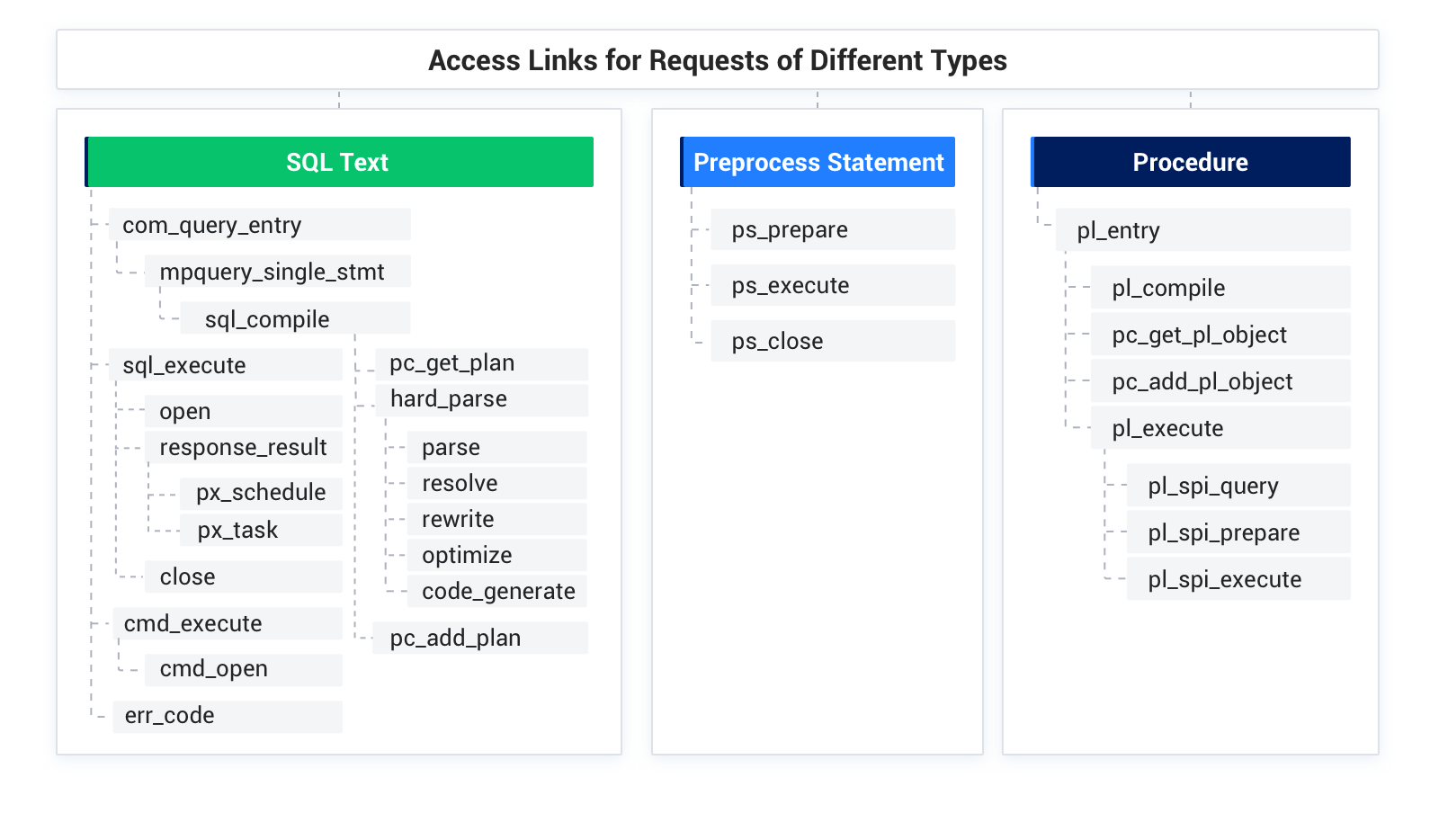
The spans are described as follows:
com_query_entry: the query procedure.
mpquery_single_stmt: the access path of a single statement.
sql_compile: specifies to compile an SQL statement.
pc_get_plan: specifies to obtain an execution plan.
hard_parse: hard parsing.
parse: soft parsing.
resolve: specifies to parse the semantics of the syntax tree and generate a statement.
rewrite: specifies to rewrite an SQL statement.
optimize: specifies to perform cost-based optimization and generate execution plan logs.
code_generate: specifies to generate a physical execution plan based on the execution plan logs.
pc_add_plan: specifies to add the generated execution plan to the plan cache.
sql_execute: specifies to execute the physical execution plan.
open: specifies to open the execution plan.
response_result: the procedure and result of the execution plan.
px_schedule: specifies to schedule tasks based on parallel execution (PX).
px_task: specifies to execute PX subtasks.
close: specifies to close the execution plan.
cmd_execute: specifies to execute the command.
cmd_open: specifies to enable the cmd plan.
ps_prepare: specifies to prepare the preprocess statement.
ps_execute: specifies to execute the preprocess statement.
ps_close: specifies to close the preprocess statement.
pl_entry: specifies to process the stored procedure.
pl_compile: specifies to compile the stored procedure object.
pc_get_pl_object: specifies to obtain the stored procedure object from the plan cache.
pc_add_pl_object: specifies to store the stored procedure object in the plan cache.
pl_execute: specifies to execute the stored procedure.
pl_spi_query: specifies to execute the SPI statement in the stored procedure.
pl_spi_prepare: the preprocessing phase of stored procedures.
pl_spi_execute: specifies to execute the SPI statement in the stored procedure.
inner_prepare: the preprocessing phase of internal SQL statements.
inner_execute: the execution phase of internal SQL statements.
inner_execute_read: specifies to read internal SQL requests.
inner_execute_write: specifies to write internal SQL requests.
inner_commit: specifies to commit an internal SQL transaction.
inner_rollback: specifies to roll back an internal SQL transaction.
Tags
The following tags are defined to supplement span information.
com_query_entry
log_trace_id: the trace ID of the current request in logs.
err_code: the error code of the current request.
sql_compile
sess_id: the session ID.
sql_text: the SQL text.
sql_id: the SQL ID.
hit_plan: indicates that the current execution plan hits the plan cache.
px_task
task_id: the logical ID of the parallel task.
dfo_id: the ID of the data flow operation.
sqc_id: the ID of the subquery coordinator.
qc_id: the ID of the query coordinator.
group_id: the ID of the resource group
px_schedule
dfo_id: the ID of the data flow operation.
used_worker_cnt: the number of PX worker threads in use.
qc_id: the ID of the query coordinator.
ps_close
- ps_id: the ID of the preprocess statement.