







Tables in a distributed analytical processing (AP) system contain a large amount of data. When data of different tables is randomly distributed, large overheads are caused by data transmission for joining tables. Table groups allow you to align partitioned tables that are partitioned by using the same partitioning method based on specific rules and centralize associated data on the same server. This way, you can apply partition-wise joins to these tables to reduce the overheads of data transmission for joining the tables and improve the performance of joins.
Overview
In a distributed database, data in multiple tables can be distributed across servers. In this case, cross-server communication is required when you perform complex operations such as JOIN queries or cross-table transactions. Table groups can help avoid cross-server operations to improve database performance.
As a distributed database, OceanBase Database supports partitioning to store data of a table into multiple partitions, which meets the requirements for scalability and multi-point writing. The column used for data partitioning in a table is called a partition key. You can hash a row of data based on its partition key value to locate the partition to which the data belongs. Data can be partitioned by using multiple methods. Hash partitioning is used as an example herein.
You can aggregate tables partitioned by using the same method into a table group. For example, hash partitioned tables have the same number of partitions, and the same hash algorithm is used to calculate partitions. Partitions with the same IDs of tables in a table group are called a partition group, as shown in the following figure.
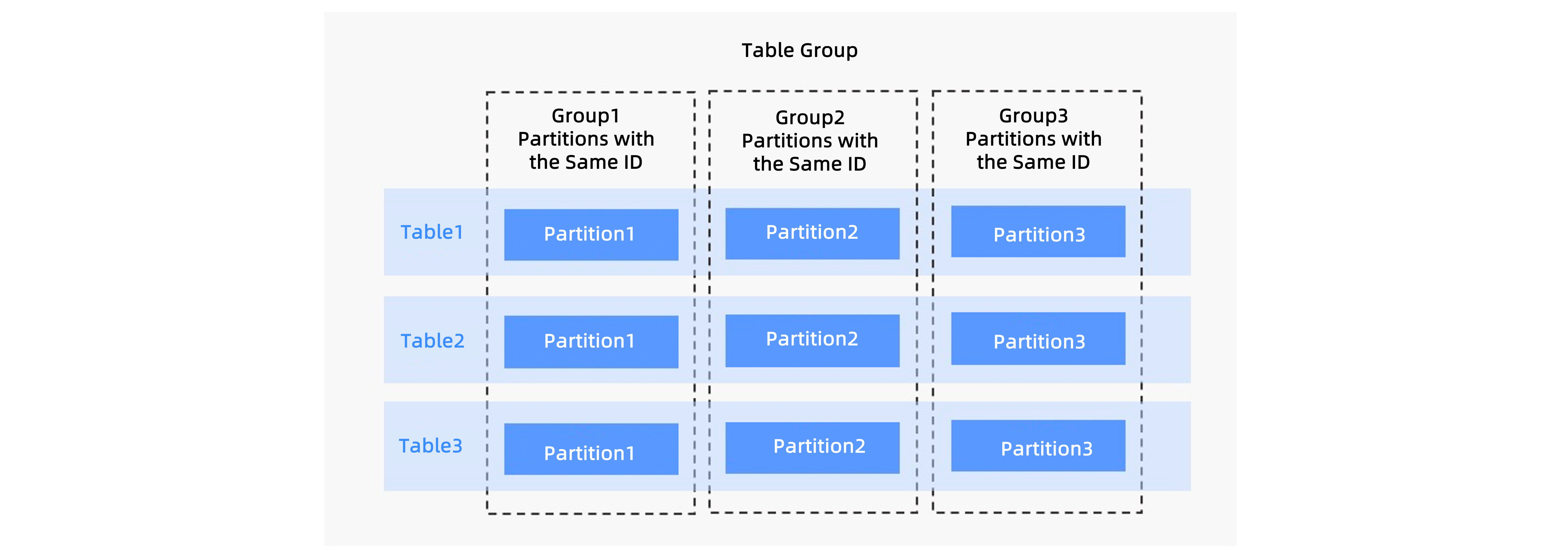
When you create partitions or during load balancing, OceanBase Database deploys partitions in one partition group to one server. This can avoid cross-server operations in cross-table data access, provided that the accessed data belongs to partitions in the same partition group. How can OceanBase Database ensure that the accessed data belongs to the same partition group? OceanBase Database does not interfere with your operations, but ensures that most cross-table data involved in some operations belongs to the same partition group based on business characteristics.
Example 1
Create a table group named tg1 with its SHARDING attribute set to ADAPTIVE, as well as two partitioned tables named tbl1 and tbl2. When the conditions for joining the two partitioned tables include join conditions for partitioning keys, you can use a partition-wise join to improve performance.
CREATE TABLEGROUP tg1 SHARDING = 'ADAPTIVE';

CREATE TABLE tbl1 (id BIGINT PRIMARY KEY,  VARCHAR(50)) TABLEGROUP = tg1
PARTITION BY HASH(id) partitions 128;

CREATE TABLE tbl2 (id BIGINT, col1 VARCHAR(50)) TABLEGROUP = tg1
PARTITION BY HASH(id) partitions 128;

SELECT count(*)
FROM tbl1, tbl2
where tbl1.id = tbl2.id;
Example 2
Create a table group named tg2 with its SHARDING attribute set to ADAPTIVE, as well as two partitioned tables named tbl3 and tbl4. When the conditions for joining the two partitioned tables include join conditions for partitioning keys, you can use a partition-wise join to improve performance.
CREATE TABLEGROUP tg2 SHARDING = 'ADAPTIVE';

CREATE TABLE tbl3 (id BIGINT PRIMARY KEY, gmt_date datetime) TABLEGROUP = tg2
PARTITION BY RANGE(gmt_date)
SUBPARTITION BY HASH(id) subpartitions 128
(partition P202401 values less than(timestamp '2024-02-01 00:00:00'),
 partition P202402 values less than(timestamp '2024-03-01 00:00:00'),
 partition P202403 values less than(timestamp '2024-04-01 00:00:00'),
 partition P202401 values less than(timestamp '2024-05-01 00:00:00'),
 partition P202405 values less than(timestamp '2024-06-01 00:00:00'),
 partition P202406 values less than(timestamp '2024-07-01 00:00:00')
);


CREATE TABLE tbl4 (id BIGINT, gmt_date datetime) TABLEGROUP = tg2
PARTITION BY RANGE(gmt_date)
SUBPARTITION BY HASH(id) subpartitions 128
(partition P202401 values less than(timestamp '2024-02-01 00:00:00'),
 partition P202402 values less than(timestamp '2024-03-01 00:00:00'),
 partition P202403 values less than(timestamp '2024-04-01 00:00:00'),
 partition P202401 values less than(timestamp '2024-05-01 00:00:00'),
 partition P202405 values less than(timestamp '2024-06-01 00:00:00'),
 partition P202406 values less than(timestamp '2024-07-01 00:00:00')
);

SELECT count(*)
FROM tbl3, tbl4
where tbl3.id = tbl4.id
  and tbl3.gmt_date = tble4.gmt_date;
Example 3
The following shows an execution plan for a TPCH-Q9 query with auto DOP enabled. The PART, SUPPLIER, LINEITEM, PARTSUPP, and ORDERS tables are partitioned tables in one table group. The NATION table is a non-partitioned table. Definitions of the tables are long and therefore not shown here.
The execution plan shows that the join (operator 21) between the PART table (operator 23) and the PARTSUPP table (operator 25) and the join (operator 7) between the ORDERS (operator 29) table and the LINEITEM (operator 27) table are partition-wise joins. Data does not need to be transmitted between the left and right branches of the two joins through the EXCHANGE operator, which greatly reduces the overheads of data transmission. The join (operator 17) between the PARTSUPP table (operator 25) and the LINEITEM table (operator 27) is not a partition-wise join. Although the two tables belong to one table group, the join keys of the two tables do not contain the partitioning keys, and therefore you cannot use the partition-wise join method to reduce the overheads of data transmission.
explain
SELECT /*+parallel(auto)*/ NATION,
                    O_YEAR,
                    SUM(AMOUNT) AS SUM_PROFIT
FROM
  (SELECT N_NAME AS NATION,
          DATE_FORMAT(O_ORDERDATE, '%Y') AS O_YEAR,
          L_EXTENDEDPRICE*(1-L_DISCOUNT)-PS_SUPPLYCOST*L_QUANTITY AS AMOUNT
   FROM PART,
        SUPPLIER,
        LINEITEM,
        PARTSUPP,
        ORDERS,
        NATION
   WHERE S_SUPPKEY = L_SUPPKEY
     AND PS_SUPPKEY= L_SUPPKEY
     AND PS_PARTKEY = L_PARTKEY
     AND P_PARTKEY= L_PARTKEY
     AND O_ORDERKEY = L_ORDERKEY
     AND S_NATIONKEY = N_NATIONKEY
     AND P_NAME LIKE '%%green%%') AS PROFIT
GROUP BY NATION,
         O_YEAR
ORDER BY NATION,
         O_YEAR DESC;

===========================================================================================
|ID|OPERATOR                                              |NAME    |EST.ROWS |EST.TIME(us)|
-------------------------------------------------------------------------------------------
|0 |PX COORDINATOR MERGE SORT                             |        |42833    |9793228     |
|1 |└─EXCHANGE OUT DISTR                                  |:EX10004|42833    |9761934     |
|2 |  └─SORT                                              |        |42833    |9758876     |
|3 |    └─HASH GROUP BY                                   |        |42833    |9757694     |
|4 |      └─EXCHANGE IN DISTR                             |        |985159   |9752609     |
|5 |        └─EXCHANGE OUT DISTR (HASH)                   |:EX10003|985159   |9721315     |
|6 |          └─HASH GROUP BY                             |        |985159   |9650996     |
|7 |            └─HASH JOIN                               |        |42590286 |9438413     |
|8 |              ├─SHARED HASH JOIN                      |        |40579279 |8156738     |
|9 |              │ ├─EXCHANGE IN DISTR                   |        |25       |26          |
|10|              │ │ └─EXCHANGE OUT DISTR (BC2HOST)      |:EX10000|25       |26          |
|11|              │ │   └─COLUMN TABLE FULL SCAN          |nation  |25       |5           |
|12|              │ └─SHARED HASH JOIN                    |        |40579279 |8006668     |
|13|              │   ├─EXCHANGE IN DISTR                 |        |1000000  |880987      |
|14|              │   │ └─EXCHANGE OUT DISTR (BC2HOST)    |:EX10001|1000000  |864431      |
|15|              │   │   └─PX PARTITION ITERATOR         |        |1000000  |10326       |
|16|              │   │     └─COLUMN TABLE FULL SCAN      |supplier|1000000  |10326       |
|17|              │   └─SHARED HASH JOIN                  |        |40579279 |6966307     |
|18|              │     ├─EXCHANGE IN DISTR               |        |5410229  |3596101     |
|19|              │     │ └─EXCHANGE OUT DISTR (BC2HOST)  |:EX10002|5410229  |3426468     |
|20|              │     │   └─PX PARTITION ITERATOR       |        |5410229  |504193      |
|21|              │     │     └─HASH JOIN                 |        |5410229  |504193      |
|22|              │     │       ├─JOIN FILTER CREATE      |:RF0000 |1355668  |326112      |
|23|              │     │       │ └─COLUMN TABLE FULL SCAN|part    |1355668  |326112      |
|24|              │     │       └─JOIN FILTER USE         |:RF0000 |5410660  |30374       |
|25|              │     │         └─COLUMN TABLE FULL SCAN|partsupp|5410660  |30374       |
|26|              │     └─PX PARTITION ITERATOR           |        |600037902|921105      |
|27|              │       └─COLUMN TABLE FULL SCAN        |lineitem|600037902|921105      |
|28|              └─PX PARTITION ITERATOR                 |        |150000000|76768       |
|29|                └─COLUMN TABLE FULL SCAN              |orders  |150000000|76768       |
===========================================================================================
References
For more information about table groups, see the following topics: