







The syntax of SELECT is complex. This topic describes the syntax of general SELECT statements and aggregate SELECT statements.
Purpose
You can use this statement to query data from a table.
Syntax
SELECT
        [/*+ hint statement */]
        [ALL | DISTINCT | UNIQUE | SQL_CALC_FOUND_ROWS]
        select_expr_list
        [FROM from_list [WHERE condition]]
        [GROUP BY group_expression_list [WITH ROLLUP] [HAVING condition]]
        [ORDER BY order_expression_list]
        [limit_clause]
        [FOR UPDATE [opt_for_update_wait]]
        [LOCK IN SHARE MODE];
select_expr:
 table_name.*
  | table_alias_name.*
  | expr [[AS] column_alias_name]

from_list:
      DUAL
    | table_reference [, table_reference ...]

table_reference:
      simple_table
    | joined_table
    | table_name@dblink_name

simple_table:
    table_factor [partition_option]
        [sample_clause [opt_seed]]
        [[AS] table_alias_name][index_hint]
    | (select_stmt [sample_clause [opt_seed])
        [AS] table_alias_name [index_hint]
    | (table_reference_list) [index_hint]

joined_table:
      table_reference [NATURAL][INNER] JOIN simple_table [join_condition]
    | table_reference outer_join_type JOIN simple_table join_condition

partition_option:
    PARTITION (partition_name_list)

sample_clause:
    SAMPLE [BLOCK] [ ALL | BASE | INCR] (sample_percent)

opt_seed:
    SEED(integer)

index_hint:
    {USE | FORCE | IGNORE} {KEY | INDEX}
       [FOR {JOIN | ORDER BY | GROUP BY}] (index_list)

index_list:
    index_name [, index_name ...]

partition_name_list:
    partition_name [, partition_name ...]

outer_join_type:
    [NATURAL]{LEFT | RIGHT | FULL} [OUTER]

join_condition:
    ON expression

condition:
    expression

group_expression_list:
    group_expression [, group_expression ...]

group_expression:
    expression [ASC | DESC]

order_expression_list:
    order_expression [, order_expression ...]

order_expression:
    expression [ASC | DESC]

limit_clause:
  LIMIT {[offset,] row_count |row_count OFFSET offset}

opt_for_update_wait:
    WAIT { DECIMAL | INTNUM }
  | NOWAIT | NO_WAIT
Parameters
Parameter |
Description |
|---|---|
| ALL | DISTINCT | UNIQUE | SQL_CALC_FOUND_ROWS | A database table may contain duplicate values.
|
| select_expr | The expressions or column names that you want to query. Multiple values must be separated with commas (,). You can also use an asterisk (*) to represent all columns. |
| AS othername | Renames the output fields. |
| FROM table_references | The table or tables from which data is to be retrieved (multi-table query is supported). |
| WHERE where_conditions | A filter condition, which is optional. Only the data that meets the condition is included in the query result. where_conditions is an expression. |
| GROUP BY group_by_list | Summarizes data by class. |
| WITH ROLLUP | Summarizes groups to produce higher-level aggregations, also known as hyper-aggregations, and additional rows. |
| HAVING search_conditions | The HAVING clause is similar to the WHERE clause, but the HAVING clause can use an accumulation function such as SUM or AVG. |
| SAMPLE [BLOCK] [ ALL | BASE | INCR] (sample_percent) | Scans only some records.
|
| SEED integer | The sampling seed. Value range: [0, 4294967295]. The same result is always returned for the same seed. |
| {USE | FORCE | IGNORE} {KEY | INDEX} [FOR {JOIN | ORDER BY | GROUP BY}] (index_list) | Specifies whether to use the specified index for the query.
|
| SQL_CALC_FOUND_ROWS | Displays the query results in ascending (ASC) or descending (DESC) order. The default value is ASC. |
| [LIMIT {[offset,] row_count |row_count OFFSET offset}] | Forces the SELECT statement to return the specified number of records. LIMIT supports one or two numeric arguments. The arguments must be integer constants.
|
| FOR UPDATE | Imposes an exclusive lock on all the rows in the query results to prevent other concurrent transactions from changing or reading the rows in some transaction isolation levels.
|
| PARTITION(partition_list) | The partitions from which data is selected in the table. For example, you can set this parameter to PARTITION(p0,p1…). |
| dblink_name | The DBLink used to query data from tables in a remote database. |
| LOCK IN SHARE MODE | Locks query results. |
Examples
Simple table queries
Take table a as an example.
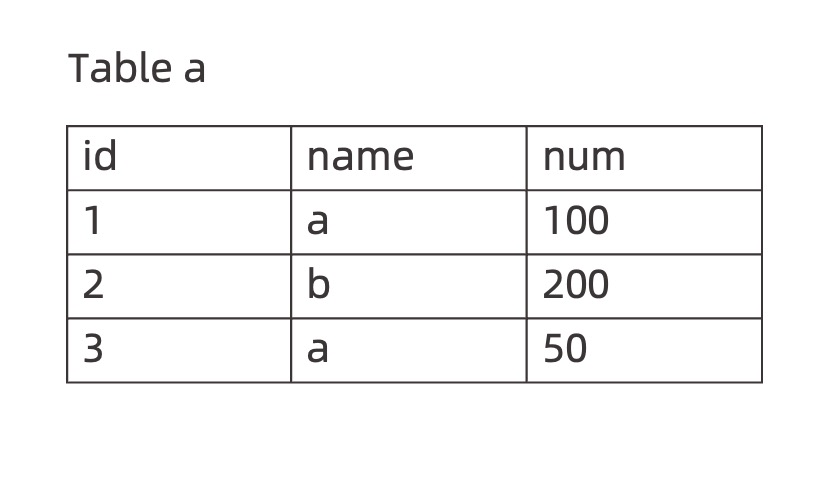
Query the data in the
namecolumn from tablea.obclient> SELECT name FROM a; +------+ | name | +------+ | a | | b | | a | +------+Deduplicate the query results of the
namecolumn.obclient> SELECT DISTINCT name FROM a; +------+ | name | +------+ | a | | b | +------+Query the
id,name, andnumvalues from tablea, divide thenumvalues by 2, and name the output column asavg.obclient> SELECT id, name, num/2 AS avg FROM a; +------+------+----------+ | id | name | avg | +------+------+----------+ | 1 | a | 50.0000 | | 2 | b | 100.0000 | | 3 | a | 25.0000 | +------+------+----------+Return the corresponding values of the
id,name, andnumcolumns based on the filter conditionname = 'a'from tablea.obclient> SELECT id, name, num FROM a WHERE name = 'a'; +------+------+------+ | id | name | num | +------+------+------+ | 1 | a | 100 | | 3 | a | 50 | +------+------+------+Query the
idandnamevalues from tablea, calculate the sum of thenumvalues byname, and return the calculation results.obclient> SELECT id, name, SUM(num) FROM a GROUP BY name; +------+------+----------+ | id | name | SUM(num) | +------+------+----------+ | 1 | a | 150 | | 2 | b | 200 | +------+------+----------+Query the
idandnamevalues from tablea, calculate the sum of thenumvalues byname, and return the rows with a sum of less than160.obclient> SELECT id, name, SUM(num) as sum FROM a GROUP BY name HAVING SUM(num) < 160; +------+------+------+ | id | name | sum | +------+------+------+ | 1 | a | 150 | +------+------+------+Query the
id,name, andnumvalues from tablea, and sort the result set by thenumcolumn inASCorder.obclient> SELECT * FROM a ORDER BY num ASC; +------+------+------+ | id | name | num | +------+------+------+ | 3 | a | 50 | | 1 | a | 100 | | 2 | b | 200 | +------+------+------+Query the
id,name, andnumvalues from tablea, and sort the result set by thenumcolumn inDESCorder.obclient> SELECT * FROM a ORDER BY num DESC; +------+------+------+ | id | name | num | +------+------+------+ | 2 | b | 200 | | 1 | a | 100 | | 3 | a | 50 | +------+------+------+Query the
id,name, andnumvalues from tablea, and useLIMITto forcibly return two result rows starting from the second row.obclient> SELECT * FROM a LIMIT 1,2; +------+------+------+ | id | name | num | +------+------+------+ | 2 | b | 200 | | 3 | a | 50 | +------+------+------+You can use the
SELECT ... FOR UPDATEstatement to apply a row lock to a table. If you use theLIMIT 1clause, the operator is pushed down to the table scan step during query optimization, and only the rows returned byLIMITare locked.obclient> SELECT * FROM a LIMIT 1 FOR UPDATE;If you use the
ORDER BYclause, the query results are sorted first, and theLIMIT 1clause is executed. In this case, all the selected rows are locked.obclient> SELECT * FROM a ORDER BY id LIMIT 1 FOR UPDATE;Use the
LOCK IN SHARE MODEoption to lock the query results of theatable.obclient> SELECT * FROM a LOCK IN SHARE MODE; +------+------+------+ | id | name | num | +------+------+------+ | 1 | a | 100 | | 2 | b | 200 | | 3 | a | 50 | +------+------+------+ 3 row in set
Queries using a DBLink
Read the
number_ttable in the remotetestdatabase.obclient> SELECT * FROM number_t@ob_dblink; +--------+-------------+---------+---------------------+--------------------------------+ | c_int | c_bigint | c_float | c_double | c_decimal | +--------+-------------+---------+---------------------+--------------------------------+ | 214748 | 92233720368 | 3.40282 | 1.7976931348623157 | 123456789123456789.1234567890 | +--------+-------------+---------+---------------------+--------------------------------+ 1 row in setRead the
number_ttable in the remotetestdatabase and join the table with the localnumber_ttable.obclient> SELECT a.c_decimal, b.c_double FROM number_t a, number_t@ob_dblink b where a.c_int = b.c_int; +--------------------------------+---------------------+ | c_decimal | c_double | +---------------------+--------------------------------+ | 123456789123456789.1234567890 | 1.7976931348623157 | +---------------------+--------------------------------+ 1 row in setRead the
datetime_ttable in the remotemysqldatabase.obclient> SELECT * FROM mysql.datetime_t@ob_dblink; +-------------+------------+---------+----------------------+----------------------+ | c_date | c_time | c_year | c_datetime | c_timestamp | +-------------+------------+---------+-----------------------+---------------------+ | 2023-04-13 | 12:12:12 | 2078 | 2100-11-01 12:12:13 | 2100-12-01 21:14:15 | +-------------+------------+---------+----------------------+----------------------+ 1 row in set