Meet OceanBase AI Lakebase, the unified database for operational data, real-time analytics, and AI.
Meet OceanBase AI Lakebase, the unified database for operational data, real-time analytics, and AI. Explore ->
Deploy and Run OceanBase from Qoder Desktop in One Sentence

- The OceanBase plugin for Qoder Desktop turns a natural-language request into an operational workflow covering host checks, configuration, installation, startup, and verification.
- A deployment is handed back with concrete acceptance data: cluster status, version, endpoints, resource settings, connection commands, and Dashboard access.
- Minimum available resources are 2 vCPUs, 6 GB of memory, and 20 GB of disk for OceanBase alone, or 4 vCPUs, 10 GB, and 25 GB for the database and all components.
Installing database software is only one part of deployment. The harder work sits around it: validating the host, selecting parameters, starting services in the correct order, confirming that the cluster is healthy, and recording enough information for whoever uses or operates it next.
The OceanBase plugin, now available in the Qoder Marketplace, turns that process into an agent task. A request such as “Deploy OceanBase on the target server” can trigger environment checks, deployment planning, configuration generation, software installation, service startup, status validation, and a structured deployment summary.
What the OceanBase Plugin Automates
Qoder Desktop interprets the goal and coordinates the task. The OceanBase plugin supplies the database-specific workflow:
- Inspect target hosts, available resources, disks, and ports
- Generate deployment parameters for the target environment
- Install OceanBase and selected supporting components
- Start the required services
- Verify cluster and component status
- Return endpoints, connection details, resource settings, and final state
This is closer to an executable runbook than a command shortcut. It combines the actions that change the environment with the checks required to accept the result.
Host Requirements Before Deployment
The target machine must have enough available capacity before the task begins:
| Deployment scope | vCPU | Available memory | Available disk |
| OceanBase Database only | 2 | 6 GB | 20 GB |
| OceanBase Database and all components | 4 | 10 GB | 25 GB |
For memory, use the available column returned by free -g, not the total installed memory. The OceanBase deployment documentation recommends at least 16 GB of memory when deploying the database with all components.
These values are deployment minimums. The official documentation also notes that low CPU allocation can affect database performance.
Start with the Task You Want to Complete
You do not need to know which OceanBase tool or component handles each step. Start by describing the result you want, and Qoder will use the OceanBase plugin to carry out the corresponding workflow.
Deploy an OceanBase cluster you can connect to
A deployment request moves from your goal to a verified result:

The task does not stop when the service process starts. The plugin verifies the cluster state and returns the information you need to connect, inspect the deployment, or continue operating it:
| What you need next | What the deployment summary gives you |
| Connect to the database | A generated MySQL client command and the MySQL service port |
| Identify the deployment | The OceanBase version and cluster name |
| Open other service endpoints | RPC and Obshell Dashboard ports |
| Review the runtime setup | The data directory, memory limit, and CPU allocation |
| Confirm the cluster is ready | An ACTIVE cluster state |
| Preserve startup behavior | systemd-based auto-start configuration, where applicable |
Operate the cluster with follow-up requests
Once OceanBase is running, you can continue with requests such as:
Check the status of this OceanBase cluster.
Restart the cluster.
Upgrade OceanBase to the specified supported version.
Check whether the related components are running.
The plugin carries out the requested start, stop, restart, status, or upgrade workflow and returns the corresponding result. The exact operations available depend on the installed plugin version and target environment.
Add the capabilities your environment needs
When you need more than the database kernel—a complete OceanBase runtime and management environment with the relevant ecosystem tools—you can launch those tasks from Qoder Desktop as well:
| What you want to do | Example request | Component used |
| Route and manage application connections | “Deploy OceanBase with a database proxy.” | OceanBase Database Proxy (ODP, also called OBProxy) |
| Manage OceanBase clusters from a central platform | “Add centralized management to this environment.” | OceanBase Cloud Platform (OCP) |
| Migrate and continuously synchronize data | “Deploy the services needed for data migration and synchronization.” | OceanBase Migration Service (OMS) |
| Collect host and database metrics | “Add monitoring to this OceanBase environment.” | OBAgent |
You can also combine these needs in a broader request, such as deploying OceanBase with OBProxy or adding OBAgent to an existing cluster.
Together, these workflows cover first-time evaluation, development and integration testing, customer demonstrations, frequently rebuilt validation environments, and teams that want a repeatable way to deploy and operate OceanBase.
Install the Plugin in Qoder Desktop
- Open Qoder Desktop and enter the Quest view.
- Open the plugin Marketplace from the left sidebar.
- Select the Database category and open the OceanBase plugin page.
- Install the plugin to enable its OceanBase skills.
- Submit a deployment or operations request, then review the returned execution summary and verification results.
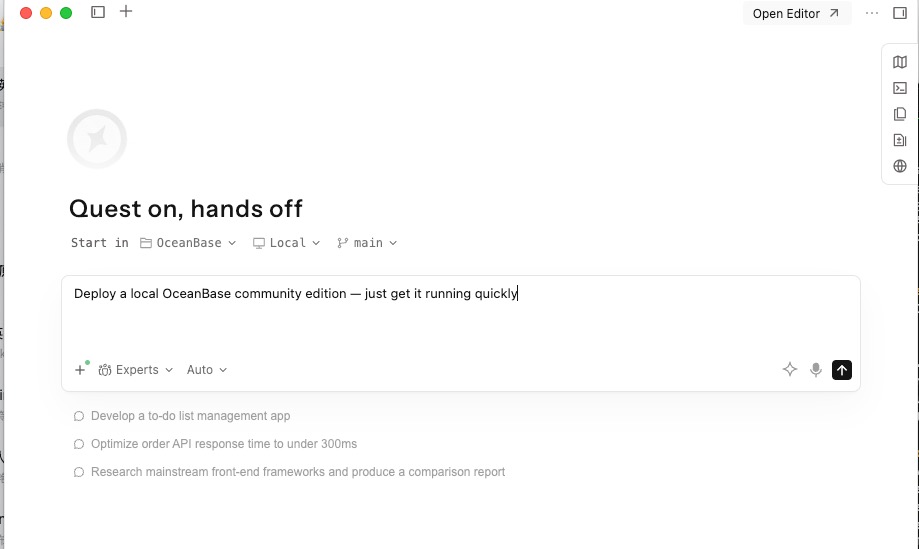
Qoder plugins are available in Quest and can bundle skills, commands, and MCP integrations. The Qoder plugin documentation explains how installed capabilities are displayed and managed.
The useful shift is not simply “natural language instead of commands.” It is moving a repeatable deployment or maintenance runbook—pre-checks, execution, verification, and handoff, into one verifiable agent task.


Keep Reading
View all posts
Exploring OceanBase 4.3: New Features and Enhancements
At the OceanBase DevCon 2024, we introduced the OceanBase 4.3.0 Beta, unveiling a brand new columnar engine. This release achieves near petabyte-scale, real-time analytics in seconds, and enhances the integration of TP and AP capabilities.


How seekdb M0 Gives OpenClaw Persistent Memory and Shared Experience
OpenClaw's memory degrades over time—an architectural limitation, not a configuration issue. seekdb M0 solves this with cloud-based memory that persists across sessions and shares learned experience across agents.
Inside OceanBase Multi-Tenancy: Resource Isolation, Allocation and Governance
OceanBase multi-tenancy consolidates many business systems into one cluster with tenant-level CPU, memory, and IOPS quotas — without the interference of a shared instance.