Meet OceanBase AI Lakebase, the unified database for operational data, real-time analytics, and AI.
Meet OceanBase AI Lakebase, the unified database for operational data, real-time analytics, and AI. Explore ->
PowerContext 1.2.0 Adds Jev Integration, Improving Accuracy by 14.2%

- PowerContext 1.2.0 turns recalled project memory into explicit evidence for provider-neutral
DecisionModeljudgments through Jev or Laya. - Decision models augment rather than replace coding agents: code generation, bounded judgment, and independent test verification remain separate steps, while unavailable judgment services return
abstaininstead of blocking the task. - Native code understanding helps coding agents trace relevant implementation and call sites using inspectable, freshness-checked repository evidence; real tests remain the final verification step.
Asking a coding agent to write a small amount-handling routine sounds simple. Put the same task into a real project, and the questions multiply: how to round a remainder smaller than one cent, whether refunds follow the same rule, and whether behavior that existing customers depend on can change. The team may have settled those details long ago. An agent that has just received the task does not know them. Even after the rules are stated clearly, changing the code raises another question: where does this logic live, and which parts of the system use it? A change that looks like one function can show up on the order page, in a billing export, or in the after-sales flow. To find those connections, a coding agent has to stitch together head, cat, grep, and similar commands. That search is slow, and it spends a lot of tokens.
OceanBase PowerContext 1.2.0 is released today. The release makes both kinds of evidence easier for a coding agent to use on a real project. Existing project memory can be handed to a decision model, which checks whether a proposal matches the project's conventions. The new native code understanding capability helps the coding agent investigate the current repository and find the relevant implementation and call sites before it edits anything.
Keep the project's experience, so later judgment and edits have something to stand on
Take the amount-handling example again, and start with the rules the team has already settled. Last week, while working on refunds, everyone confirmed how amounts should be rounded and ruled out an approach that does not fit this project. If those conclusions stay inside that one discussion, the next task has to explain them all over again.
PowerContext's existing memory keeps those conclusions together with the evidence behind them. Why an old version still has to be supported, why a change that looks small has never been made, and why a proposal was dropped can all be saved as project records. When a new task starts, an application—or an AI tool configured for recall—can look through the selected project, pull out the records that match the current question, and assemble them into context for this task. A developer can also ask the AI to look them up directly. When something needs to be checked, the sources and historical versions are still there, so you can judge whether a past conclusion still applies.
This is part of what context engineering is for: select the information the current task needs, and keep what later work will use again. Anthropic's introduction to context engineering also stresses the selection of relevant information and the role of long-term notes. Context engineering for AI agents
Once those records exist, the next question has somewhere to land: how do you get a model to check a proposal against the project's own rules?
How do you connect a decision model?
Questions such as "Does this implementation follow the amount-handling rules?" do not need another written proposal. They need a judgment on a specific question. Fix the question and the allowed answers in advance, then supply the material the judgment needs. That is how a decision model is used.
- TypeSafe's Jev entered early access on September 15, 2026. It returns a choice, a score, or a judgment for a concrete question. LangChain has also described how to use it for AI evaluation and for specific tasks. Introducing Jev · Building with Jev and LangGraph
- Two weeks later, on September 29, OpenAI announced the Decisions API at DevDay. It targets the same kind of bounded judgment. It uses Luna. Developers define a set of questions, each with a finite set of predetermined answers, provide text or images as context, and use the results to classify content, route requests, or choose an agent's next step. DevDay 2026 recap
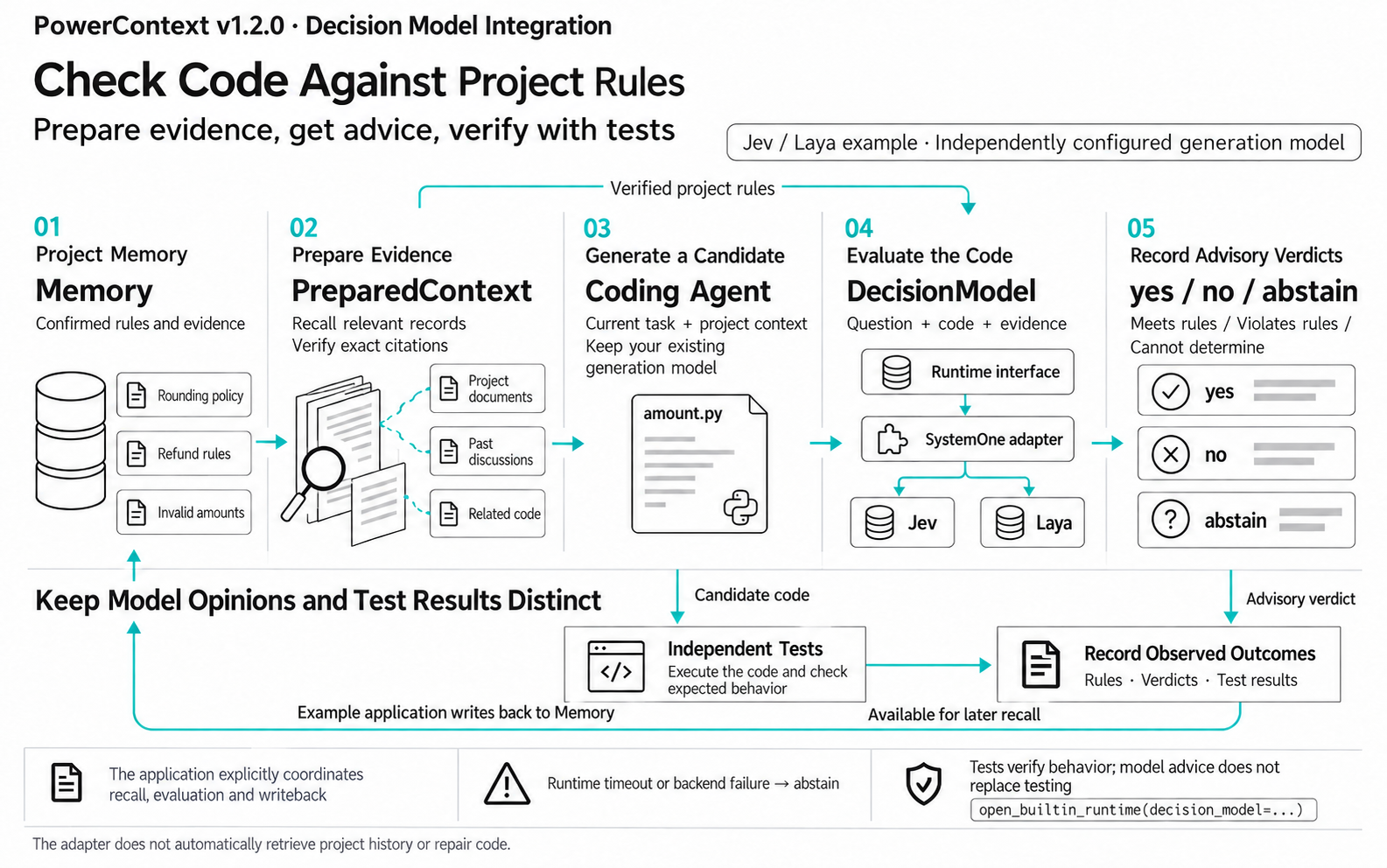
A model can judge. The project's rules still have to be given to it. PowerContext 1.2.0 provides a DecisionModel interface that puts the question, the content under review, and the project evidence into one request. Integration examples for Jev and Laya are already available. The integration flow is shown below:
One cent, and the team rule behind it
Back to the amount-handling task. The team has already confirmed the rounding method, the refund rule, and how invalid amounts are handled. A generic implementation may not satisfy those requirements. The PowerContext example first saves the rules as project memory, then finds the related records while preparing context. The coding agent writes a proposal from that context. The decision model receives the same records and checks the proposal against the same rules. Connecting a model does not mean it automatically has the project's history. The relevant evidence has to be passed in explicitly. The decision model's opinion and the program's actual behavior are examined separately.
The example gives the same coding agent the task twice: once with only the current request, and once with the project's existing rules as well. Both proposals are checked by Jev or Laya, and an independent test checks what the program does when it runs. Whether the historical convention actually reached the model, whether the model's judgment matches the requirement, and whether the program actually did the right thing each have their own record.
The model opinion and the test result are kept separately. After the task, the example writes what it observed back into project memory. The next time a similar question comes up, the team can look up which rule was used, which cases were checked, and what the result was.
You do not have to replace the coding agent
Integration can start as a checkpoint after a proposal is generated. The model that writes the code stays in place. The application chooses the project background, arranges the flow, and then calls DecisionModel with the question, the proposal under review, and the recalled evidence. It receives yes, no, or abstain (cannot be determined for now). The interface is not tied to a vendor, and it does not appear in the coding agent's tool list. The application calls it when a judgment is needed. The snippet below shows how, after PowerContext is connected to Jev, one saved rule is loaded and sent to the model together with the candidate code:
# 1. Configure the Jev service. Credentials come from environment variables.
provider = SystemOneConfig(
    provider="jev",
    endpoint=os.environ["JEV_ENDPOINT"],
    model=os.environ["JEV_MODEL"],
    api_key=SecretStr(os.environ["JEV_API_KEY"]),
)
backend = SystemOneDecisionModel(provider, client)

# 2. Hand the adapter to PowerContext.
async with open_builtin_runtime(
    config,
    decision_model=backend,
    scheduler_path=directory / "scheduler.db",
) as runtime:
    memory = runtime.memory.for_scope(scope.scope_id)
    record = await memory.get(
        GetMemoryEntryRequest(citation=saved.entry.citation)
    )

    # 3. The question, the candidate code, and the project rule go into one judgment request.
    result = await runtime.decision_model.evaluate(
        DecisionRequest(
            decision_kind="example.invoice-review",
            question="Does this implementation satisfy every amount-conversion rule in the evidence?",
            subject="def cents(text):\n    return round(float(text) * 100)",
            evidence=(record.entry.text,),
        )
    )
    print(result.outcome.value, result.used_fallback)
The Jev and Laya adapters handle each service's request format. Callers use the same PowerContext DecisionModel interface. Teams that want to run the decision model in their own environment can connect Laya and compare results on real tasks. Switching decision models means changing the adapter. The existing coding agent, project memory, and later tests all stay in place.
If the judgment service cannot be reached for the moment, this step returns abstain. The proposal and the tests do not stop because of it. When the result is "cannot be determined for now," the team can add evidence or check the case another way. PowerContext ships a runnable example. The decision model is attached to DecisionModel through an adapter.
After the decision model is connected, does the extra judgment help?
The example above shows that a decision model can be connected to the PowerContext runtime in a few lines of code and take part in decisions while context is assembled. What does that do in practice? Before this release, we ran a LoCoMo-Plus stress test to find out. PowerContext's existing flow already looks up related records. This comparison uses the same materials and the same tasks, then adds Jev on top of that flow. Jev takes part in context selection and judges which material is more useful for answering the current question. We then watched how the final answers and the runtime cost changed. "PowerContext + Jev" in the table is that extra judgment.
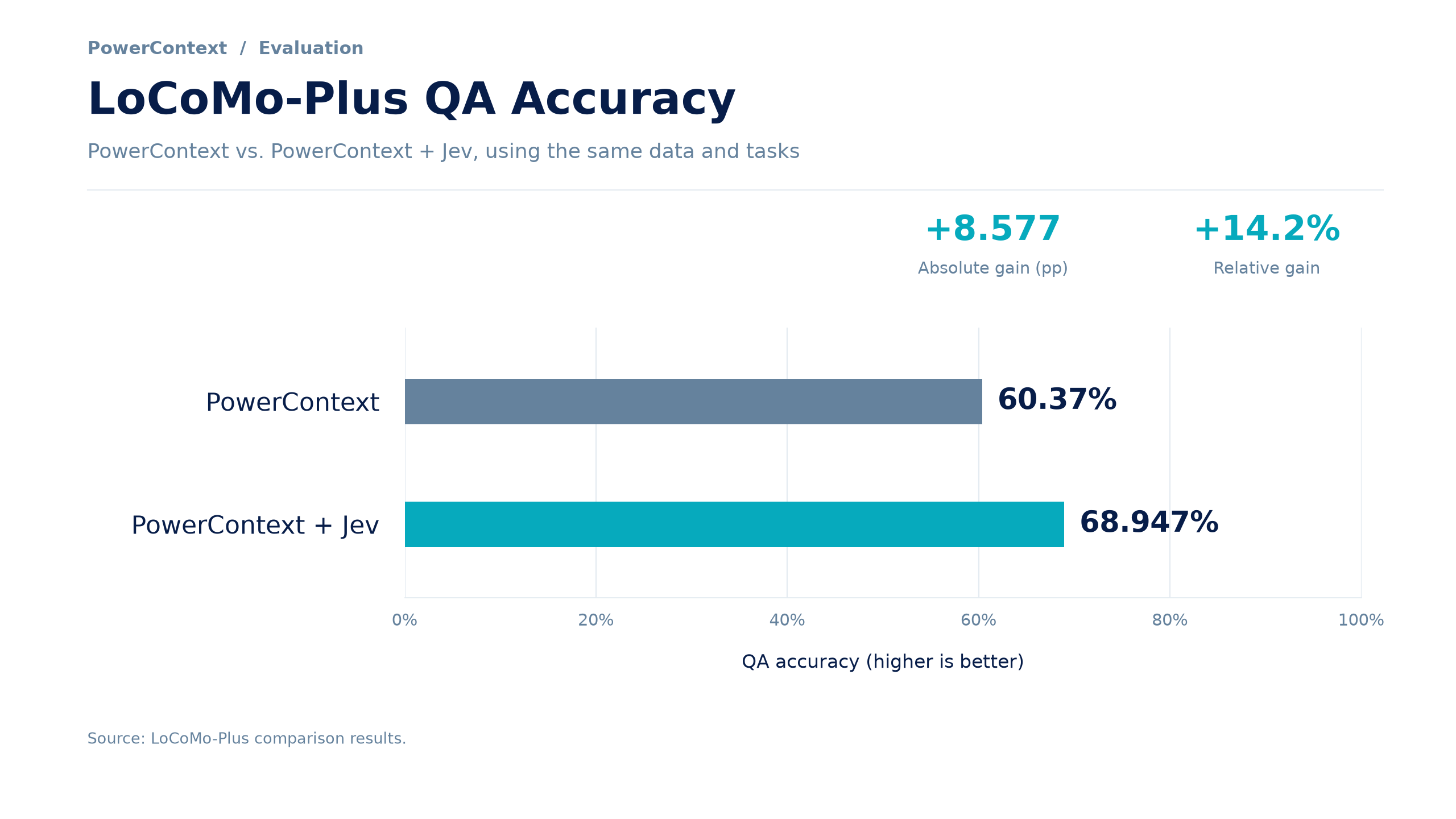
On this question-answering evaluation, adding Jev raised answer accuracy from 60.37% to 68.947%, a relative gain of about 14.2%. Those numbers measure how selecting historical material affects question-answering results. In the amount-handling example above, whether the code is correct is still checked by an independent test.
Native code understanding: let the coding agent read the repository
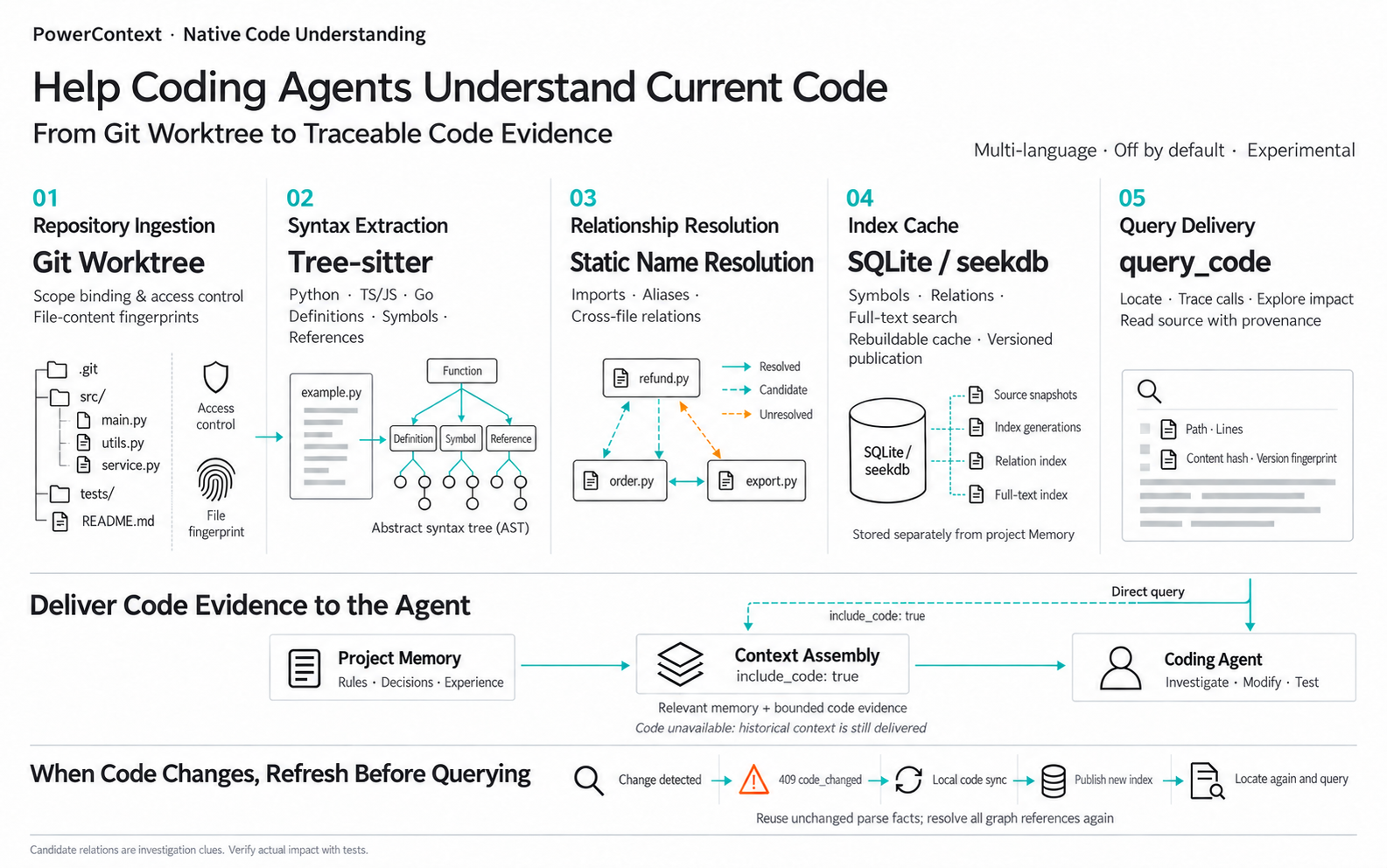
Return to the amount-handling task. Even when the rules are clear, changing an existing implementation still requires the coding agent to find the relevant code and see where it is used. Project memory can explain why a decision was made. The current implementation and its call relationships have to be investigated in the repository. Change how a refund amount is calculated, and the order page, the billing export, and the after-sales flow may all use that logic. Finding those connections before editing is how you know what to check next. Native code understanding in PowerContext 1.2.0 is that investigation capability. The design is shown below:
See the connections before you change the code
After receiving a task, the coding agent can find the relevant code, look at the parts connected to it, read the specific content, and keep investigating from there. Before changing shared logic, see who uses it. When reviewing a change, look first at the parts that may be affected. Query results keep a concrete source location. A developer can go back to the code and check the agent's suggestion. Another colleague, or another tool, can follow the same leads.
With this capability enabled, a PowerContext context pack can hold related project experience and a small amount of current code evidence at the same time. A historical record might say, "Existing customers still depend on this behavior, so it cannot change for now." The code investigation helps the agent find the implementation and the places that use it. The team's convention then has concrete code to compare against, and the boundary of the change is easier to state.
When the code changes, the picture of it has to change too
The repository keeps moving. A relationship found last time cannot be reused indefinitely. PowerContext checks whether the code has changed at query time. If the existing analysis is stale, it requires an update before that analysis is used again. Historical records and the current code analysis are stored separately so they can be checked against each other: a practice from a year ago can still be consulted, and whether it applies today depends on the implementation now. Native code understanding is currently an optional experimental capability. It provides investigation leads and evidence you can inspect. The final impact of a change still has to be confirmed with real tests. You can turn it on for one concrete change and see whether the coding agent finds the places that need checking more quickly.
Memory governance: keep the experience you hand on still usable
From recovering a rule, to checking a proposal, to investigating code, the evidence a project leaves behind gets used again and again. After a task, the team can also save a new observation. As records accumulate, they need maintenance: which conclusions are still valid, which are out of date, and which were only a guess at the time? "This proposal should fix the problem" and "this proposal passed verification under these conditions" are very different for the person who picks the work up later. Save the conditions and the evidence together with the conclusion, and the next check has something to verify.
PowerContext 1.2.0 adds an optional memory quality check before a record is saved. The flow is shown below:
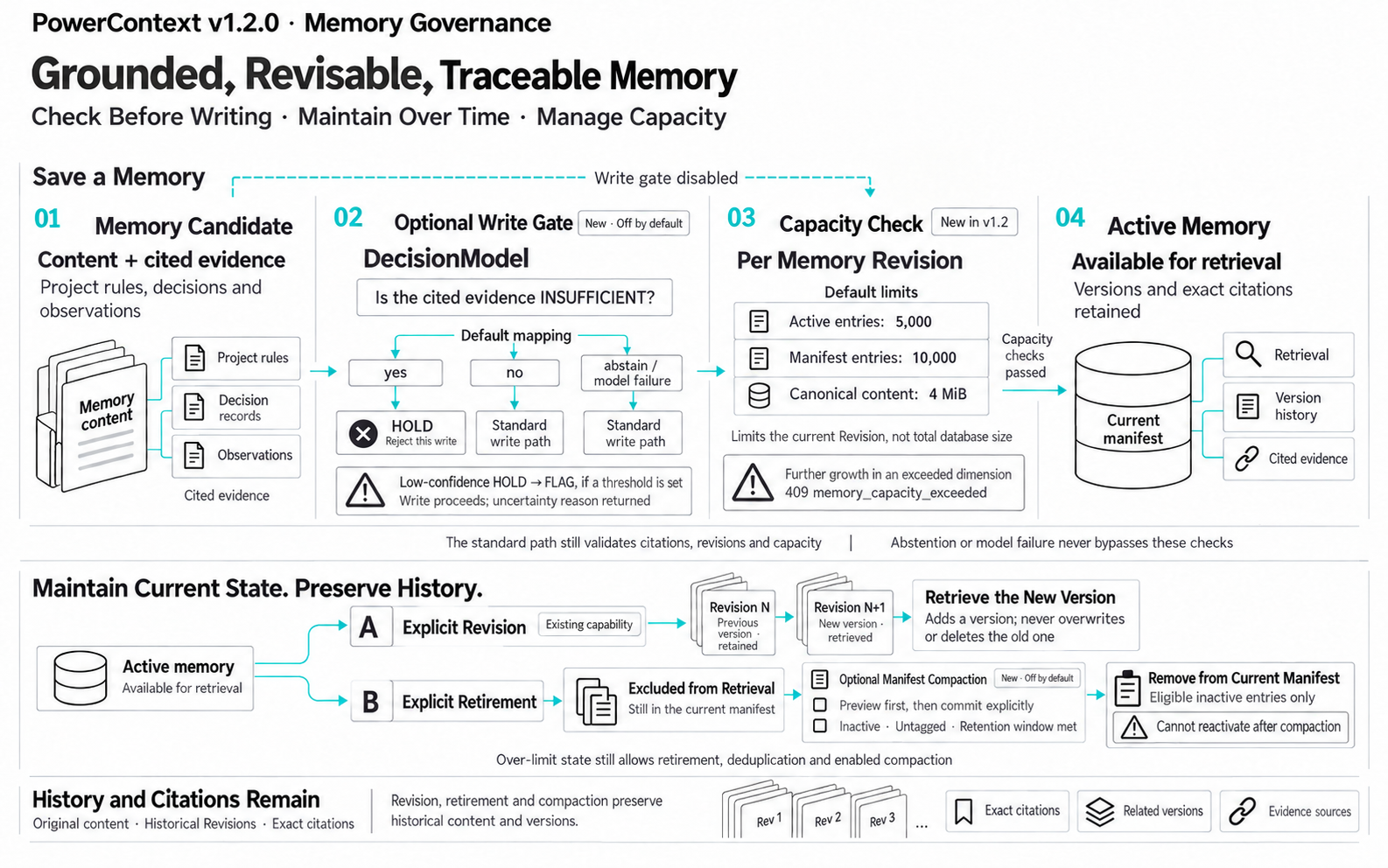
The check uses the same DecisionModel. It asks whether the existing citations can support the memory. If they cannot, the write is held, or the record is marked for review. If the model returns abstain, or the judgment service is unavailable, the write continues, so a model failure does not block saving the record. This check is an aid to judgment. The content still has to be maintained against actual results. Records that are already stored can be adjusted. PowerContext's existing memory management supports revision: an outdated record leaves everyday retrieval, and its history is kept. After the team changes a convention, later work uses the updated content, and the original choice can still be reviewed when needed. As records grow, you can also manage the size of the memory currently in use and clean up expired records that match the conditions. A practice worth reusing can be recorded with the situation at the time, the action taken, and the actual result, then organized into an experience and reviewed for later lookup. A stable way of operating can go one step further and be organized into skill guidance, reviewed, and exported to a supported tool. What one task leaves behind then has a chance to be useful in the work that follows.
Connect it to the tools you already use every day
These capabilities enter daily work by connecting to the tools developers already use. PowerContext already connects to AI tools such as Codex and Claude Code, so you can look up background, save memory, and hand work off in those environments. This release also extends the community integration for ZCode, covering the command line and the Windows desktop. Suppose a refund-logic investigation is half done and you need to move from the terminal to the desktop client. You can prepare a handoff first and leave the objective, the facts already confirmed, the blockers, and the next step. The coding agent that picks the work up reads the existing conclusions, then checks them against the current situation. It does not have to search the same ground from the beginning. The same handoff continues the work when the person or the session changes.
Install it in one sentence:
Install and use PowerContext. Project URL: https://github.com/oceanbase/powercontextStart with one checkpoint, and one change
To try this release, pick a task you already have in hand. If the project has confirmed business rules, add one check after the proposal is generated and give the rules and the proposal to Jev or Laya. The existing coding agent keeps writing the code. Then see whether the model judged according to the convention, and whether the program actually did the right thing when it ran. If you are about to change code that is used in several places, turn on native code understanding and let the coding agent find the related implementation and call sites first. Follow the source locations it returns, check them, and then edit and test. The next time a task like amount handling comes up, the rules the team has settled can be the model's basis for judgment, and the call relationships in the repository have a source you can look up.
PowerContext · Not only memory, but a full story.


Keep Reading
View all posts
I Built a Knowledge Base That Thinks — Inspired by Karpathy's LLM Wiki
Inspired by Karpathy's LLM Wiki, ex-brain is an open-source personal knowledge base that compiles, links, and evolves your notes using LLMs and seekdb's hybrid search.


From Complex to Simple: How We Built seekdb for the AI Era
AI era doesn't need another heavy, complex enterprise database. It needs agility. It needs flexibility. We went back to the drawing board to understand what an AI application actually needs from a database. Our answer is OceanBase seekdb

Building Durable Project Context: How MiniMax Code Works with PowerContext
How MiniMax Code approaches context management for coding agents: traceable multimodal evidence with seekdb, plus Memory and Handoff with PowerContext.