Meet OceanBase AI Lakebase, the unified database for operational data, real-time analytics, and AI.
Meet OceanBase AI Lakebase, the unified database for operational data, real-time analytics, and AI. Explore ->
Building Durable Project Context: How MiniMax Code Works with PowerContext


- A retrieval hit is only useful if it leads back to evidence you can check. Keep original screenshots, code, and logs separate from their OCR text, snippets, and embeddings, and use OceanBase seekdb to combine full-text search, vector search, and filters on project, version, and access in a single query.
- Context management for coding agents is a lifecycle problem: standing constraints, task state, retrieved evidence, and long-term memory each follow different rules for updates and removal, and any compression has to preserve what the next action depends on.
- With the PowerContext plugin for MiniMax Code, you can save project decisions to Memory and commit unfinished work as a Handoff checkpoint, so the next session starts from a verified state instead of repeating the investigation.
A screenshot shows the bottom navigation bar covering the checkout button. A log shows a request that keeps failing. A developer hands both to a coding agent, along with the code repository: "Can you look into this?"
Everything the agent needs is there, but none of it is connected yet. Which version of the code produced the screenshot? Under what conditions does the error occur? Are the hidden button and the failed request really caused by the same thing?
Once the agent starts digging, it reads documentation, edits code, and runs tests, producing more findings and test results along the way. The further the task goes, the more important it becomes to keep three things straight: what is backed by evidence, what is still a guess, and where the next round should pick up.
This article follows a development task like this one to look at how MiniMax Code approaches context management for coding agents, from governing raw materials and retrieving evidence to managing context and carrying work across sessions.
Along the way, it shows where seekdb and PowerContext fit in practice: seekdb helps organize and search clues in different formats, while PowerContext carries forward the project knowledge worth keeping and the state of unfinished work.
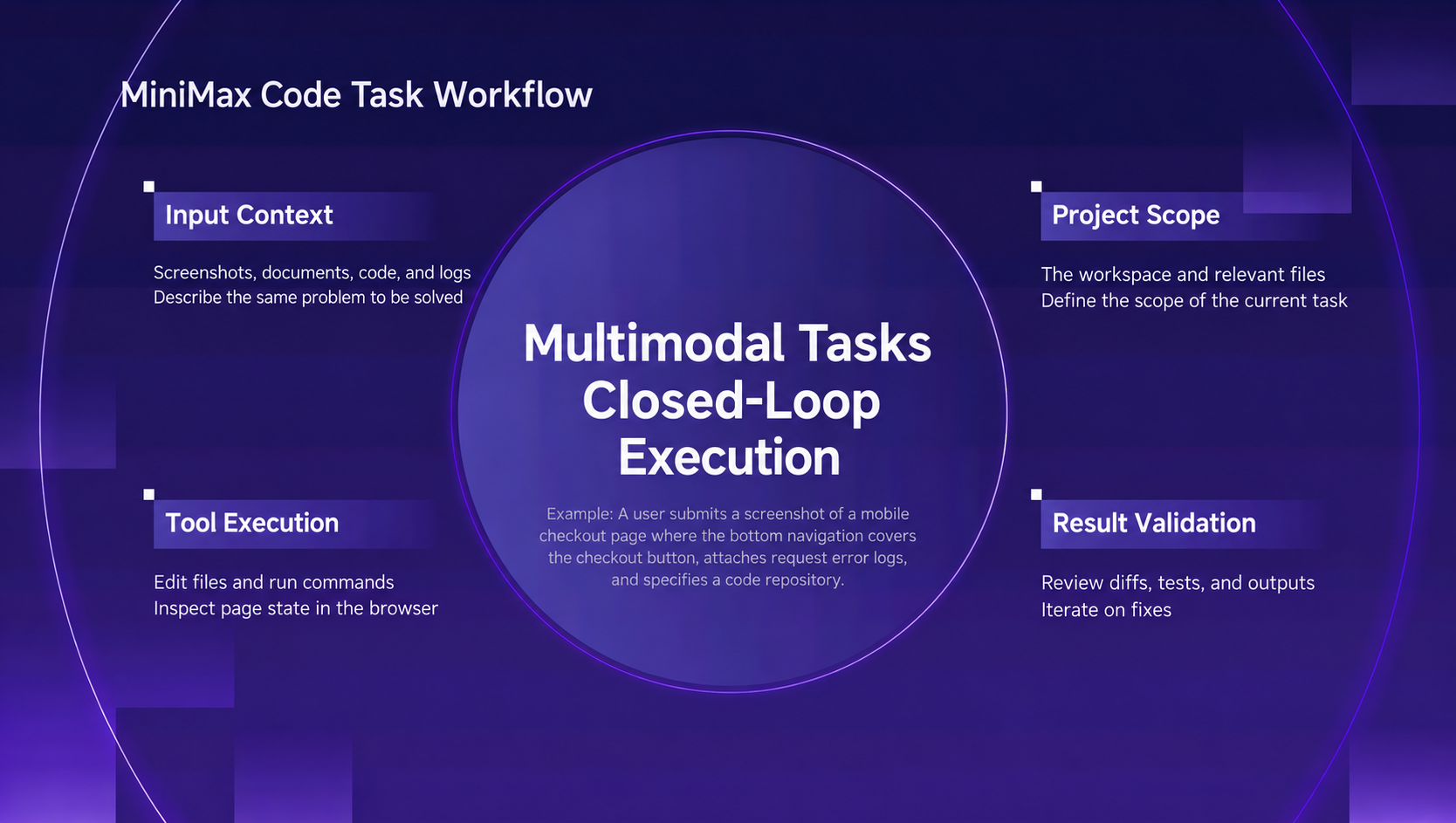
Figure 1. Starting from screenshots, logs, and code, a development task goes through execution, verification, and multiple rounds of correction.
Turn Multimodal Inputs into Evidence You Can Check
Start with the checkout page problem. To the developer, the screenshot, the repository, and the logs are all part of one task. To the agent, the connections between them still have to be built.
The problem area in the screenshot needs to map to a specific page and component. A code snippet needs to point to a repository, a file path, and a commit. A log entry needs to show when it happened, what triggered it, and which tool calls were involved.
The key to multimodal data governance is making sure anything retrieval returns can be traced back to where it came from.
One important practice is to manage original artifacts separately from the representations derived from them for retrieval:
| Input | Representation for retrieval | Source information to retain |
| Screenshot | OCR text, layout description, image embedding | Original image and affected region coordinates |
| Code | Searchable snippets | Repository, file path, and commit |
| Log | Error codes and extracted messages | Original record, timestamp, and call associations |
The original preserves the record of what actually happened; the derived representation makes it findable. When a parser is upgraded, summaries or embeddings can be regenerated and tagged with the new parser version, so no single parsing pass becomes the only source of truth.
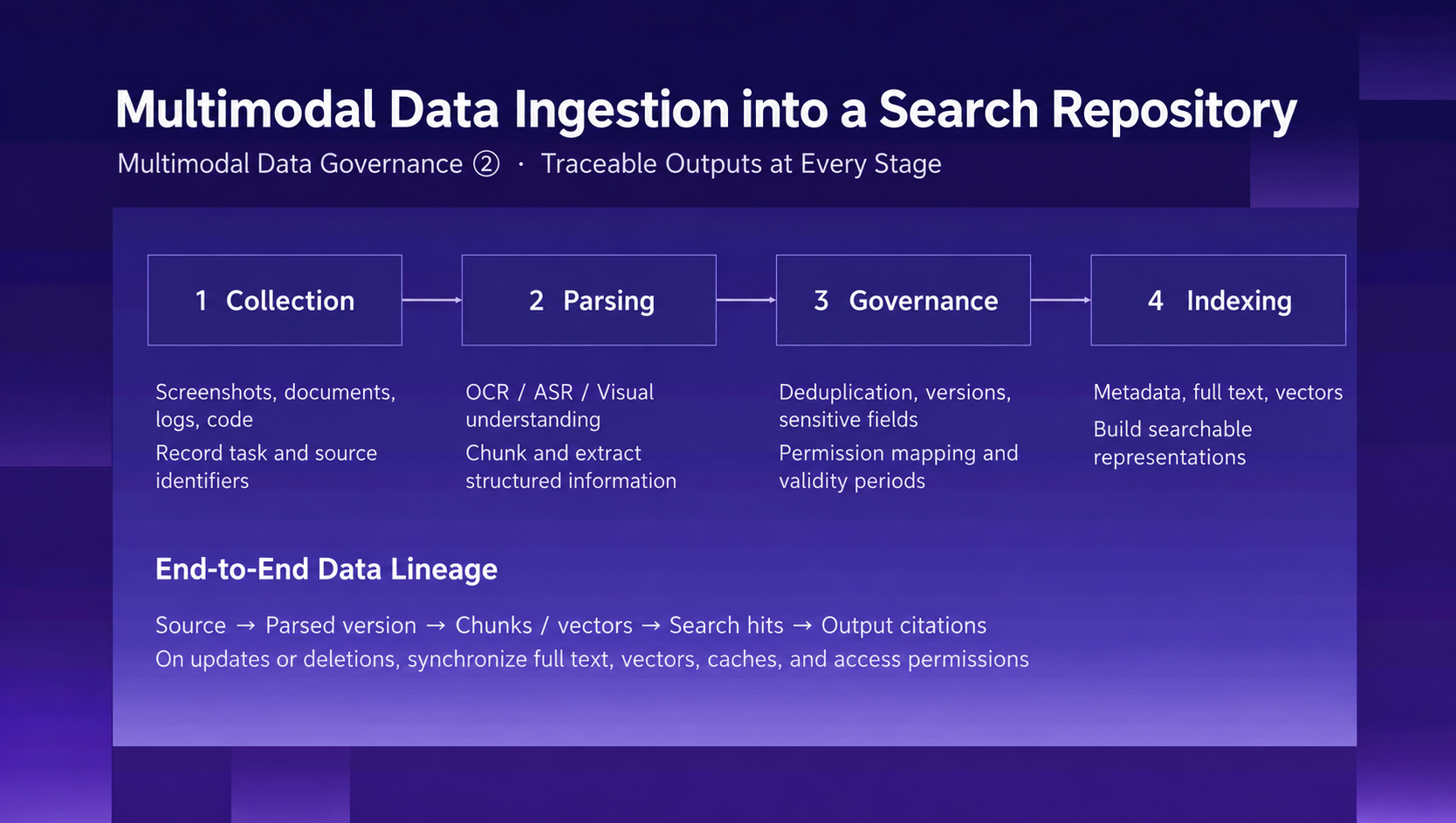
Figure 2. Keeping links intact from ingestion and parsing through governance and indexing makes it possible to trace a retrieval hit back to the original evidence.
Changes need to flow through the same chain. When a new screenshot comes in, its relationship to earlier versions should be explicit. When an artifact is deleted or becomes invalid, the related full-text index, embeddings, and caches should be updated accordingly, so later searches don't keep surfacing stale content.
Team settings add another boundary: first determine which resources the current user is allowed to access, then search only within that scope. A source reference tells you where to check. Whether the material is correct, and whether it applies to the task at hand, still has to be judged.
Search Exact and Semantic Clues Together with OceanBase seekdb
Once materials have traceable sources, the next step is making sure the agent can find them.
In the checkout example, error codes, API names, and function names are best found by keyword. A description like "the bottom navigation covers the checkout button" is better served by semantic search across related pages, components, and past issues.
Both kinds of search also have to respect project, version, and access constraints. Results that merely look relevant can lead the agent into a different project, or into an implementation that is no longer valid.
OceanBase seekdb is a candidate unified retrieval foundation for this kind of local multimodal governance. seekdb supports relational, JSON, full-text, and vector data, so structured filters and hybrid search can be handled in a single database. See the seekdb repository and documentation.
For this investigation, queries can be organized in three layers:
- Scope the search. Look only at materials from the current project that the user is allowed to access and that match the applicable version.
- Combine clues. Use full-text search for error codes and API documentation, and vector search for semantically related pages and components.
- Return the evidence. Attach the image region, log location, code path, and version to each result so it can be checked further.
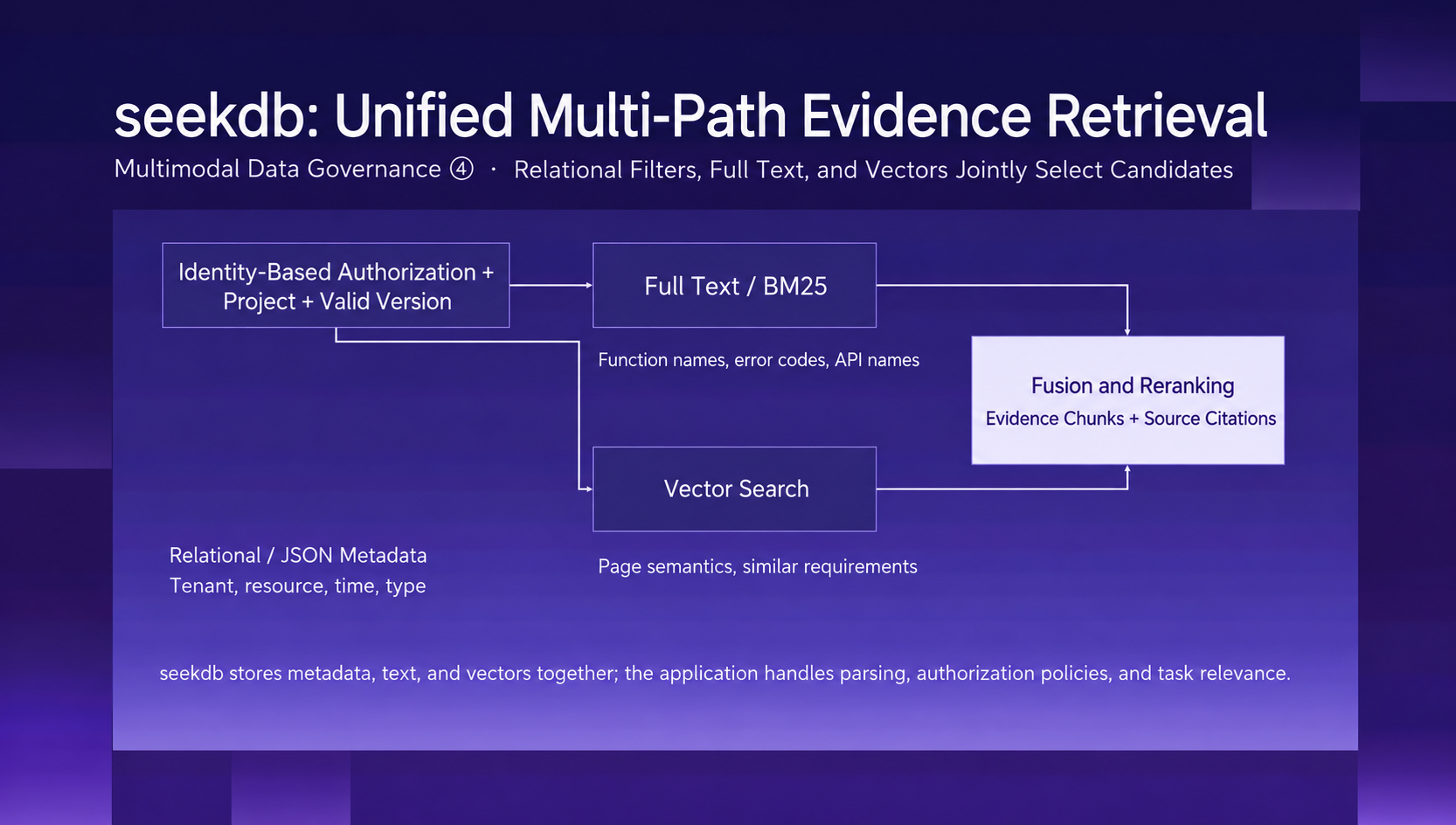
Figure 3. Structured filters narrow the candidate set, while full-text and vector search handle exact and semantic clues, respectively.
The database and the parsing services have separate jobs. In this kind of design, models or dedicated services handle parsing for images, audio, and video, as well as embedding generation, while seekdb stores and retrieves the results. Relationships between artifacts, versions, and access rules also need to be modeled explicitly in the application.
Ultimately, retrieval quality has to be validated against the task itself. Does the error code lead to the right API? Does the page description lead to the right component? Does the returned evidence belong to the version currently in use?
Only after getting the right hits can the agent decide which materials are strong enough to support a change, and where it still needs to gather more evidence.
Context Management: Keep the Window Focused on the Current Turn
Being able to find materials doesn't mean bringing all of them into every turn.
A full log can be very long, while the current step needs only one error snippet. A past decision may be useful background, but it can't override a new requirement that came in today. Context management decides what belongs in the window right now and what should stay outside, to be read back when needed.
MiniMax Code's approach divides context into four categories: standing constraints (user goals, project rules, and permission boundaries), task state (the plan, verified progress, blockers, and next steps), retrieved evidence (the snippets needed for this turn, with source references and versions), and long-term memory (stable preferences, project decisions, and debugging lessons).
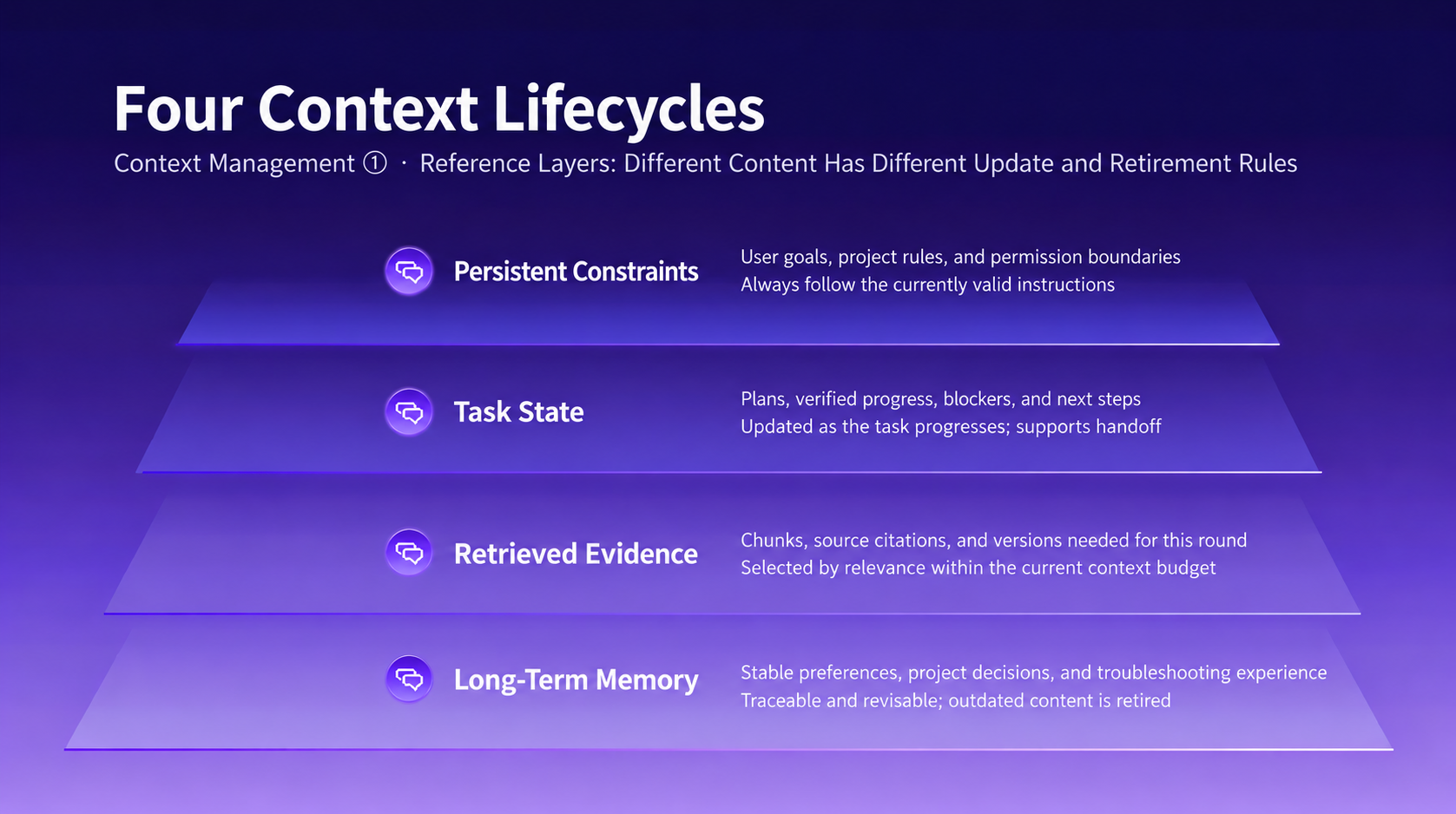
Figure 4. Each of the four categories follows its own rules for updates and removal, and all of them serve the current task.
What matters in this split is lifecycle. As the task moves forward, progress and blockers need to be updated. Evidence that enters the context should carry its version and source reference. Stable conventions can be kept for the long term, but they must stay revisable and be retired once they're out of date.
These principles also show up in MiniMax Code's product controls. The desktop app lets users manage how session memory is used and generated, and shows how much of the window different kinds of content take up. The CLI uses dynamic output budgets, tool-result trimming, and compression recovery to make room for long-running tasks.
Long logs and full reports stay in files, while the context keeps only the essential summary and a path to read them back. Repeated or outdated output gets cleared promptly. Stage summaries capture the goal, decisions made, verified progress, blockers, and next steps.
Compression frees up the window, but it still has to preserve what the next action depends on.
For example, if the button overlap has been traced but the request error hasn't been explained yet, the summary should record those two states separately. Two symptoms showing up together isn't enough to conclude they share a cause. When the work resumes, the agent still needs to recheck the code, logs, and tool state.
The same applies to multi-agent collaboration. In MiniMax Code's Agent Team model, a Leader manages goals and progress, Workers execute in their own contexts, and a Verifier independently checks what gets delivered. Results are passed along through files, summaries, and paths, and the coordinator expands details only when needed, so no single role has to carry the entire debugging history.
Whether the work is actually done still comes down to verification results, not the executor's own summary.
Project Knowledge and Work State That Outlast a Session
Retrieval, trimming, and compression help the agent move a task forward within a session. But development work often stops partway: an investigation gets halfway done today and continues in a new session tomorrow, or one agent finishes the implementation and a developer picks up verification.
At that point, whoever comes next needs two kinds of information. The first is project knowledge that stays valid, such as technical decisions, compatibility requirements, and team conventions. The second is where this piece of work currently stands: what has been changed, how far verification has gotten, and which questions remain open.
PowerContext supports this kind of continuity by keeping traceable project knowledge and handoff state outside any single session and outside the harness (the environment that runs and coordinates the agent), so later work starts from a point that can be verified.
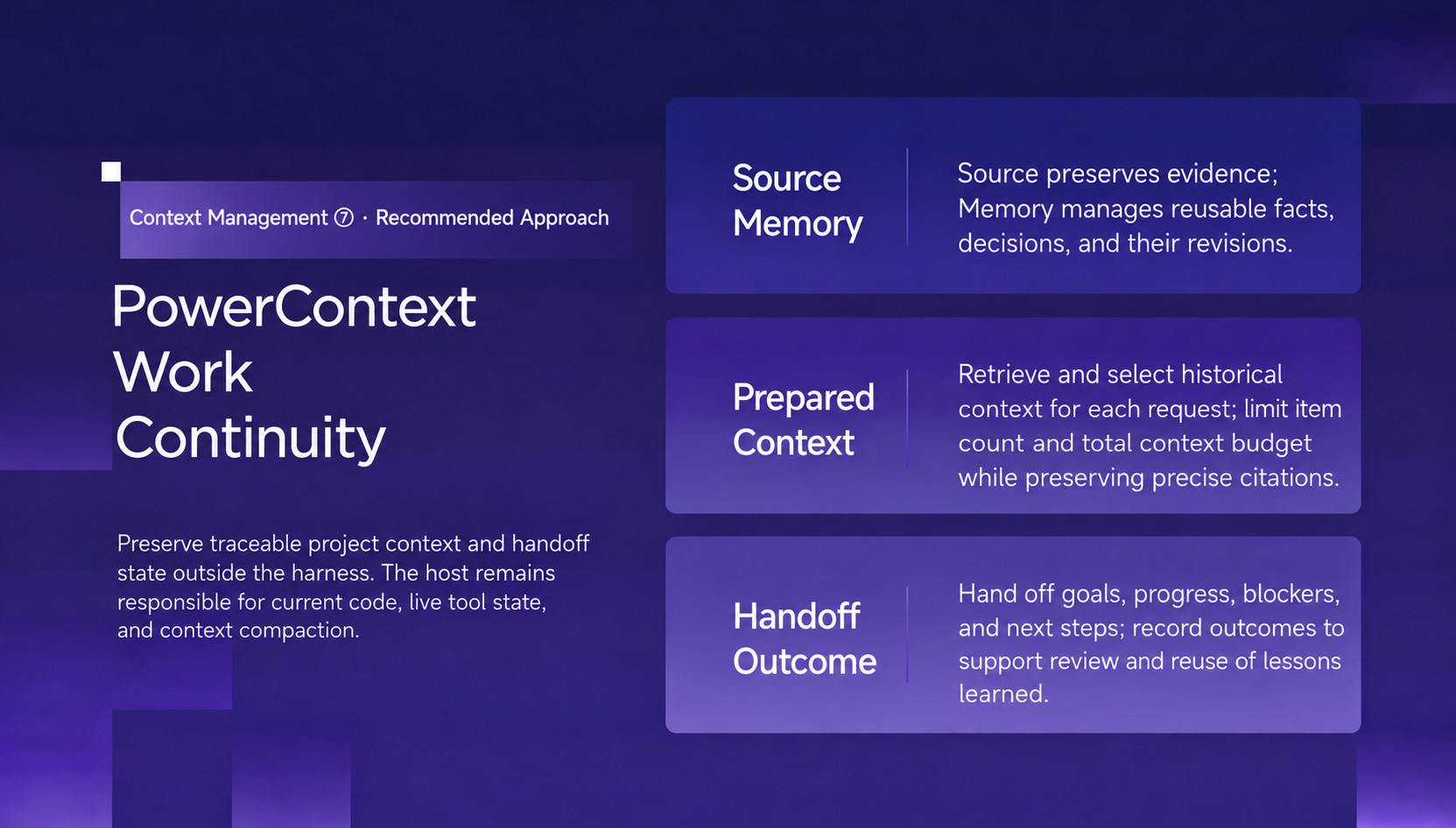
Figure 5. The PowerContext approach supports continuity through evidence, project memory, and handoff state.
The PowerContext plugin for MiniMax Code turns these two needs into two entry points: Memory stores project knowledge worth reusing, and Handoff organizes work that isn't finished yet.
The plugin consists of a Skill and a native Model Context Protocol (MCP) configuration. The Skill provides usage guidance, and MCP connects to PowerContext Server to carry out operations. It saves content only when asked and does not automatically capture every conversation. See the MiniMax Code plugin guide.
Memory: Keep the Decision and the Reason Behind It
To understand a piece of implementation, developers often need to know why it exists. Why was this approach chosen? What constraints applied at the time? Do they still hold today?
With PowerContext connected, you can ask directly in MiniMax Code:
Find our earlier decisions about database migrations and list their sources.
The source references in the results let developers check the background of a decision, then make a judgment call based on the current code.
When a new project constraint is confirmed, you can explicitly ask to save it:
Remember: this project needs to support Python 3.11. Keep this in mind for all future implementation work.
You decide what gets saved. Good candidates include confirmed decisions, stable constraints, and lessons that have been verified and are worth reusing. When the project changes, you can ask to correct a memory or retire information that no longer applies.
This gives later tasks a project background they can query, though that background should still be used alongside the current workspace and active instructions.
Handoff: Give the Next Session a Clear Starting Point
Back to the checkout page. Suppose this round has confirmed that the hidden button is a layout issue and part of the fix is in, but behavior across screen sizes hasn't been verified and the request error is still unexplained.
Leaving a note that just says "checkout issue fixed" would send the next person in the wrong direction. At a minimum, a handoff should separate four things:
- Confirmed: how the overlap shows up, along with the relevant screenshot and code location.
- Done: what was actually changed, which checks were run, and what they showed.
- Unresolved: which screen sizes haven't been verified, and what clues remain on the request error.
- Next: check the current code first, then finish layout verification and keep digging into the request error.
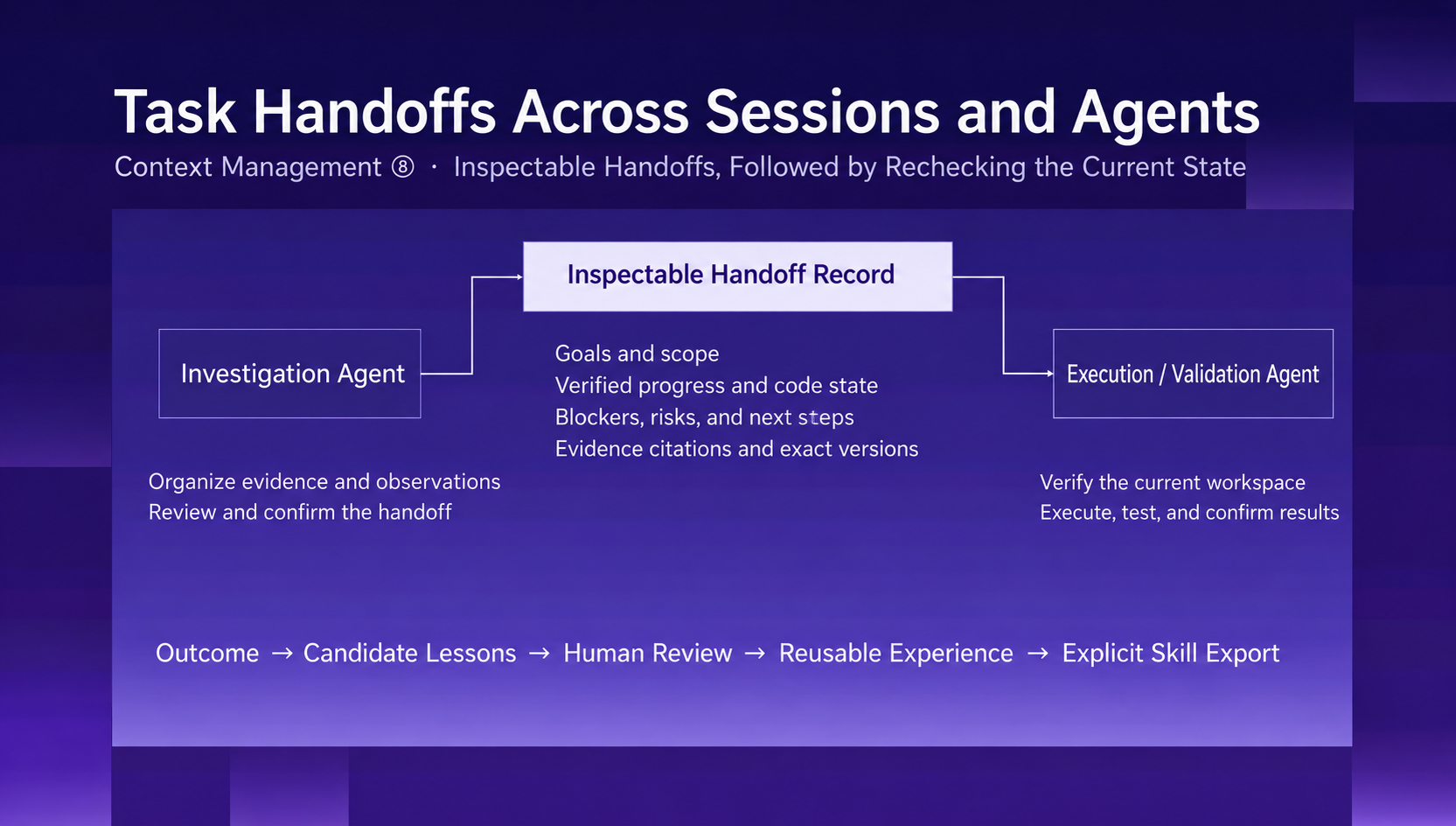
Figure 6. A handoff preserves goals, progress, risks, and evidence. Whoever picks it up rechecks it against the current workspace before continuing.
You can start by asking MiniMax Code to draft a temporary handoff:
Use PowerContext to prepare a handoff for the current work, including progress, key evidence, remaining checks, and next steps. Show it to me first and don't commit it yet.
The draft can then be reviewed and filled in. Once you're sure it should be available to later sessions, commit it explicitly:
Commit this handoff as a durable checkpoint and return its version.
The next time you open the project, you can ask:
Resume the most recent committed handoff for this project. Check the current workspace first, then continue with the remaining work.
Preparing a handoff and persisting it are two separate steps. The plugin documentation clearly distinguishes temporary handoffs from committed checkpoints, so if you need to pick one up in a later session, make sure the commit succeeded. See the Handoff documentation.
What the next person receives is a work state they can inspect: conclusions come with evidence, open questions stay open, and the next step has a clear direction. Once the task is done, any conclusions worth reusing can also be saved to Memory at the user's explicit request.
Get Started with PowerContext in MiniMax Code
MiniMax Code's multimodal task practice, seekdb's evidence retrieval, and PowerContext's project memory and handoffs each address a different part of this workflow: how to find materials, how to use the window, and how to keep the work going.
When putting this into practice, start with a real task that involves both multimodal inputs and work across sessions. Watch whether the evidence is accurate, whether the task actually gets done, and whether resuming cuts down on repeated investigation, then adjust the approach accordingly. In the end, the value of data governance and context management shows up in whether work can keep moving forward more reliably.
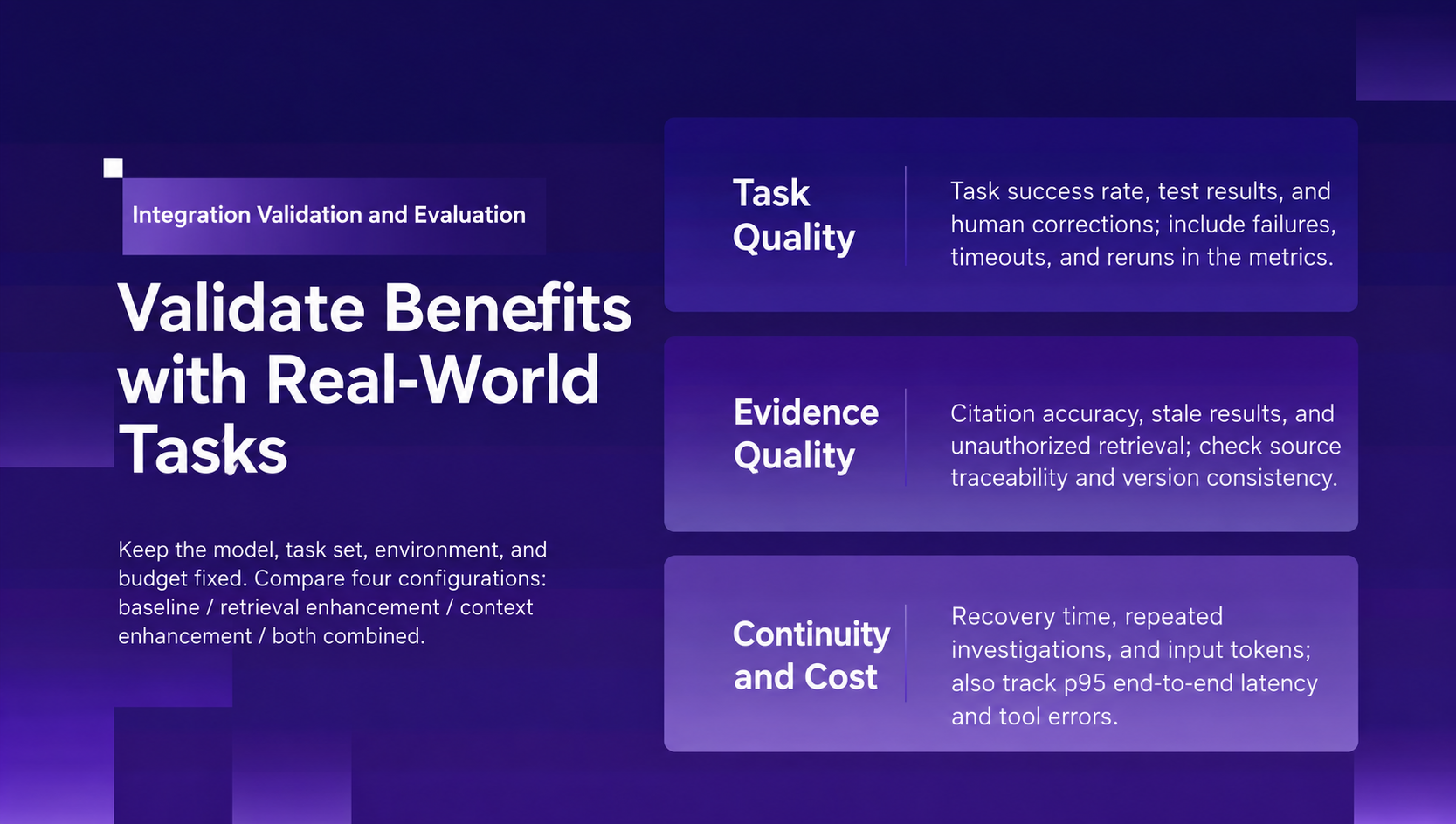
Figure 7. The benefits of multimodal data governance and context engineering need to be tested on real tasks.
PowerContext now offers a native MiniMax Code plugin, available in the official MiniMax plugin marketplace. It connects through a Skill and an MCP configuration: the Skill provides guidance for using project memory and handoffs, and MCP connects to the PowerContext service to carry out the operations.
To set it up, you need MiniMax Code, Python 3.11 or later, and uv:
- Install and run PowerContext Server on the machine running MiniMax Code, following the installation documentation. Configure the generation and embedding models before starting the server if you plan to use vector search.
- Enable the PowerContext plugin in MiniMax Code. By default, it connects to the local server at
http://127.0.0.1:8000/mcp. The integration guide covers verification and protected-server setup. - Select PowerContext with
@in a MiniMax Code session, then ask it to search, save, or hand off context.
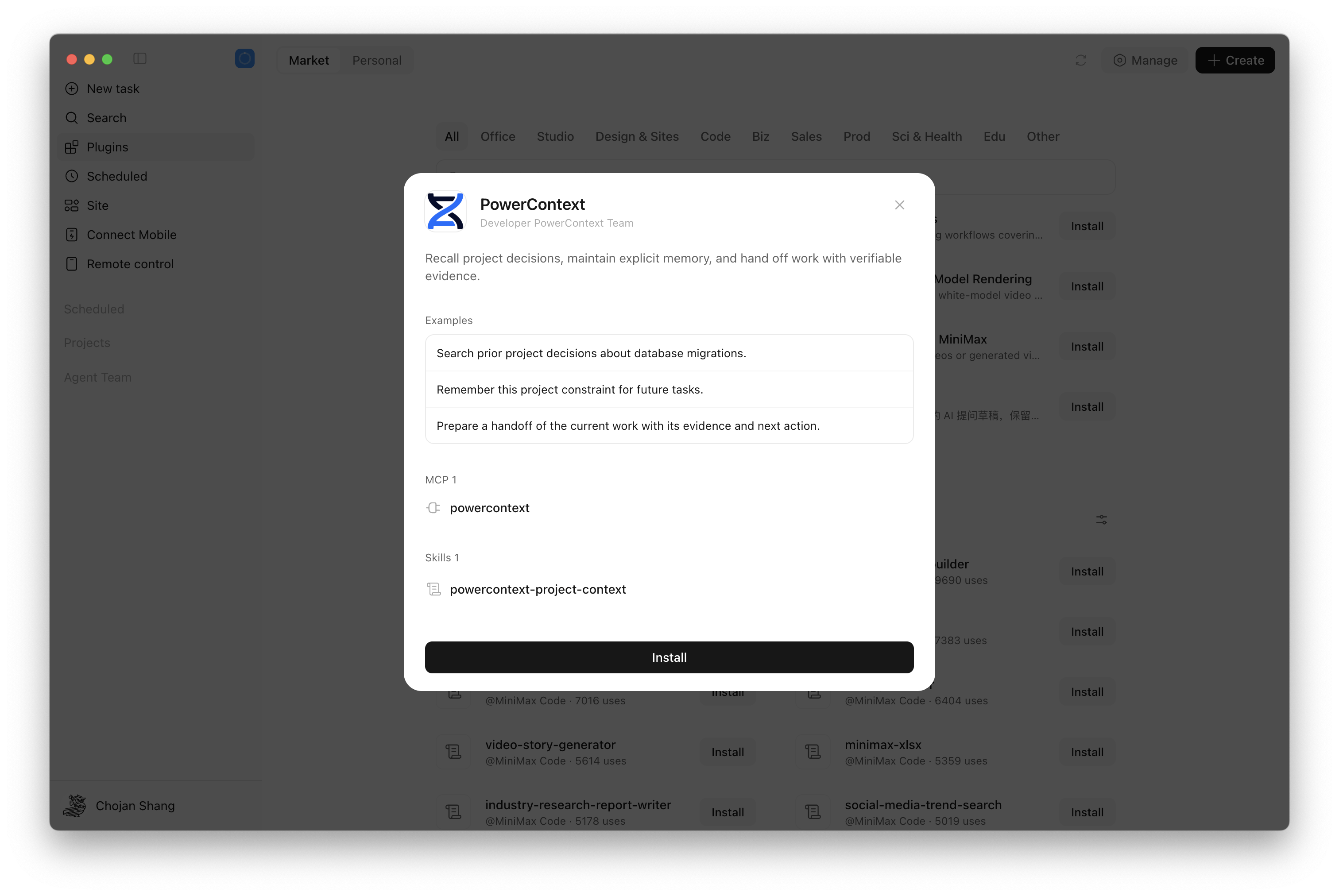
Figure 8. The PowerContext plugin is now available in the MiniMax plugin marketplace.
We recommend building the following routine into your daily work:
- Search before you start: retrieve the project decisions and constraints relevant to the current task, and check their sources.
- Save once confirmed: keep conclusions worth reusing over the long term, and check that the write succeeded.
- Hand off before you pause: organize progress and evidence, and explicitly commit the checkpoints you need to keep.
- Reconcile when you resume: confirm the current state against the workspace before continuing with unfinished work.
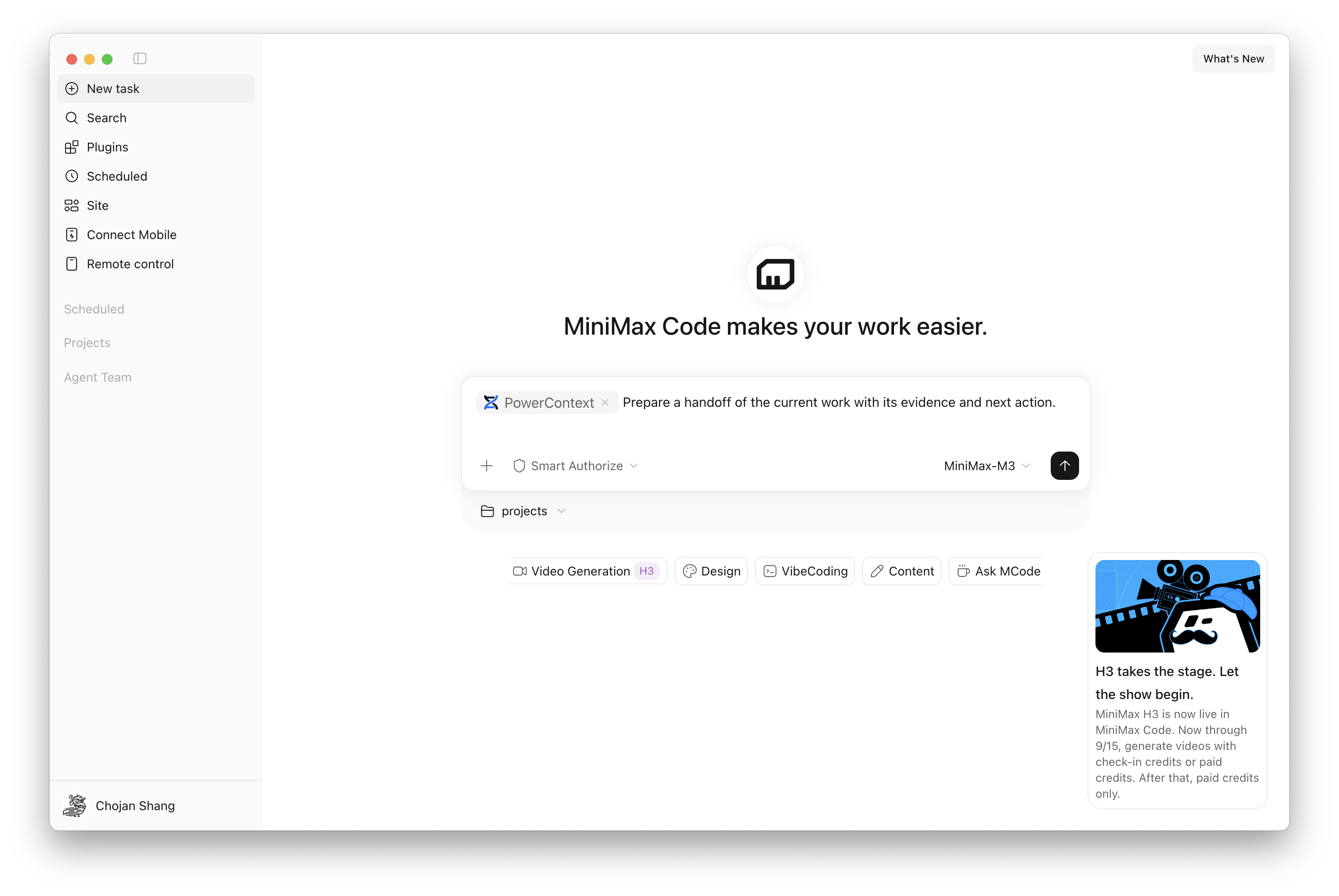
Figure 9. Select PowerContext with @ to start using it.
Explicitly saving and reading Memory and preparing handoffs don't require configuring a separate generation model for PowerContext. Vector search and model-generated content, however, rely on the model services configured on PowerContext Server. MiniMax Code's own account and model settings are managed separately. See the plugin's model configuration notes.
Back to the checkout page from the beginning. The next time the task resumes, the agent should know where the layout changes stand, which screen sizes are still untested, and what evidence is still missing for the request error.
It will still need to read code, run tests, and check the current state, but it won't have to re-investigate what has already been confirmed. Making sure every round of work leaves behind a reliable next step is the problem all of these mechanisms are built to solve.


Keep Reading
View all posts
I Built a Knowledge Base That Thinks — Inspired by Karpathy's LLM Wiki
Inspired by Karpathy's LLM Wiki, ex-brain is an open-source personal knowledge base that compiles, links, and evolves your notes using LLMs and seekdb's hybrid search.

From Complex to Simple: How We Built seekdb for the AI Era
AI era doesn't need another heavy, complex enterprise database. It needs agility. It needs flexibility. We went back to the drawing board to understand what an AI application actually needs from a database. Our answer is OceanBase seekdb

Building on the Semantic Layer: OceanBase DataPilot’s Approach to Ontology
OceanBase DataPilot uses ontology to help Data Agents understand business objects, relationships, and actions — moving beyond accurate queries to verifiable attribution and decision support.