Meet OceanBase AI Lakebase, the unified database for operational data, real-time analytics, and AI.
Meet OceanBase AI Lakebase, the unified database for operational data, real-time analytics, and AI. Explore ->
Why Your Vector Database Benchmark Is Wrong for AI Agents

- Most vector database benchmarks (ann-benchmarks, vendor pages) test bulk-load + read-only — but AI agents actually run streaming workloads: concurrent writes and reads at millisecond latency.
- Under streaming load, P99 latency under concurrency — not QPS or serial latency — determines whether your agent's SLA holds. Across 6 vector databases, P99 jitter ranged from 1.1× to 10.3× when concurrency was added.
- The root cause is architectural: most engines accumulate index segments under streaming writes, so concurrent queries fanout and contend on CPU. We rebuilt seekdb v1.3.0 around two fixed indexes (delta + snapshot HNSW) to avoid this — and saw 22× QPS and 19× P99 improvement over our own v1.2.0.
If you're picking a vector database for an AI agent, you're probably looking at ann-benchmarks or vendor performance pages. Those benchmarks all run the same shape of test: bulk-load the dataset, build the index, then run read-only queries.
That is not what an agent does.
An agent's real workload looks like this:
for step in agent.run():
    memory.write(step.observation)        # continuous writes
    relevant = memory.search(step.query)  # millisecond-later reads
Writes and reads happen together. They happen concurrently. The interval between them is milliseconds, not minutes. This pattern has a name — streaming workload — and VectorDBBench has a test case designed specifically for it: StreamingPerformanceCase. Sustained writes at a fixed rate plus concurrent queries. The same shape your agent runs in production.
VectorDBBench is maintained by Zilliz (the company behind Milvus), so it's a third-party open-source benchmark.
The Metric Everyone Skips: How Much Does Your P99 Move Under Concurrency?
Test setup: Cohere 10M dataset (768-dim), 16 vCPU / 64 GiB, identical HNSW index parameters across all systems (M=16, ef_construction=256, ef_search=200), sustained write rate of 500 rows/sec.
A note on the two seekdb rows. You'll notice seekdb appears twice in the chart — v1.2.0 and v1.3.0. v1.3.0 is the latest release, and it's a deliberate architectural rewrite specifically targeting streaming workloads (we'll explain what changed in the next section). We kept v1.2.0 in the comparison on purpose: it lets you see, on the same hardware and the same dataset, how a conventional vector-database design behaves under streaming load versus the redesigned one.
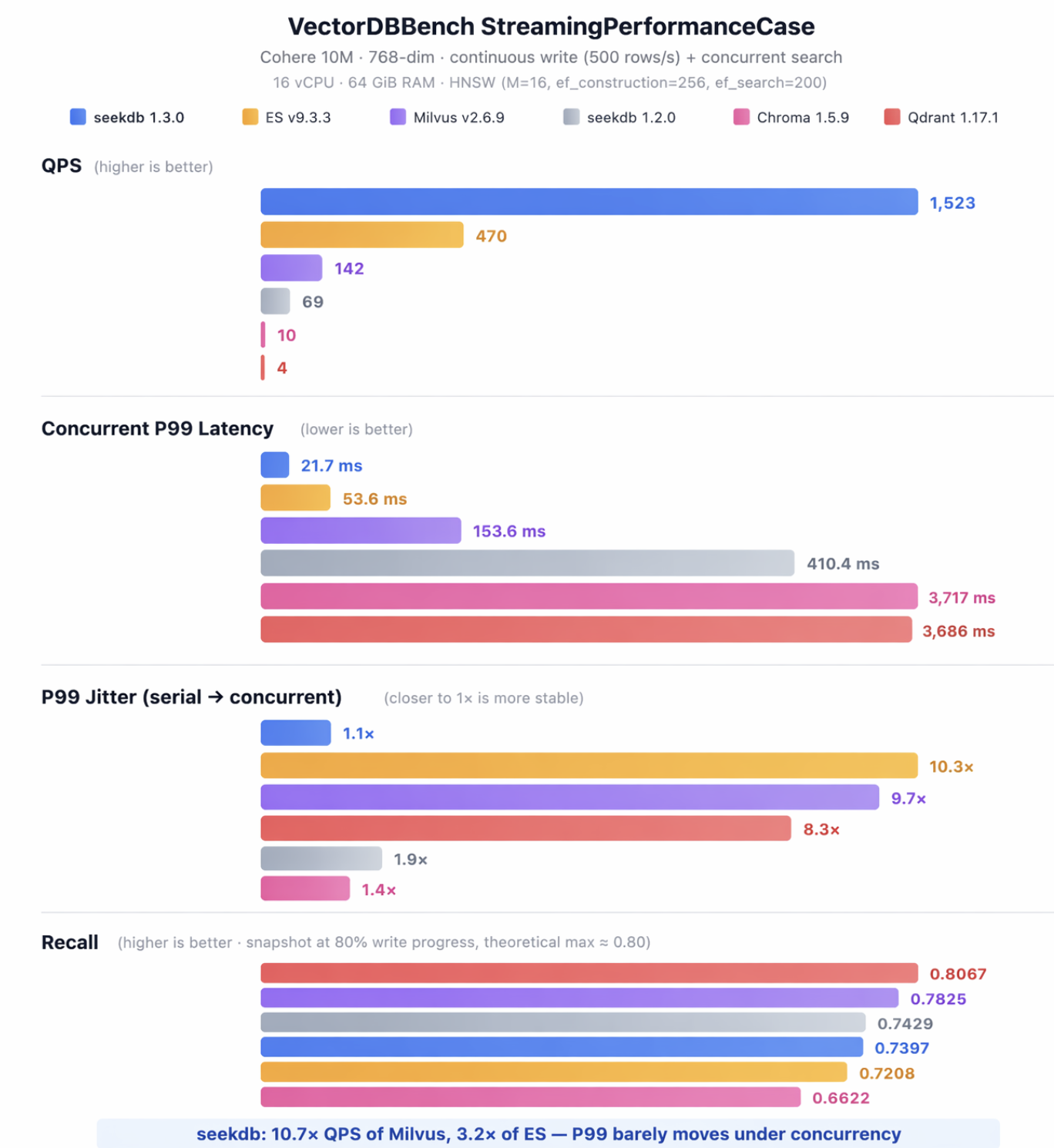
Most people look at benchmark charts and read off two numbers: QPS and serial latency. But your agent doesn't run single-threaded in production. What actually determines whether your SLA holds is concurrent P99 — and how much it inflates when you add concurrency.
Look at the "P99 Jitter" group in the chart:
- Elasticsearch: 10.3× — Serial P99 of 5.2ms (faster than seekdb on the cold path), but the moment you add concurrency it climbs to 53.6ms.
- Milvus: 9.7× — Serial 15.9ms, concurrent 153.6ms.
- seekdb: 1.1× — From 19.7ms to 21.7ms. Barely moves.
This is not a tuning problem. It's an architecture problem. The next section explains why.
Full benchmark scripts and configs: github.com/oceanbase/vdb-streambench. PRs welcome to add more systems.
Why Streaming Workloads Blow Up P99
Milvus, Elasticsearch, and Qdrant all perform well in the workloads they were designed for: bulk ingestion followed by read-only queries. They were built around that shape, and they are good at it.
But streaming writes expose a structural assumption baked into all of them: every batch of new data produces a new index segment. At query time, the engine has to fan the request out to N segments, run a k-NN search against each one, and merge the results. With a single query thread that's manageable. But once you run M concurrent query threads against N segments, you have N×M units of work contending for CPU, and P99 explodes.
Most vector databases let their segment count grow with streaming writes, so concurrent queries fight harder and harder for CPU. seekdb keeps the segment count fixed at exactly two — so it doesn't.
Concretely, seekdb v1.3.0 introduced two mechanisms specifically for streaming:
1. The write path never touches the index. When a transaction commits, all that happens synchronously is a write to the redo log. A separate Change Stream pipeline asynchronously consumes the redo log in the background and applies vectors to an in-memory delta HNSW index. Writes and index construction are physically decoupled — writes never block on indexing, and indexing never blocks on writes.
2. The query path always hits exactly two indexes. seekdb maintains a delta HNSW (the incremental layer that absorbs new writes) and a snapshot HNSW (the steady-state main index), modeled after the LSM-tree pattern from KV stores. A query runs k-NN against both indexes and merges the result. The number of indexes is fixed regardless of how much data you've written, so concurrent queries don't contend on a growing fanout.
We learned this the hard way. The seekdb v1.2.0 row in the chart — 69 QPS, concurrent P99 of 410ms — is what we shipped before the rewrite. The old write path built indexes synchronously, so we hit exactly the architectural problem described above. The 22× QPS and 19× latency improvement in v1.3.0 came entirely from these two changes. Same product, same dataset, same hardware.
Agents Need More Than Speed — They Need an Undo Button
Performance is one half of the agent problem. The other half is something most benchmarks don't even try to measure: agents need to make speculative changes to their data.
An agent might:
- Update memory with a hypothesis it isn't sure about yet
- Run an A/B experiment on its own state
- Try a tool call that could write garbage rows
You don't want any of that touching production state directly. You need a sandbox, and you need a clean way to roll back.
Most vector databases don't have a primitive for this. seekdb implements Copy-on-Write directly in the storage engine:
-- Snapshot in seconds, no data copy
FORK DATABASE agent_state TO sandbox_42;

-- Agent does whatever it wants in the sandbox
USE sandbox_42;
INSERT INTO memory (embedding, content)
VALUES ('[0.1,...]', 'new observation');

-- Speculation succeeded → merge back
MERGE TABLE sandbox_42.memory INTO agent_state.memory
       STRATEGY THEIRS;

-- Speculation failed → drop it, mainline is unaffected
DROP DATABASE sandbox_42;
This is kernel-level COW, not application-layer snapshot/restore. The fork is instant, no data is copied, and each sandbox is a fully writable database — schemas, vector indexes, auto-increment columns all behave normally. Three conflict resolution strategies (FAIL, THEIRS, OURS) let you decide exactly how much of an agent's writes you trust. Both FORK DATABASE and FORK TABLE are supported, so you can branch at whichever granularity matches your use case.
Hybrid Retrieval in a Single SQL Query
Agent retrieval is rarely pure vector similarity. You usually want to combine vector distance with structured filters and sometimes full-text matching — show me the top 10 documents authored by user 42 since January, that match "quarterly report", ranked by similarity to this embedding.
In seekdb, that's one SQL statement:
SELECT id, title, l2_distance(emb, '[0.12,0.34,...]') AS dist
FROM docs
WHERE MATCH(content) AGAINST ('quarterly report')
  AND author_id = 42
  AND created_at > '2026-01-01'
ORDER BY dist APPROXIMATE LIMIT 10;
Vector, full-text, and scalar filters are pushed down into a single execution plan — no client-side merging of multiple round-trip results. Full MySQL wire protocol compatibility means LangChain, LlamaIndex, Dify, and any MySQL client connect with no adapter.
30 Seconds to Try It
pip install -U pyseekdbimport pyseekdb
client = pyseekdb.Client(path="./agent_state.db")
memory = client.get_or_create_collection(name="episodic")
# Round 1: write agent observations
memory.upsert(
ids=["1", "2", "3"],
documents=[
"user prefers dark mode",
"user speaks English and Chinese",
"user timezone is UTC+8",
],
)
memory.refresh_index()
results = memory.query(query_texts="ui preferences?", n_results=1)
print(results["documents"])
# -> [['user prefers dark mode']]
# Round 2: write a new observation, refresh, query immediately
memory.upsert(ids=["4"],
documents=["user saw pricing page 3 times today"])
memory.refresh_index()
results = memory.query(query_texts="purchase intent signals", n_results=1)
print(results["documents"])
# -> [['user saw pricing page 3 times today']]No server, no schema migration, embedded mode runs in-process. Writes go through the same async indexing pipeline as the server build, so when you need a write to be queryable immediately, call refresh_index() once. Switching to server or distributed mode is a one-line connection-string change. There's also a hosted Cloud trial — no signup, free for 7 days, single curl command.
About seekdb
seekdb is fully open source under Apache 2.0, built by the OceanBase team. You're probably already running on OceanBase indirectly — it's in production at Alipay, Taobao, DiDi, and Xiaomi, among others. seekdb inherits the same storage engine and SQL executor, focused specifically on the hybrid vector + relational workloads that agents need. Six months in, the project has 2,500+ GitHub stars and is integrated with LangChain, LlamaIndex, Dify, and Coze.
If you're picking a database for an agent, take 30 seconds and run the demo above. If your current vector database has a StreamingPerformanceCase number you're proud of, we'd love to add it to the comparison.
⭐ github.com/oceanbase/seekdb — a star helps more people find the project, and gives us reason to keep investing in it.
Questions or want to discuss your agent workload: GitHub Issues · GitHub Discussions


Keep Reading
View all posts
Exploring OceanBase 4.3: New Features and Enhancements
At the OceanBase DevCon 2024, we introduced the OceanBase 4.3.0 Beta, unveiling a brand new columnar engine. This release achieves near petabyte-scale, real-time analytics in seconds, and enhances the integration of TP and AP capabilities.

How seekdb M0 Gives OpenClaw Persistent Memory and Shared Experience
OpenClaw's memory degrades over time—an architectural limitation, not a configuration issue. seekdb M0 solves this with cloud-based memory that persists across sessions and shares learned experience across agents.
Inside OceanBase Multi-Tenancy: Resource Isolation, Allocation and Governance
OceanBase multi-tenancy consolidates many business systems into one cluster with tenant-level CPU, memory, and IOPS quotas — without the interference of a shared instance.