Meet OceanBase AI Lakebase, the unified database for operational data, real-time analytics, and AI.
Meet OceanBase AI Lakebase, the unified database for operational data, real-time analytics, and AI. Explore ->
Permanent Server Offline in OceanBase: How the Cluster Heals After a Node Is Gone

- A leader failover took seconds. But the Paxos group that was three replicas strong is now running on two, and another failure in that group costs quorum. Restoring the contract, not just service, is where cluster-level HA lives.
- Two clocks decide whether the cluster acts on its own: after ten seconds the node is marked inactive and traffic reroutes; after one hour the missing replicas are pulled from every Paxos member list and rebuilt on other same-Zone peers.
- But during an actual failure, don't wait the hour. If you know the node is gone, isolate it and move its units by hand — the auto-heal path is the safety net, not the plan.
An OceanBase cluster runs every log stream on three (or more) replicas coordinated by Paxos. When one of those replicas goes down — an entire OBServer process, usually — the surviving replicas still hold majority, elect a new leader in a few seconds, and keep committing writes. Most high-availability writing stops there, and it's a fair place to stop if the story is the application didn't notice.
But it's only half the story if the story is the cluster's health. That log stream is now running on two replicas out of three. Another failure in the same group and there's no majority left — no quorum, no writes, no reads at consistent isolation. The service is still up; the redundancy that kept it safe is spent.
The cluster knows this, and it will heal on its own — but not for an hour, by default. This post is about how the healing actually works: the two clocks that gate it, and the operator toolkit for skipping the wait when the node is truly gone.
What Root Service Actually Sees
OceanBase 4.x runs heartbeats in both directions. Every OBServer pushes a lease request to Root Service to keep its membership alive; Root Service, in turn, polls each OBServer with a heartbeat RPC every two seconds. RS reads the returning packets and classifies each OBServer along two independent axes — a heartbeat state driven by the polling window, and a disk-health status carried inside the packet.
The heartbeat state has three values in code — alive / lease_expired / permanent_offline:
| Heartbeat state | Trigger | What RS does |
| alive | Heartbeats are arriving | Nothing. |
| lease_expired | No heartbeat for cumulative lease_time (default 10s), but under server_permanent_offline_time | Marks server status INACTIVE; ODP stops routing there. No data movement, no Paxos member change. |
| permanent_offline | No heartbeat for cumulative server_permanent_offline_time (default 3600s) | Removes the missing replicas from every affected Paxos member list; schedules re-replication on other same-Zone OBServers. |
The disk-health status is a separate signal on a parallel axis. Each heartbeat packet reports the OBServer's data-disk status — normal or error. When a packet arrives with disk error, RS internally issues ALTER SYSTEM STOP SERVER against that node: the process is alive and reachable, but its storage can't be trusted. STOP SERVER stops routing to the node, and Leaders that lived there switch away through re-election — not because RS forcibly moves them, but because they can no longer take traffic. When a later packet reports disk normal again, RS auto-issues START SERVER. Neither the ten-second nor the one-hour clock is involved. This is often surprising the first time you see it: a node has its Leaders gone but its heartbeat state is still alive, because it is.
Three visible fields sit on top of those two internal axes. DBA_OB_SERVERS.STATUS is ACTIVE / INACTIVE / DELETING. DBA_OB_SERVERS.STOP_TIME is NULL when the node isn't isolated and a timestamp when it is — set by any of the three isolation verbs below, or by RS itself in the disk-fault path. And "stopped" isn't a STATUS value: it's STATUS='ACTIVE' AND STOP_TIME IS NOT NULL. "Permanently offline" is the heartbeat state, not something you'll find in STATUS; when you query the views during recovery, you're reading STATUS and STOP_TIME.
The two clocks produce this sequence:
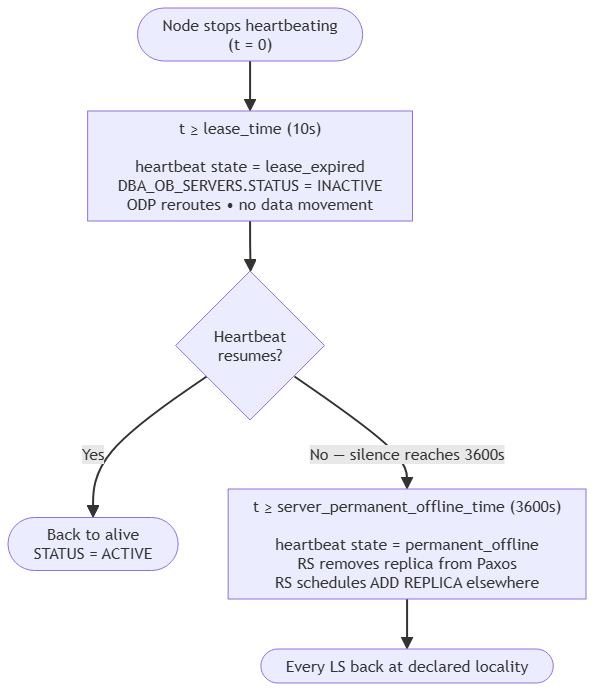
The Ten-Second Clock: lease_expired
lease_time — cluster-level, default 10 seconds, range [1s, 5min] — is the window the cluster spends betting that the outage resolves itself. When RS misses heartbeats for cumulative lease_time, three things happen and three things don't.
What flips:
- The heartbeat state becomes
lease_expired. DBA_OB_SERVERS.STATUSbecomesINACTIVE.- ODP stops routing to the node. Any Leaders that lived there are already gone — the surviving replicas re-elected inside OceanBase's ~8-second leader-failover RTO.
What doesn't flip: no replica movement, no Paxos member change, no locality-triggered ADD REPLICA. The cluster is betting on a reboot or a network blip resolving inside server_permanent_offline_time, and moving data now would be work it might not need to do. Most of the time that bet is right.
The One-Hour Clock: permanent_offline
server_permanent_offline_time — cluster-level, default 3600s, range [20s, +∞), since V1.4 — is the window RS waits before it accepts the node is gone. Once the timer expires, the heartbeat state flips to permanent_offline and RS begins the self-heal, per affected log stream:
- Remove the missing replica from the Paxos member list. Metadata change only, executed on the surviving members. The quorum size shrinks by one.
- Schedule a new replica on some other OBServer in the same Zone that has capacity. The new replica picks a healthy peer as its data source, copies macro blocks plus a log start point, then replays clog to catch up.
- Rejoin the member list. Once the new replica is current, it joins Paxos. The quorum is whole again; the cluster can absorb the next minority failure without risk.
You watch this through OceanBase's replica-task views:
-- what's healing right now
SELECT ls_id, task_type, task_status, comment
  FROM oceanbase.DBA_OB_LS_REPLICA_TASKS;

-- what just finished
SELECT ls_id, task_type, execute_result, finish_time
  FROM oceanbase.DBA_OB_LS_REPLICA_TASK_HISTORY
  ORDER BY finish_time DESC LIMIT 20;
Convergence is still "the views are empty." When both queries return zero rows, every log stream is back to its declared locality.
Two preconditions have to hold, and both are worth naming because a reader in the wrong operational context won't see the healing happen:
enable_rereplicationmust beTrue. It's the cluster-level master switch for automatic replica re-placement (defaultTrue, since V1.4). Some upgrade procedures turn it off — if it's off when a node goes permanently offline, the timer will fire and nothing will move.- The same Zone must have capacity for the new replica. If no surviving OBServer can host it, ADD REPLICA waits. Precheck the Zone's free CPU and memory before assuming healing will complete on its own.
One more behavior worth stating explicitly, because it comes up when a "dead" node is restored: if the node returns after the timer has fired, its old replicas are already gone from every Paxos member list, so they're erased on rejoin and the data comes back from healthy peers. There's no reconciliation of stale state.
The Timer Is a Safety Net, Not the Plan
An hour at reduced redundancy is a long window to accept for a failure you already know is permanent. During a real minority-node failure, don't wait for server_permanent_offline_time at all. Intervene:
STOP SERVERon the bad node — orFORCE STOP SERVERif STOP SERVER fails.- Add a new OBServer in the same Zone.
- Manually issue
ALTER SYSTEM MIGRATE UNITfor each unit on the old node. - Watch
DBA_OB_UNIT_JOBS WHERE JOB_TYPE='MIGRATE_UNIT'until it's empty. DELETE SERVERon the old node.
Three reasons the manual path beats the timer:
- Topology stays balanced. Auto-replicate places replicas wherever there's capacity; a human placing units by hand can preserve intended balance.
- The reduced-redundancy window shrinks from an hour to whatever the copy takes.
- Bandwidth impact is observable in real time, so you can throttle if the copy is competing with foreground traffic.
The timer isn't wrong — it's the safety net for the case where nobody is watching. But if someone is watching, give the cluster better information than the timer can.
For planned operations, tune server_permanent_offline_time to fit what you're actually doing:
- Cluster upgrade → 72 hours. OCP sets this automatically for supported upgrades so rolling restarts don't trip the timer.
- Hardware replacement → 4 hours. Long enough to swap the box without re-replicating; short enough to heal if the swap fails.
- Clean re-onboarding → 10 minutes. When you're deliberately taking a node out and putting it right back.
Adjust with ALTER SYSTEM SET server_permanent_offline_time = '<value>' (sys tenant only; effective immediately, no restart).
Three Isolation Verbs, in Order of Preference
Before removing or replacing a node, isolate it from traffic. OceanBase offers three verbs with decreasing safety guarantees. The right default is always the strictest one.
| Verb | Pre-checks | Guarantee after success | When to use |
| STOP SERVER | Single Zone across all currently-stopped nodes; every LS still has Paxos majority after stopping; followers within 3s of leader by END_SCN gap; every LS has a Leader; no tenant mid-locality-change | Any action on the target is safe, including killing the observer process | Default. Always try this first. |
| FORCE STOP SERVER | Same as above, minus the log-sync check | Traffic is off the node; killing the process may still break majority | When a non-target node has log lag that would fail STOP SERVER for the wrong reason |
| ISOLATE SERVER | Only that isolating the node won't strand a tenant's entire primary-zone region | Traffic isolation only | When a non-target node is in an abnormal state and neither of the above will pass |
Syntax is uniform — all three accept one or more 'ip:port' targets:
ALTER SYSTEM STOP SERVER 'ip:2882';
ALTER SYSTEM FORCE STOP SERVER 'ip:2882';
ALTER SYSTEM ISOLATE SERVER 'ip1:2882', 'ip2:2882';
The rule is simple: prefer STOP SERVER. The weaker verbs exist because the strict checks would fail for the wrong reason — not because they're "the fast option." FORCE STOP SERVER is what you reach for when you need to isolate node C but node B is dragging in an unrelated way; ISOLATE SERVER is what you reach for when the multiple-zone constraint blocks the safer verbs.
A failed STOP SERVER is diagnostic — the error text tells you exactly which invariant would break. The ones worth recognizing:
-4179 Tenant(X) LS(Y) log not sync, stop server not allowed— a follower is more than three seconds behind its leader (the thresholdPALF_LOG_SYNC_DELAY_THRESHOLD_USin PALF; the value some docs still cite as 5s refers to an unused constant).-4179 Tenant(X) locality is changing, stop server not allowed— you can't isolate a node while the tenant's member list is in flux.-4179 Tenant(X) LS(Y) has no enough valid paxos member after stop server, stop server not allowed— stopping this node would drop the LS below majority.-4660 cannot stop server or stop zone in multiple zones— another Zone already has stopped nodes; onlyISOLATE SERVERrelaxes this.
Read the error string before reaching for a weaker verb. Half the time the fix is somewhere else (catch up a lagging follower, finish a locality change) and STOP SERVER succeeds on the next try.
The Failure-Driven Replacement Flow
Putting it end to end for a permanently failed node in a homogeneous Zone:
-- 1. Isolate. Confirms it's safe to touch the node.
ALTER SYSTEM STOP SERVER '10.0.0.5:2882';

-- 2. Add a new OBServer to the same Zone (usual add-node procedure).

-- 3. For each unit that was on the old node, move it to the new one.
--    List them first:
SELECT unit_id FROM oceanbase.DBA_OB_UNITS WHERE svr_ip = '10.0.0.5';
--    Then, per unit:
ALTER SYSTEM MIGRATE UNIT 1001 DESTINATION '10.0.0.9:2882';
--    ...one statement per unit.

-- 4. Watch migration finish.
SELECT * FROM oceanbase.DBA_OB_UNIT_JOBS WHERE job_type = 'MIGRATE_UNIT';
-- Empty result = migration done.

-- 5. Delete the old node from cluster metadata.
ALTER SYSTEM DELETE SERVER '10.0.0.5:2882';
Two guardrails worth naming:
Precheck same-Zone capacity before DELETE SERVER. DELETE SERVER succeeds only after all units on the target have been migrated off. If no surviving OBServer in the same Zone has room, the node hangs in DELETING indefinitely.
SELECT svr_ip,
       cpu_capacity_max - cpu_assigned_max AS cpu_free,
       mem_capacity     - mem_assigned      AS mem_free
  FROM oceanbase.GV$OB_SERVERS
  WHERE zone = 'target_zone';
If it does stall, roll back. ALTER SYSTEM CANCEL DELETE SERVER 'ip:2882' reverses a stuck DELETING back to ACTIVE. Add capacity, then retry.
Two knobs shape how fast the background copy runs, and both are worth knowing so migration doesn't starve foreground traffic — or the reverse:
sys_bkgd_net_percentage(cluster, default 60) — cap on the share of network bandwidth background tasks may use.balancer_idle_time(tenant, default 10s, range[10s, +∞)) — the interval at which the balancer issues new migration tasks.
The shortcut some operators reach for: skip step 3 and go straight to DELETE SERVER. RS will auto-migrate units to whichever same-Zone OBServer has capacity. Same eventual outcome, less control over destination — fine for homogeneous clusters, less fine when servers differ in spec and you care where things land.
When Arbitration Mode Changes the Clock
A short aside for readers on 4F1A or 2F1A tenants — four or two full-function replicas plus one arbitration member, an Enterprise-only topology.
For arbitration-enabled tenants, the majority-loss story is different. When the cluster can no longer form a Paxos majority among the F replicas — for example, exactly half the F replicas in a 4F1A tenant have failed — the arbitration service kicks in on a much shorter timer. arbitration_timeout (tenant-level, default 5s, range [3s, +∞)) governs how long the service waits before degrading the log stream: it removes the failed F replicas from the member list without changing locality, so the surviving replicas plus the arbitration member can keep committing at RPO = 0. When the failed replicas come back, the arbitration service upgrades the log stream and rejoins them.
The rest of this post is written for the multi-replica-only case, where server_permanent_offline_time is the clock that matters. If your topology includes an arbitration member, five seconds — not one hour — is the deadline the service is measuring against.
Whose Information Is Better
The cluster's timer is conservative because moving data is expensive and most outages resolve themselves. That's the correct default for a system with no operator on the other end. But an operator watching a genuinely dead node has information the cluster doesn't — the machine is scrapped, the cloud instance is terminated, the rack is decommissioned. Don't make the cluster wait. STOP SERVER, MIGRATE UNIT by hand, DELETE SERVER, watch the same tasks and views you'd watch either way.
Either path ends in the same place — every log stream back at its declared replica count, the locality contract restored. The DR verbs are identical. The only difference is who decides the node is gone: the clock, or you.
The next post takes the failure model one step further: not a single node lost, but an entire cluster. That's the domain of the tenant-level physical standby, and its two role-switch primitives — Switchover for planned recovery, Failover for the unplanned kind.
Try It Yourself
On a three-Zone OceanBase Community Edition cluster, kill an OBServer process and watch the two-clock progression:
-- Within seconds: STATUS flips to INACTIVE.
SELECT svr_ip, status, stop_time FROM oceanbase.DBA_OB_SERVERS;
To exercise the automatic path without a one-hour wait, shorten the timer in a test cluster:
ALTER SYSTEM SET server_permanent_offline_time = '60s';

-- After ~60s, the healing tasks appear:
SELECT ls_id, task_type, task_status, comment
  FROM oceanbase.DBA_OB_LS_REPLICA_TASKS;
To exercise the operator path, run the replacement flow above end to end and watch DBA_OB_UNIT_JOBS and DBA_OB_LS_REPLICA_TASKS side by side — one shows units moving, the other shows replicas being added and old ones being removed from Paxos. When both views come back empty, the cluster is whole again.


Keep Reading
View all posts
From Complex to Simple: How We Built seekdb for the AI Era
AI era doesn't need another heavy, complex enterprise database. It needs agility. It needs flexibility. We went back to the drawing board to understand what an AI application actually needs from a database. Our answer is OceanBase seekdb


Beyond Fine-tuning: Solving DABstep's Hard Mode with Versioned Assets
On the DABstep Global Leaderboard, OceanBase DataPilot agent has secured the top spot, maintaining a significant lead over the runner-up for a month. The secret to our SOTA results was a fundamental shift in engineering paradigm: moving from "Prompt Engineering" to "Asset Engineering."

PowerContext: A Foundation for Human–Agent Collaboration
PowerContext is open-source context infrastructure that lets people and AI agents hand off unfinished work across sessions, models, and agent hosts.